¶ 1. Overview
The Bank Reconciliation feature allows law firms to reconcile their bank statements with the transactions recorded in LawPractica. This process ensures that:
- Bank balances match system balances
- All deposits and withdrawals are accounted for
- Errors, omissions, or duplicates are identified
- Trust and general accounts remain compliant and audit‑ready
Bank reconciliation is a mandatory accounting practice and is especially critical for trust accounting, where strict regulatory rules apply.
¶ 2. When to Use Bank Reconciliation
Bank reconciliation should be performed:
- Monthly (required for trust accounts)
- After receiving a bank statement
- After periods of high transaction volume
- Before audits or financial reviews
- When discrepancies appear in trust or general balances
This ensures accurate financial reporting and compliance with law society trust rules.
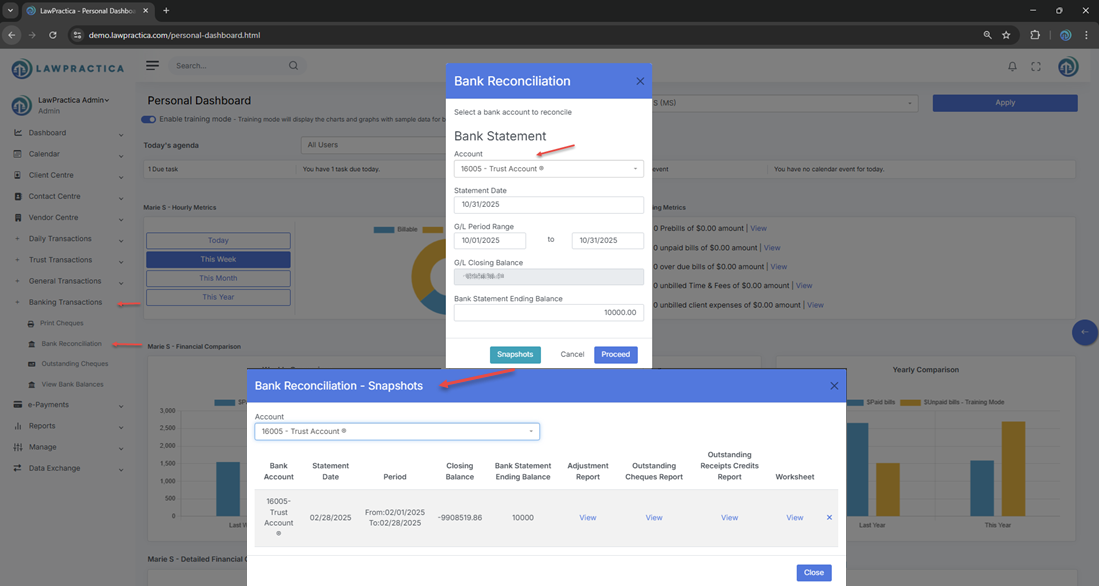
¶ 3. Selecting the Bank Account
- At the top of the reconciliation screen, users select the bank account they want to reconcile.
¶ Supported Accounts
- Trust bank accounts
- General (operating) bank accounts
- Additional firm bank accounts (if configured)
- Why It Matters
Each account has its own ledger and must be reconciled separately.
¶ 4. Entering Statement Information
Users must enter:
- Statement Date
- Statement Ending Balance
- Statement Opening Balance (if required)
This information is used to compare the bank’s reported balance with the system’s calculated balance.
¶ 5. Matching Transactions
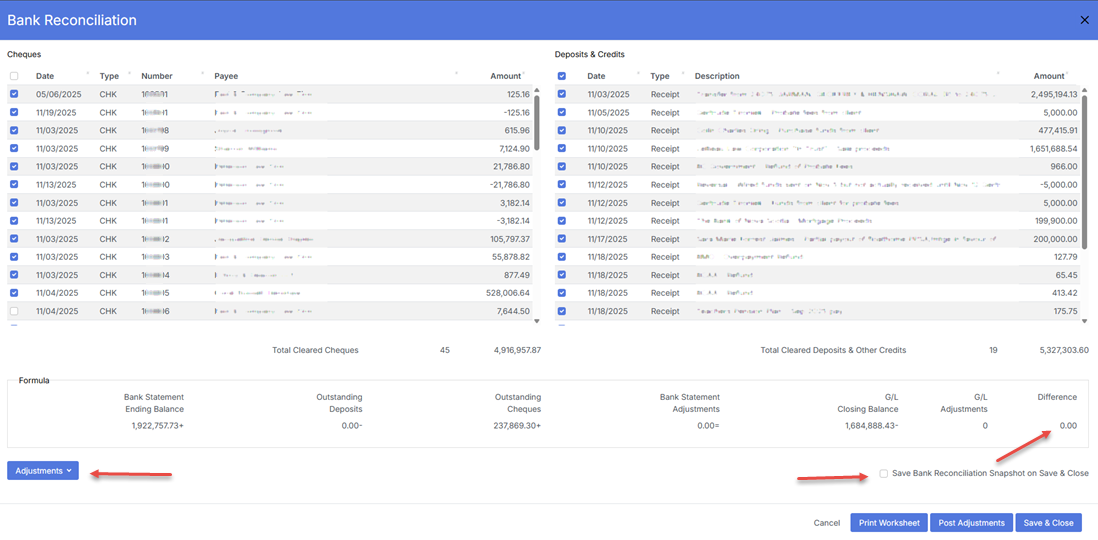
The reconciliation screen displays all uncleared transactions recorded in LawPractica, including:
¶ For Trust Accounts
- Trust Receipts
- Trust Cheques
- Trust Transfers
- Trust Transfer Cheques
¶ For General Accounts
- General Receipts
- General Cheques
- Journal Entries (bank‑related)
Users mark each transaction as Cleared once it appears on the bank statement.

¶ 6. Cleared vs. Uncleared Transactions
¶ Cleared Transactions
- These appear on the bank statement and are checked off during reconciliation.
¶ Uncleared Transactions
- These remain outstanding and may include:
- Cheques not yet cashed
- Deposits not yet processed
- Timing differences
- Errors requiring investigation
- Uncleared items carry forward to the next reconciliation period.
¶ 7. Adjustments & Corrections
If discrepancies exist, users may:
¶ Add Adjustments
- Bank charges
- Interest earned
- Service fees
- Corrections for rounding differences
¶ Investigate Errors
- Duplicate entries
- Missing transactions
- Incorrect amounts
- Wrong bank account selection
- All adjustments are logged for audit purposes.
¶ 8. Completing the Reconciliation
- The reconciliation is complete when:
- Statement Ending Balance=System Balance After Cleared Items
- Once balanced, users select Reconcile & Close.
¶ System Updates
- Locks the reconciliation period
- Generates reconciliation reports
- Updates trust and general audit logs
- Carries forward uncleared items
- Reconciliations cannot be edited after posting — they must be reversed and redone if corrections are needed.
¶ 9. Compliance Notes (Especially for Trust Accounts)
Trust accounting rules require:
¶ 1. Monthly Trust Reconciliation
- Mandatory for all trust accounts.
¶ 2. No Overdrafts
- Trust accounts must never show a negative balance.
¶ 3. Full Audit Trail
Reconciliation must record:
- Statement date
- Statement balance
- Cleared items
- Uncleared items
- Adjustments
- User who completed the reconciliation
¶ 4. Supporting Documentation
- Printed or exported reconciliation reports must be retained for audits.
¶ 5. Accuracy
- All trust transactions must be matched to bank activity.
- The Bank Reconciliation feature ensures firms meet these requirements.
¶ 10. Integration with Other Features
Bank Reconciliation integrates with:
- Trust Transactions – Trust receipts, cheques, transfers
- General Transactions – General receipts, cheques, journal entries
- Trust Ledger – Updates cleared/uncleared trust activity
- General Ledger – Updates cleared/uncleared general activity
- Reports – Trust reconciliation reports, bank summaries, audit logs
- Find – Investigate discrepancies and reverse transactions
This creates a complete and compliant financial ecosystem.
¶ 11. Summary
The Bank Reconciliation feature provides a structured, compliant method for reconciling bank statements with trust and general ledger activity. With support for cleared/uncleared matching, adjustments, audit logging, and trust‑accounting compliance, it ensures accurate financial management and regulatory readiness across the firm.