¶ 1. Overview
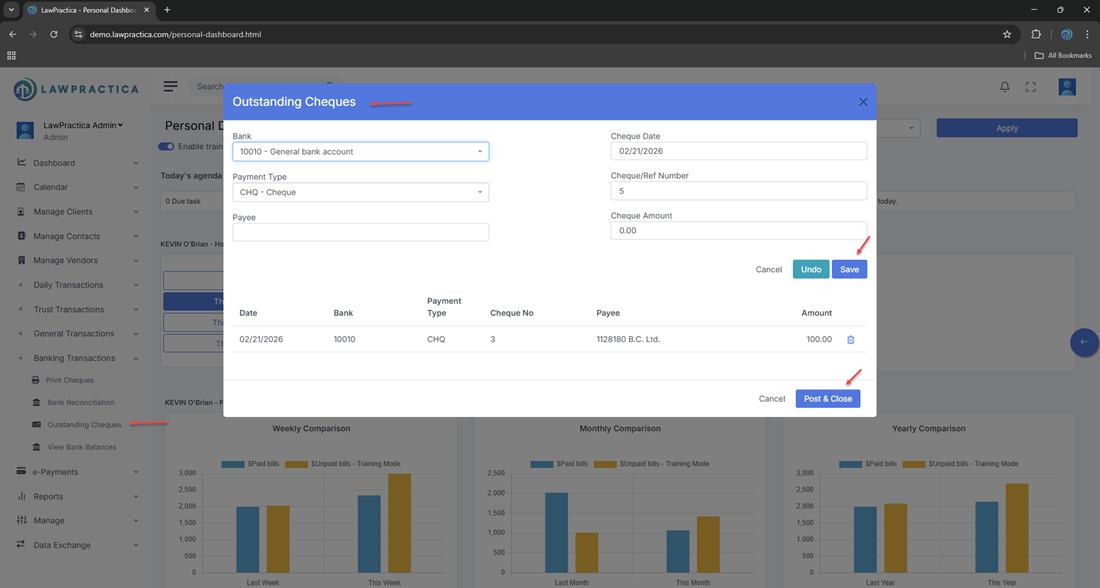
The Outstanding Cheques feature displays all cheques that have been issued from the firm’s bank accounts but have not yet cleared the bank. These cheques remain “outstanding” until they appear on a bank statement and are marked as cleared during Bank Reconciliation.
This feature is essential for:
- Monitoring pending withdrawals
- Identifying stale‑dated cheques
- Supporting trust‑accounting compliance
- Ensuring accurate reconciliation
- Preventing overdrafts or duplicate payments
Outstanding Cheques includes both trust and general cheques.
¶ 2. What Counts as an Outstanding Cheque
A cheque appears in this list when:
- It has been created (Trust Cheque, General Cheque, or Trust Transfer Cheque)
- It has been printed or recorded
- It has not yet cleared the bank
- It has not been voided or reversed
Once the cheque clears during Bank Reconciliation, it is automatically removed from the Outstanding Cheques list.
¶ 3. Types of Cheques Displayed
The feature includes all cheque types issued in LawPractica:
¶ Trust Cheques
- Trust withdrawals
- Settlement payments
- Client refunds
- Court‑ordered payments
¶ General Cheques
- Vendor payments
- Court filing fees
- Firm expenses
- Non‑trust client refunds
¶ Trust Transfer Cheques
- Automatically created when paying invoices from trust
- Represent trust‑to‑general movement
- All cheque types appear in a single consolidated list for easy review.
¶ 4. Information Displayed for Each Cheque
Each outstanding cheque includes:
- Cheque Number
- Bank Account (Trust or General)
- Payee Name
- Amount
- Date Issued
- Client / Matter (if applicable)
- Description / Purpose
- Status (Outstanding)
This provides a complete snapshot of all pending withdrawals.
¶ 5. Why Outstanding Cheques Matter
- Outstanding cheques are a critical part of financial and trust‑accounting compliance.
¶ 1. Prevent Overdrafts
- Cheques that haven’t cleared still reduce the available balance.
¶ 2. Support Accurate Reconciliation
- Outstanding cheques must be matched against bank statements.
¶ 3. Identify Stale‑Dated Cheques
- Cheques older than 6 months may need to be voided or reissued.
¶ 4. Maintain Trust Compliance
- Trust regulations require:
- Full tracking of all trust withdrawals
- No editing of posted trust cheques
- Complete audit trail of uncleared items
¶ 5. Avoid Duplicate Payments
- Ensures the firm does not accidentally re‑issue payments.
¶ 6. Using the Outstanding Cheques Feature
¶ Step 1 — Open Outstanding Cheques
- Located under Banking Transactions.
¶ Step 2 — Review the List
Filter by:
- Bank account
- Cheque number
- Payee
- Date
- Amount
- Trust vs. General
¶ Step 3 — Take Action (If Needed)
Users may:
- Investigate stale‑dated cheques
- Void a cheque (via the original transaction)
- Re‑print a cheque (via Print Cheques)
- Reverse a cheque (if posted incorrectly)
All actions maintain a full audit trail.
¶ 7. Integration with Other Features
Outstanding Cheques integrates with:
- Trust Cheque – Displays uncleared trust withdrawals
- General Cheque – Displays uncleared general withdrawals
- Trust Transfer Cheque – Displays uncleared trust‑to‑general transfers
- Bank Reconciliation – Cleared cheques are removed automatically
- Find – Search and reverse cheque transactions
- Reports – Cheque register, trust audit reports, reconciliation summaries
This ensures a complete and compliant cheque‑tracking workflow.
¶ 8. Compliance Notes (Especially for Trust Accounts)
Trust accounting rules require:
¶ 1. Monthly review of outstanding trust cheques
- To ensure no stale‑dated or uncashed cheques remain unresolved.
¶ 2. Full audit trail
Every outstanding cheque must show:
- Cheque number
- Payee
- Amount
- Date
- Purpose
¶ 3. No editing of posted trust cheques
- Corrections must be done through reversals.
¶ 4. Accurate reconciliation
- Outstanding cheques must be included in trust reconciliation reports.
- The Outstanding Cheques feature ensures firms meet these obligations.
¶ 9. Summary
The Outstanding Cheques feature provides a clear, compliant view of all cheques issued but not yet cleared by the bank. With support for trust and general accounts, cheque tracking, stale‑date monitoring, and reconciliation integration, it ensures accurate financial management and full audit readiness across the firm.