¶ 1. Overview
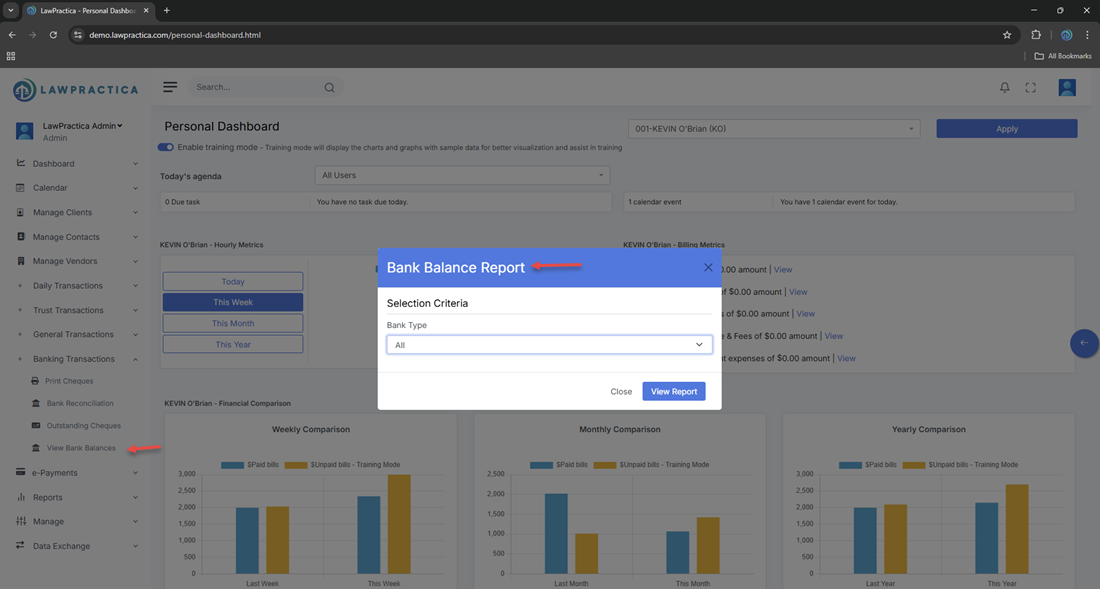
The View Bank Balance feature provides a quick, accurate snapshot of the firm’s current bank balances across all configured bank accounts. This includes both:
- Trust bank accounts
- General (operating) bank accounts
The feature displays the system‑calculated balance based on all posted transactions, helping firms monitor cash flow, trust compliance, and reconciliation status.
This is a read‑only, audit‑friendly view designed for accountants, bookkeepers, and administrators who need immediate visibility into firm finances.
¶ 2. Why View Bank Balance Is Important
This feature supports:
¶ 1. Trust Accounting Compliance
Trust balances must always be:
- Accurate
- Up‑to‑date
- Non‑negative
- Fully traceable
¶ 2. Cash Flow Monitoring
General account balances help firms:
- Track available operating funds
- Plan payments and expenses
- Avoid overdrafts
¶ 3. Reconciliation Preparation
Users can quickly identify:
- Unexpected balance changes
- Large outstanding items
- Timing differences
¶ 4. Financial Transparency
- Partners and administrators can instantly see the firm’s financial position without running reports.
¶ 3. What the View Bank Balance Screen Shows
Each bank account displays the following key values:
¶ 3.1 Ledger Balance (System Balance)
The total balance based on all posted transactions in LawPractica.
Includes:
- Receipts
- Cheques
- Transfers
- Journal entries (bank‑related)
- This is the system’s internal calculation of the account balance.
¶ 3.2 Reconciled Balance
The balance after clearing all items matched during the last completed bank reconciliation.
- This helps users see:
- What the bank balance should be
- Whether reconciliation is up‑to‑date
- If discrepancies may exist
¶ 3.3 Outstanding Items
Items that have been posted in the system but not yet cleared by the bank.
Includes:
- Outstanding cheques
- Outstanding deposits
- Trust transfer cheques
- Timing differences
Outstanding items explain why the ledger balance may differ from the bank statement.
¶ 3.4 Last Reconciliation Date
- Shows when the account was last reconciled.
- This is especially important for trust accounts, which must be reconciled monthly.
¶ 4. Trust vs. General Bank Balances
¶ Trust Accounts
- Must never show a negative balance
- Must match client‑specific trust ledgers
- Must be reconciled monthly
- Must maintain full audit trail
¶ General Accounts
- Used for firm operations
- Can fluctuate based on expenses and revenue
- Must be reconciled regularly for accurate financial reporting
- The View Bank Balance feature clearly separates trust and general accounts to avoid confusion.
¶ 5. How the Feature Works
¶ Step 1 — Open View Bank Balance
- Located under Banking Transactions.
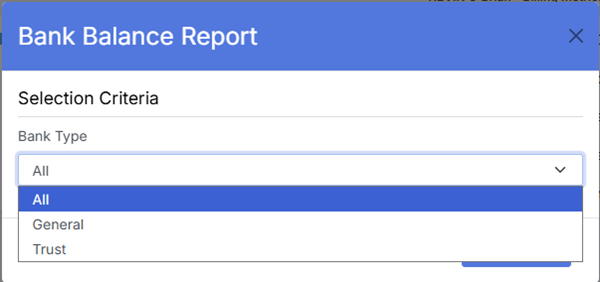
¶ Step 2 — Select Bank Account
Users can view:
- Trust accounts
- General accounts
- Additional firm accounts
¶ Step 3 — Review Balances
The system displays:
- Ledger balance
- Reconciled balance
- Outstanding items
- Last reconciliation date
¶ Step 4 — Investigate if Needed
If balances do not match expectations, users may:
- Review Outstanding Cheques
- Review Outstanding Deposits
- Open Bank Reconciliation
- Check recent transactions
- Investigate trust or general ledger entries
¶ 6. Compliance Notes (Especially for Trust Accounts)
Trust accounting rules require:
¶ 1. Accurate Trust Balances at All Times
- Trust funds must always belong to the correct client.
¶ 2. No Overdrafts
- A trust account must never go below zero.
¶ 3. Monthly Reconciliation
- Trust accounts must be reconciled every month.
¶ 4. Full Audit Trail
- All trust activity must be traceable and reviewable.
¶ 5. Clear Separation of Funds
- Trust and general balances must never be mixed.
- The View Bank Balance feature helps firms meet these requirements by providing real‑time visibility into trust balances.
¶ 7. Integration with Other Features
View Bank Balance integrates with:
- Bank Reconciliation – Shows reconciled vs. ledger balances
- Outstanding Cheques – Explains uncleared withdrawals
- Trust Transactions – Trust receipts, cheques, transfers
- General Transactions – General receipts, cheques, journal entries
- Reports – Bank summary, trust reconciliation, financial statements
- Find – Investigate discrepancies
This creates a complete and transparent financial ecosystem.
¶ 8. Summary
The View Bank Balance feature provides an instant, accurate snapshot of trust and general bank balances. With visibility into ledger balances, reconciled balances, outstanding items, and reconciliation status, it ensures financial accuracy, trust‑accounting compliance, and operational transparency across the firm.