¶ 1. Overview
The Client feature allows law firms to create, edit, and maintain complete client profiles within LawPractica. Each client record includes essential contact information, billing preferences, invoice configuration, and optional advanced settings used across all billing and financial workflows.
This feature ensures accurate client setup, consistent billing behavior, and seamless integration with daily activities such as time entry, expenses, invoicing, payments, LEDES billing, and e‑Statements.
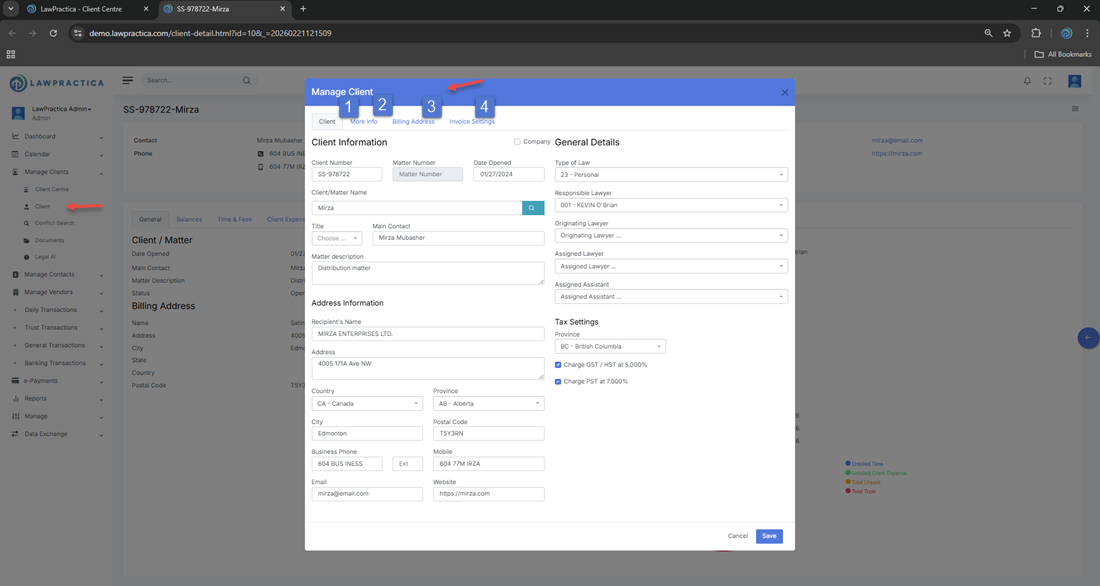
The Client feature is organized into four tabs:
- Client
- More Info
- Billing Address
- Invoice Settings
Each tab is described in detail below.
¶ 2. Client Tab
The Client tab contains the primary information required to identify and manage the client.
¶ Key Fields
- Client Name – Full legal name of the client
- Client Code – System‑generated or user‑defined identifier
- Matter Description – Summary of the matter or case
- Client Type – Individual, business, insurance, etc.
- Email Address – Used for invoices, e‑Statements, and communication
- Phone Number – Primary contact number
- Status – Active or inactive
- Assigned Lawyer – Responsible lawyer for the matter
- Open Date – When the client/matter was created
¶ Purpose
This tab establishes the core identity of the client and ensures all communication and billing activities are linked to the correct record.
¶ 3. More Info Tab
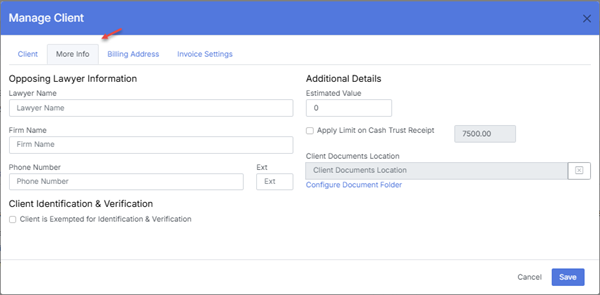
The More Info tab stores additional client details that support internal tracking and reporting.
¶ Common Fields
- Alternate Contact Information
- Reference Numbers (insurance, claim, file numbers)
- Notes – Internal notes for staff
- Industry or Category
- Additional Email Recipients
- Custom Fields (if enabled by the firm)
¶ Purpose
This tab helps firms capture extended client information that may be required for insurance billing, reporting, or internal workflows.
¶ 4. Billing Address Tab
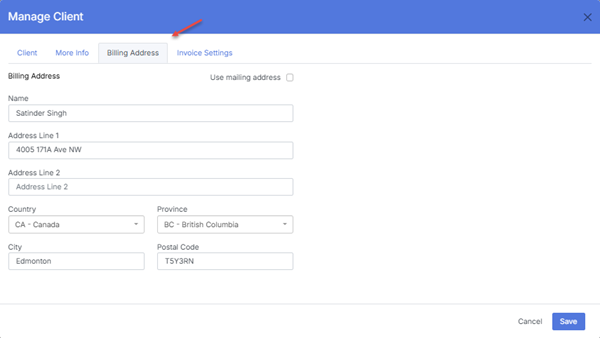
The Billing Address tab stores the address used for invoices, statements, and financial correspondence.
¶ Fields
- Billing Name
- Street Address
- City
- Province/State
- Postal/ZIP Code
- Country
¶ Purpose
This ensures all invoices, statements, and billing communications reflect the correct billing address, especially for corporate or insurance clients.
¶ 5. Invoice Settings Tab
The Invoice Settings tab controls how invoices are generated, formatted, and delivered for the client.
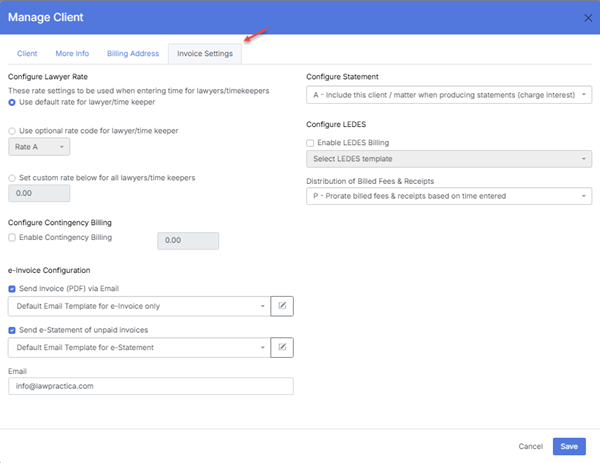
This tab is the most important for billing configuration.
¶ 5.1 Invoice Template & Delivery
¶ Fields
- Invoice Template – Select the default invoice layout
- Send Invoice by Email – Enable email delivery
- Default Email Template – Template used when sending invoices
- Attach PDF Invoice – Ensures a PDF copy is included
¶ Purpose
Controls how invoices appear and how they are delivered to the client.
¶ 5.2 e‑Statement Configuration
¶ Fields
- Send e‑Statement of Unpaid Invoices – Enable e‑Statements
- e‑Statement Email Template – Select the default template
¶ Purpose
Allows automated or manual sending of unpaid invoice summaries.
¶ 5.3 LEDES Billing Settings
If the client requires insurance billing, LEDES settings are configured here.
¶ Fields
Enable LEDES Billing – Turns on LEDES support
LEDES Format – Choose from:
- LEDES 1998B
- LEDES 2000
- LEDES XML
UTBMS Code Requirements – Ensures time and expense entries include required codes
¶ Purpose
Ensures invoices for insurance companies are generated in the correct LEDES format.
¶ 5.4 Interest Settings
¶ Fields
Apply Interest on Overdue Invoices
- Interest Rate (%)
- Grace Period (Days)
¶ Purpose
Controls how interest is calculated for overdue invoices.
¶ 5.5 Payment & Trust Settings
¶ Fields
- Default Payment Method
- Trust Requirements
- Retainer Tracking
¶ Purpose
Ensures payments and trust activity follow the client’s billing rules.
¶ 6. Integration with Other Features
The Client feature integrates with:
- Time & Fees – Assigns entries to the correct client
- Client Expenses – Tracks disbursements
- Invoices – Uses invoice settings and templates
- Invoice Payments – Applies payments to the correct matter
- Email Manager – Sends invoices and e‑Statements
- LEDES Manager – Generates LEDES files
- Interest – Applies overdue interest
- Find – Locates client transactions
- NSF – Reverses returned payments
This ensures a unified and consistent billing workflow.
¶ 7. Summary
The Client feature provides a complete environment for creating and managing client records in LawPractica. With structured tabs for contact details, additional information, billing addresses, and invoice settings, it ensures accurate client setup and seamless integration across all billing and financial workflows.
A properly configured client record is essential for:
- Accurate invoicing
- Correct LEDES billing
- Automated e‑Statements
- Payment processing
- Interest calculation
- Communication tracking
This page serves as the central reference for all client‑related configuration.