¶ 1. Overview
The Client Centre provides a centralized workspace for managing all client records across the firm. Users can search, filter, and navigate client files, review responsible lawyer assignments, and open full client details in a new tab for deeper case management.
This module supports daily operations by ensuring client information is organized, searchable, and consistently accessible. Information displayed in the Client Centre includes client numbers, names, descriptions, and responsible lawyers.
¶ 2. Client List Interface
The Client Centre displays a structured list of all clients available to the user.
¶ Key Columns
- Number – Unique client identifier (e.g., BA‑537528)
- Name – Client or entity name (e.g., E. KEVIN O’Brian)
- Description – Matter or case description (e.g., Refugee Claim, Family Law)
- Responsible Lawyer – Assigned lawyer for the file (e.g., KEVIN O’Brian)
- Action – Open client detail in a new tab
These fields appear in the main client table and support quick navigation across large client lists.

¶ 3. Search & Filtering
The Client Centre includes powerful search and filtering tools to help users locate specific client files.
¶ Search Options
- Search by client number
- Search by client name
- Search by description
- Search by the responsible lawyer
¶ Filters
- Responsible Lawyer: Filter by assigned lawyer
- Status: Filter by Open or other statuses
These tools help users quickly navigate large datasets, such as the 233 client entries shown in your system. Restricted view can also be applied through User Permissions
¶ 4. Client Detail (Client Centre)
The Client Detail page provides a complete, centralized view of all information, transactions, balances, and activities associated with a specific client and their matters. It is the operational hub for reviewing client data, managing financial activity, and accessing all related records.
This page is accessed from Client Centre → Select Client → Client Detail and complements the overview provided on the Client Centre home page.
¶ 1. Client Header Information
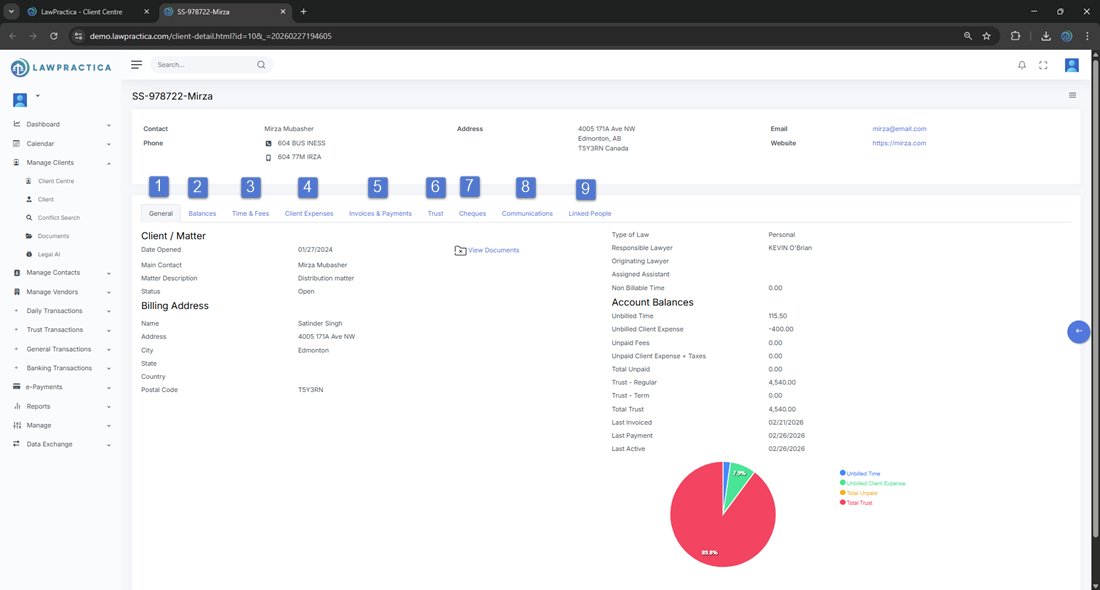
At the top of the page, the client’s core profile information is displayed, including:
- Client Code / Identifier (e.g., SS‑978722‑Mirza)
- Contact Name
- Phone Numbers
- Address
- Website
This section provides quick access to essential client contact details.
¶ 2. Client / Matter Summary Panel
This panel summarizes the active matter associated with the client, including:
- Client / Matter Number
- Date Opened
- Matter Description
- Status (Open / Closed)
- Main Contact
- Billing Address
- Type of Law
- Responsible Lawyer
- Originating Lawyer
- Assigned Assistant
- Non‑Billable Time
This section provides a complete snapshot of the matter’s administrative and billing profile.
¶ 3. Account Balances Overview
A real‑time financial summary is displayed, showing:
- Unbilled Time
- Unbilled Client Expense
- Unpaid Fees
- Unpaid Client Expense + Taxes
- Total Unpaid
- Trust – Regular
- Trust – Term
- Total Trust
- Last Invoiced Date
- Last Payment Date
- Last Active Date
These balances help staff quickly assess the client’s financial standing and outstanding work.
¶ 5. Tabs & Transaction Categories
- The Client Detail page contains multiple tabs, each representing a category of transactions or records. Each tab includes its own sub‑actions such as Add, Edit, Delete, View, Export, or Generate depending on the transaction type.
¶ 5.1 General Tab
Displays the client’s general information, matter details, and administrative data. Common actions include:
- Edit client details
- Update matter information
- View documents
- Access linked contacts

¶ 5.2 Balances Tab
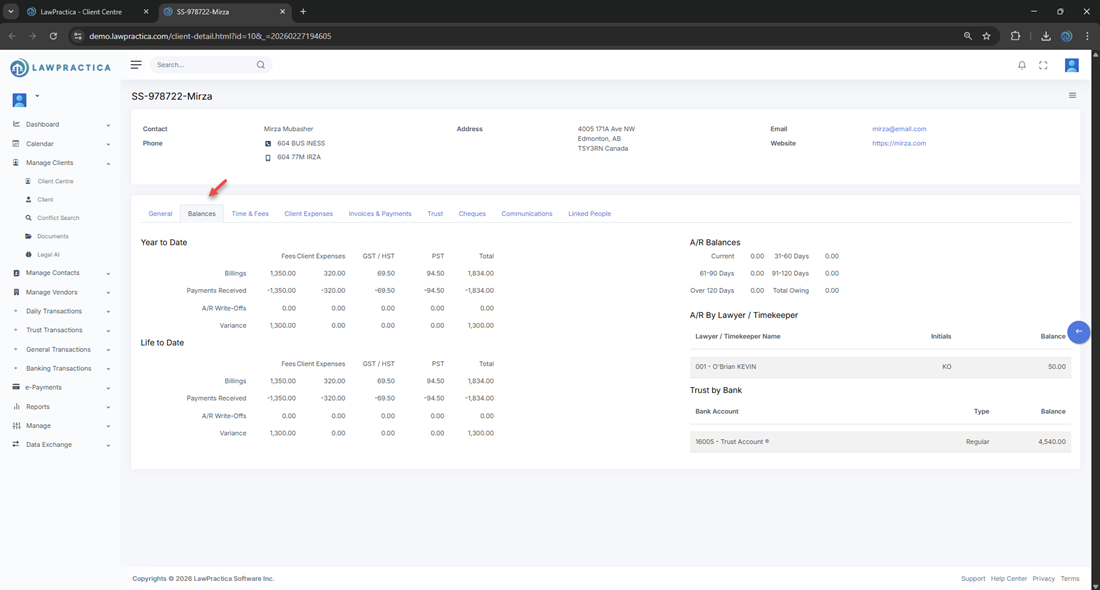
Shows a consolidated view of all financial balances for the client, including trust, AR, unbilled time, and expenses. Useful for:
- Pre‑billing review
- Trust compliance checks
- Financial snapshot for client meetings
¶ 5.3 Time & Fees Tab
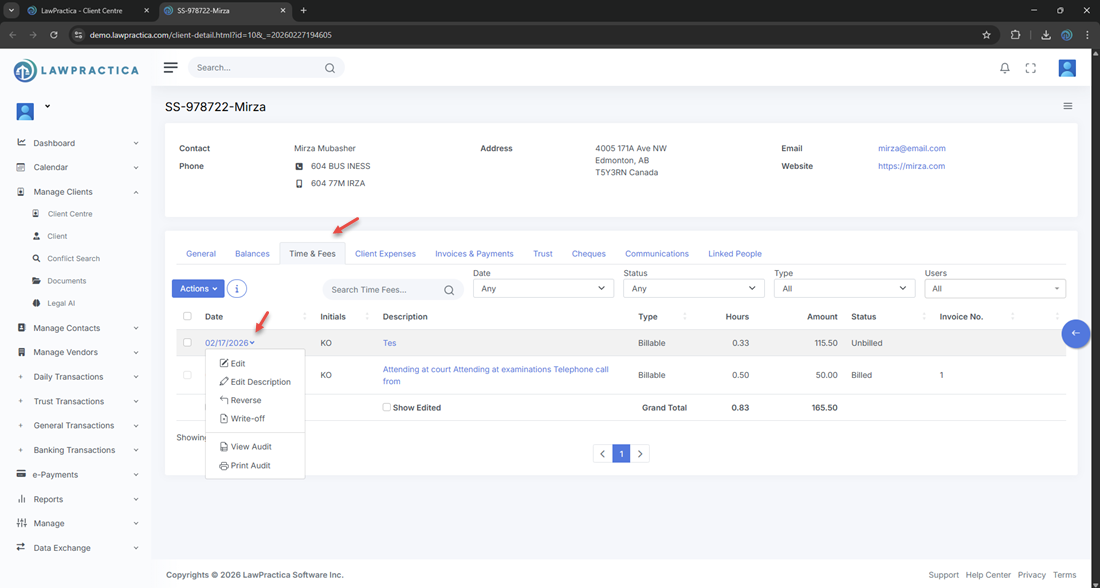
Lists all time entries and fee transactions associated with the client/matter. Sub‑actions typically include:
- Add Time Entry
- Edit / Delete Time Entry
- View Time Summary
- Export Time Records
¶ 5.4 Client Expenses Tab
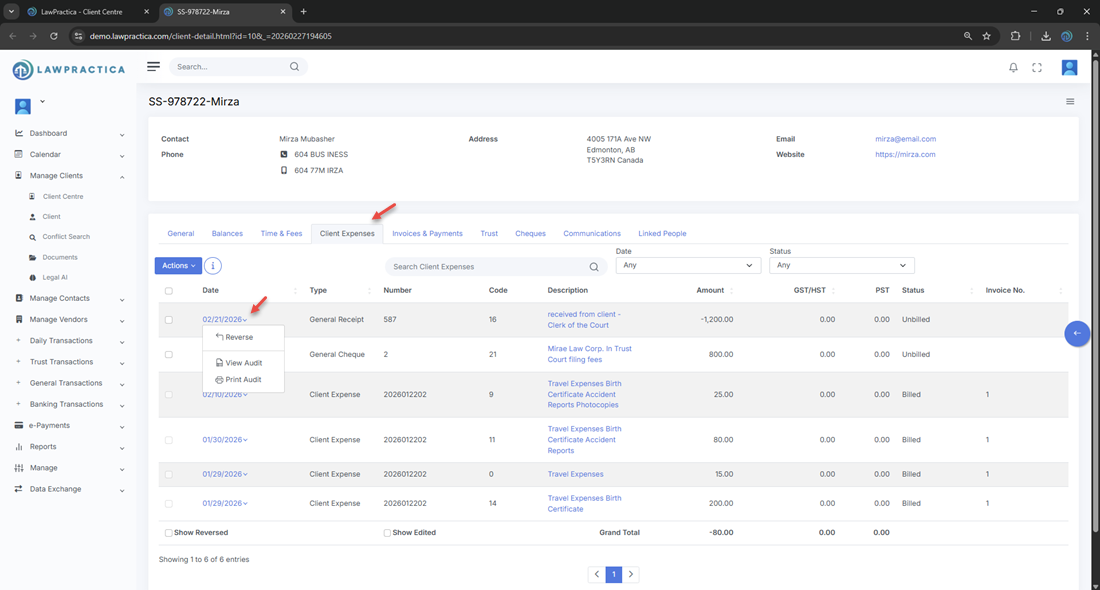
Displays all disbursements and client‑related expenses. Sub‑actions include:
- Add Expense
- Edit / Delete Expense
- Mark as Billable / Non‑Billable
- Export Expense List
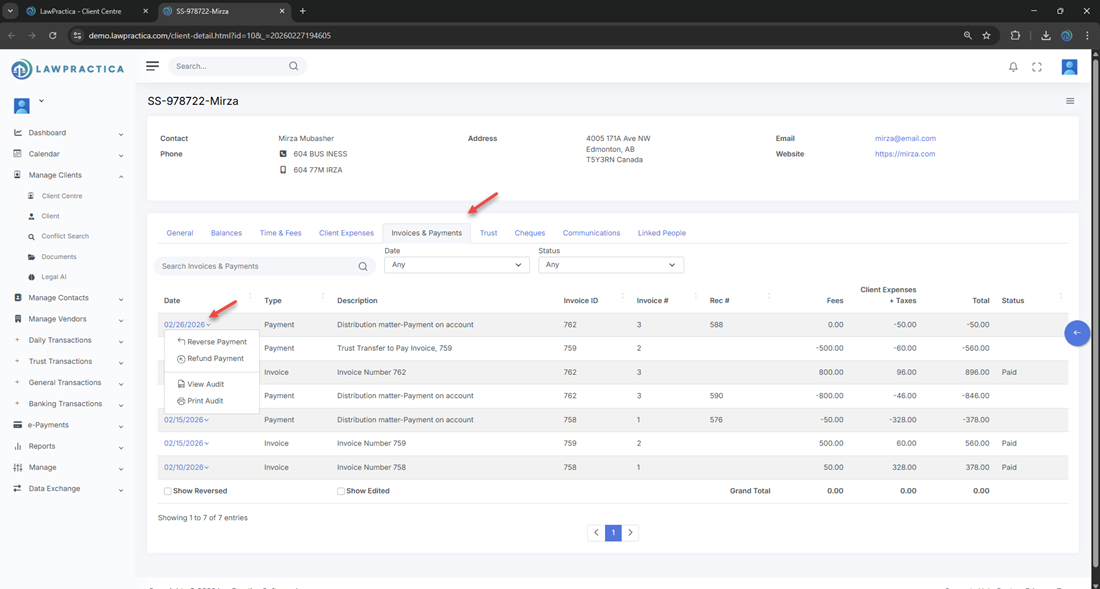
¶ 5.5 Invoices & Payments Tab
Shows all invoices issued to the client and all payments received. Includes:
- Invoice details
- Payment allocation
- Write‑offs
- Credit notes
- Export invoice/payment history
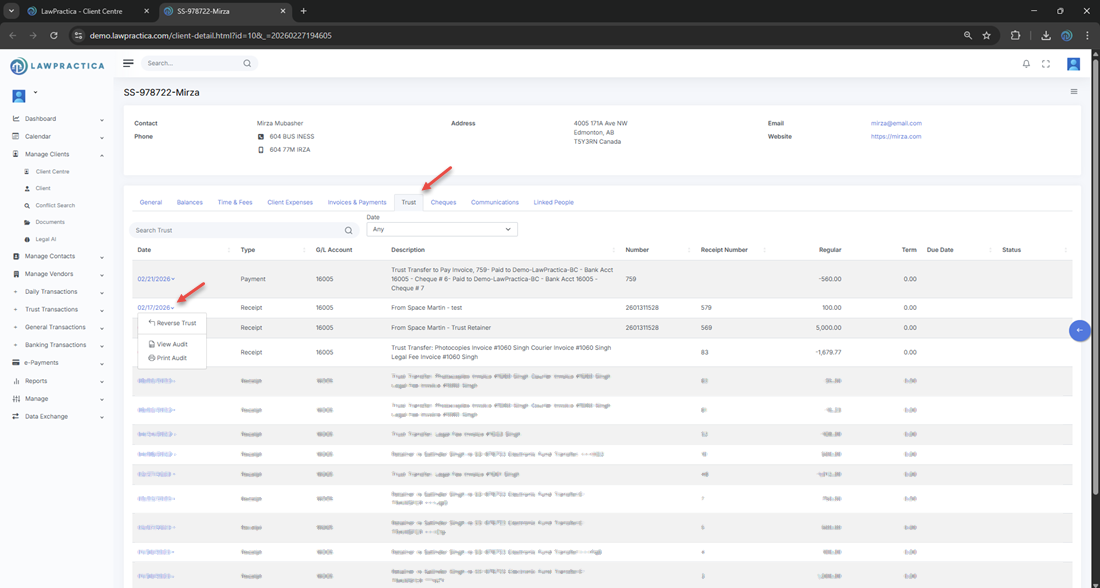
¶ 5.6 Trust Tab
Displays trust account activity for the client, including:
- Trust receipts
- Trust disbursements
- Trust transfers
- Trust balances (Regular & Term)
- Sub‑actions include:
- Add Trust Receipt
- Issue Trust Cheque
- Transfer Trust Funds
- View Trust Ledger
This tab is essential for Law Society trust compliance.
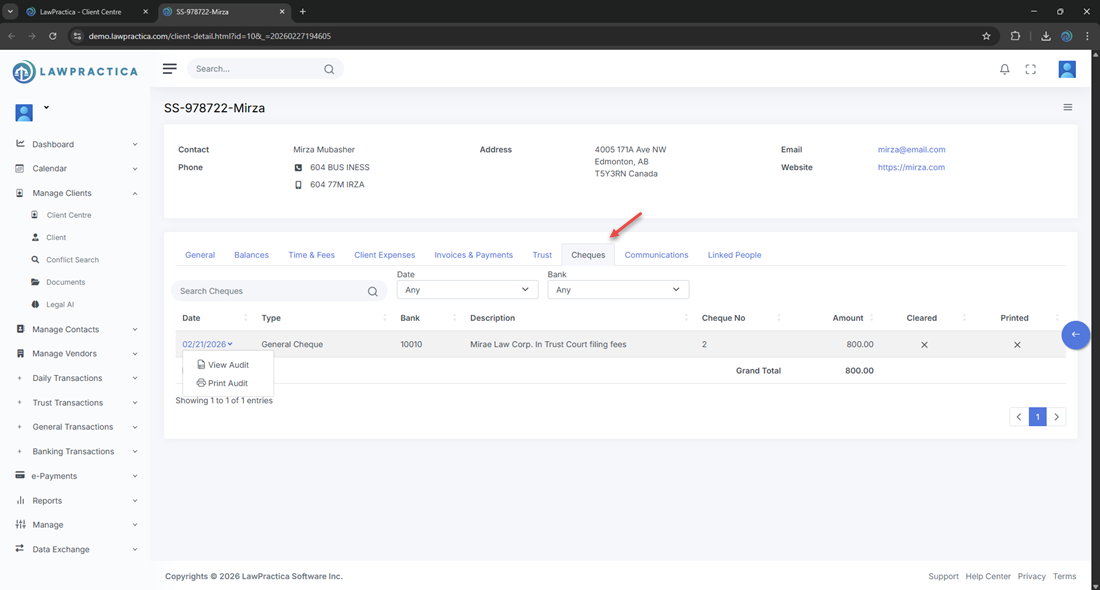
¶ 5.7 Cheques Tab
Lists all cheques issued for the client, including trust and general cheques. Actions include:
- View cheque details
- Reprint cheque
- Void cheque
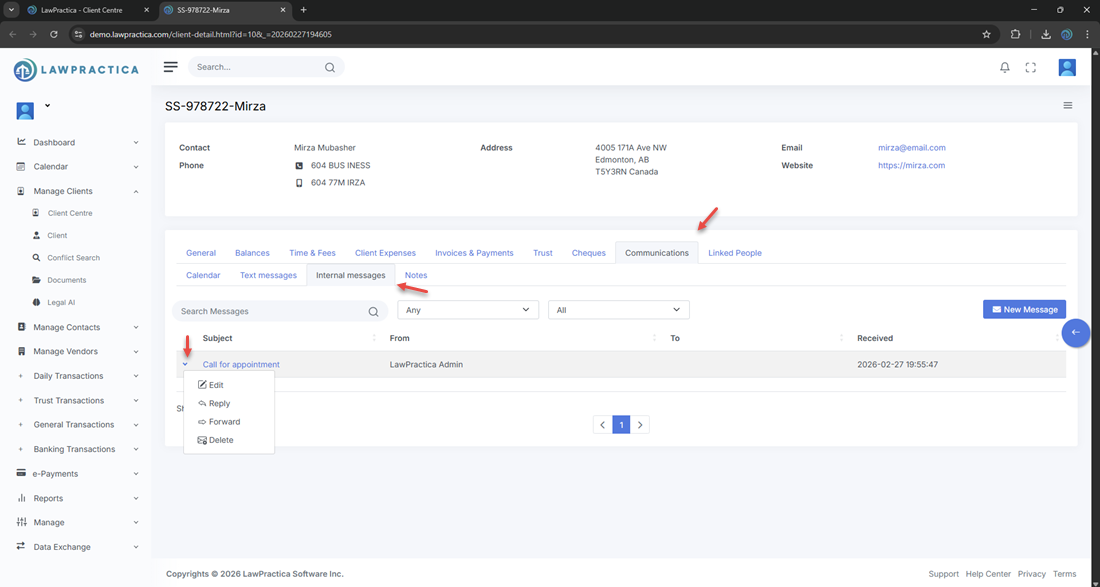
¶ 5.8 Communications Tab
Shows all logged communications related to the client/matter, such as:
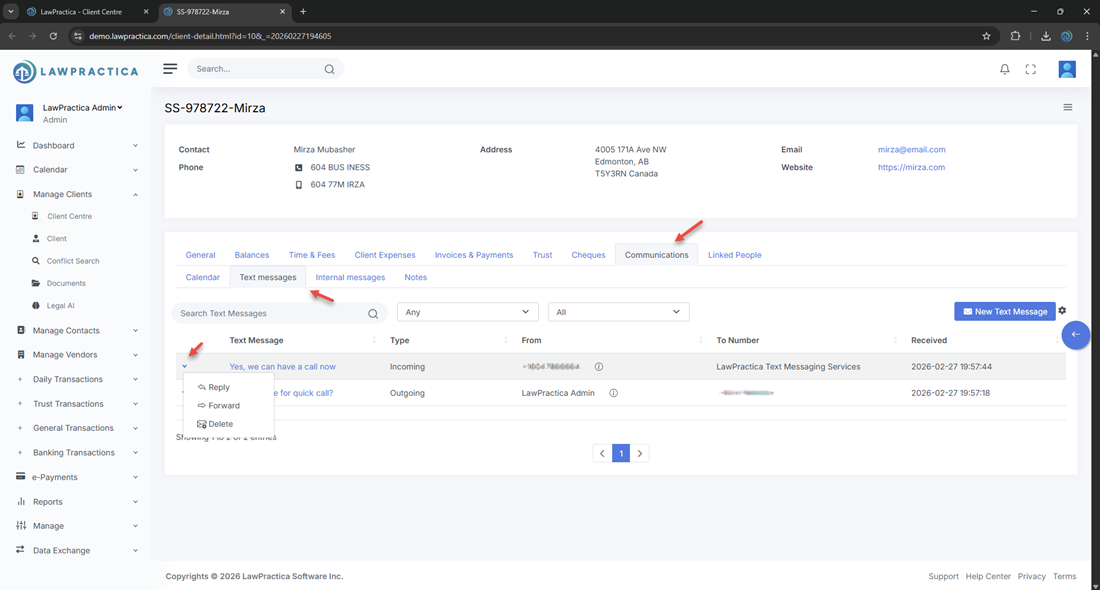
- Emails
- Phone call notes
- Meeting notes
- Internal comments
- Sub‑actions:
- Add Communication
- Edit / Delete Communication
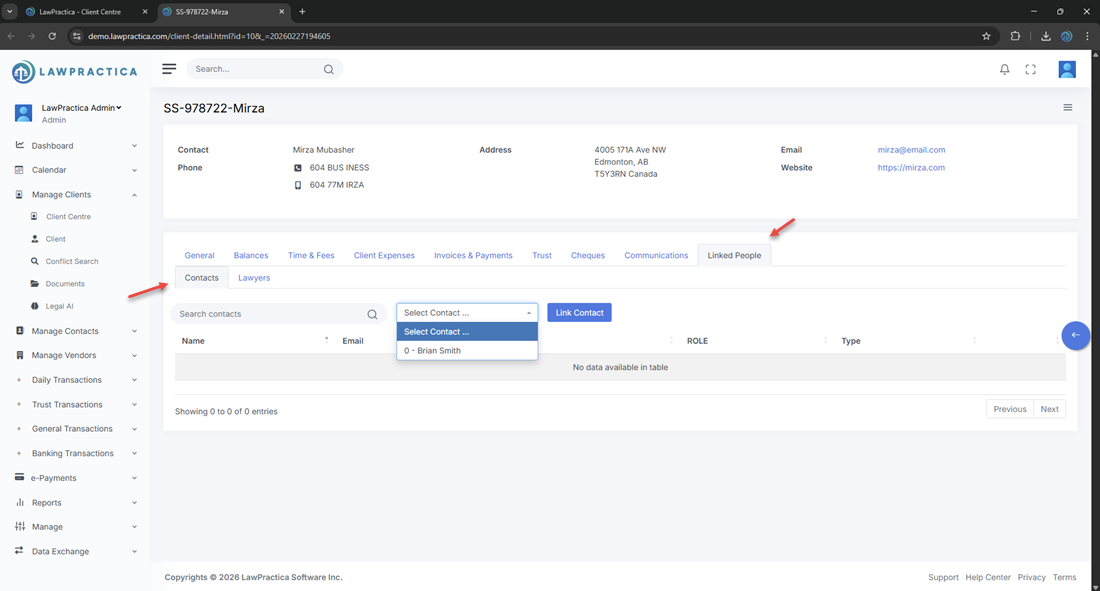
¶ 5.9 Linked People Tab
Displays all individuals associated with the client or matter, including:
- Contacts
- Opposing counsel
- Related parties
- Internal staff
- Actions include:
- Add Linked Person
- Edit / Remove Linked Person
¶ 6. Document Access
- A View Documents button is available directly from the Client Detail page, allowing quick access to all uploaded or generated documents for the client/matter.

¶ 7. Integration with Other Modules
The Client Centre integrates with:
- Client Detail
- Matters
- Calendar
- Tasks
- Billing & Transactions
- Conflict Search
- Contacts
This ensures client data flows consistently across all operational areas.
¶ 8. Summary
The Client Centre provides a unified, searchable interface for managing all client records. With structured data, powerful search tools, responsible lawyer filtering, and direct access to client details, it supports efficient client management and daily legal operations. The Client Detail page is the central hub for managing all client‑related information and transactions. With dedicated tabs for time, expenses, invoices, trust, communications, and linked people, it provides a complete operational and financial picture of each client and matter. This page is essential for daily operations, billing, trust compliance, and client management.