¶ 1. Overview
The Conflict Search feature allows law firms to perform a mandatory conflict‑of‑interest check before creating a new client or matter. This search ensures the firm does not represent clients whose interests may conflict with existing or past clients, opposing parties, related contacts, or other entities stored in the system.
Conflict Search is a critical compliance requirement for legal practice and helps maintain ethical standards, transparency, and risk mitigation.
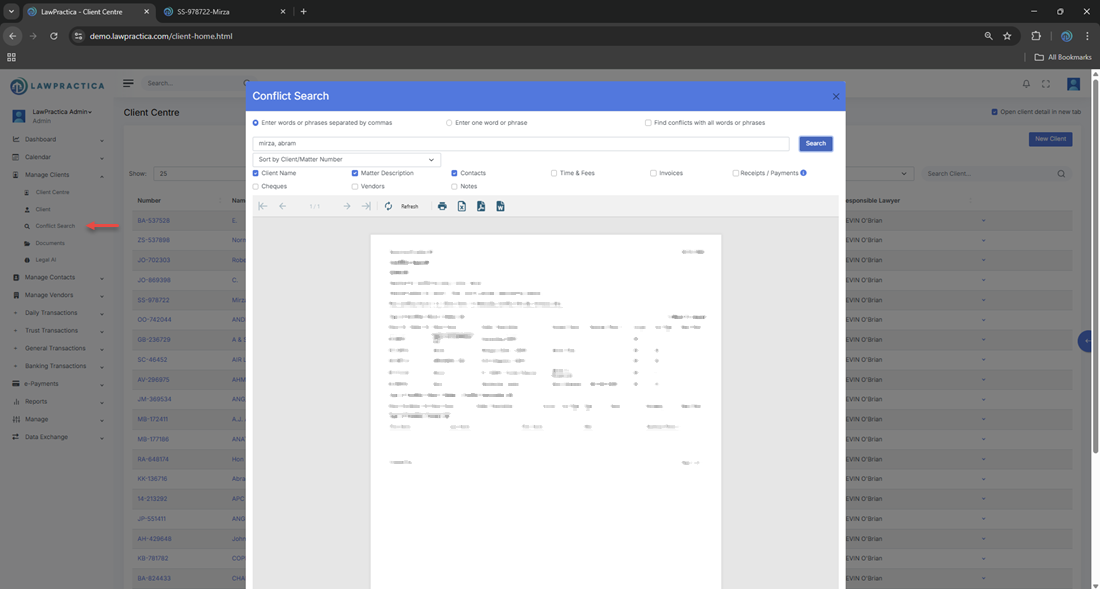
¶ 2. When to Use Conflict Search
Lawyers must run a conflict search:
- Before opening a new client
- Before creating a new matter for an existing client
- When adding a new party to a matter
- When onboarding corporate clients with multiple related entities
- When receiving referrals or third‑party instructions
Running a conflict search ensures the firm avoids ethical violations and maintains professional responsibility.
¶ 3. How Conflict Search Works
The feature searches across multiple data sources within LawPractica, including:
¶ Searchable Records
- Client names
- Matter names and descriptions
- Opposing parties
- Contacts and related persons
- Vendors
- Time & Fees entries
- Client Expenses
- Invoices and payments
- Notes or descriptions containing relevant names
This comprehensive search ensures that even indirect or historical relationships are identified.
¶ 4. Running a Conflict Search
¶ Steps
- Open the Conflict Search feature.
- Enter the name or keyword to search (e.g., person, company, organization).
- Select additional filters if available (client type, matter type, date range).
- Run the search.
- Review all matching results across the system.
The results display all records where the searched name appears, helping the lawyer determine whether a conflict exists.
¶ 5. Understanding Search Results
Search results typically include:
- Client Name
- Matter Description
- Related Party (opposing party, contact, vendor)
- Record Type (client, matter, expense, invoice, etc.)
- Description or Notes
- Date
- Assigned Lawyer
Each result helps the lawyer assess whether the new client or matter may conflict with existing relationships.
¶ 6. Reviewing Potential Conflicts
Once results appear, the lawyer should:
- Review all matching names
- Identify relationships (client, opposing party, related entity)
- Determine whether the conflict is direct, indirect, or administrative
- Consult firm policy or senior counsel if unsure
- Document the conflict check outcome
This ensures the firm maintains a defensible conflict‑checking process.
¶ 7. Actions Available After Conflict Search
Depending on permissions, users may:
- Open the client or matter directly from the results
- View detailed records (contacts, invoices, expenses, etc.)
- Add notes documenting the conflict review
- Proceed with client creation if no conflict exists
- Escalate if a potential conflict is identified
This supports a complete and traceable conflict‑checking workflow.
¶ 8. Importance of Conflict Search
Conflict Search is essential for:
- Ethical compliance
- Avoiding representation conflicts
- Protecting the firm from liability
- Maintaining client trust
- Ensuring transparency in client onboarding
A documented conflict search is often required by law societies, bar associations, and insurance carriers.
¶ 9. Integration with Other Features
Conflict Search integrates with:
- Client Detail – Opens client and matter records
- Contacts – Searches related parties
- Vendor Centre – Searches vendor relationships
- Time & Fees – Searches historical entries
- Client Expenses – Searches disbursements
- Invoices & Payments – Searches billing history
- Find – Supports deeper investigation if needed
This ensures a complete and reliable conflict‑checking process.
¶ 10. Summary
The Conflict Search feature provides a comprehensive, firm‑wide search tool to identify potential conflicts of interest before onboarding new clients or matters. By searching across all client, matter, contact, vendor, and financial records, it ensures ethical compliance, reduces risk, and supports responsible legal practice.