¶ 1. Overview
The Add / Edit Contact interface provides a structured workspace for creating new contacts or updating existing records within the firm. This module ensures that all contact information - clients, vendors, and general contacts - is captured accurately and maintained consistently across the platform.
The interface supports detailed data entry, communication preferences, and matter associations, enabling seamless integration with the Contact Centre, Matters, Billing, and Messaging.
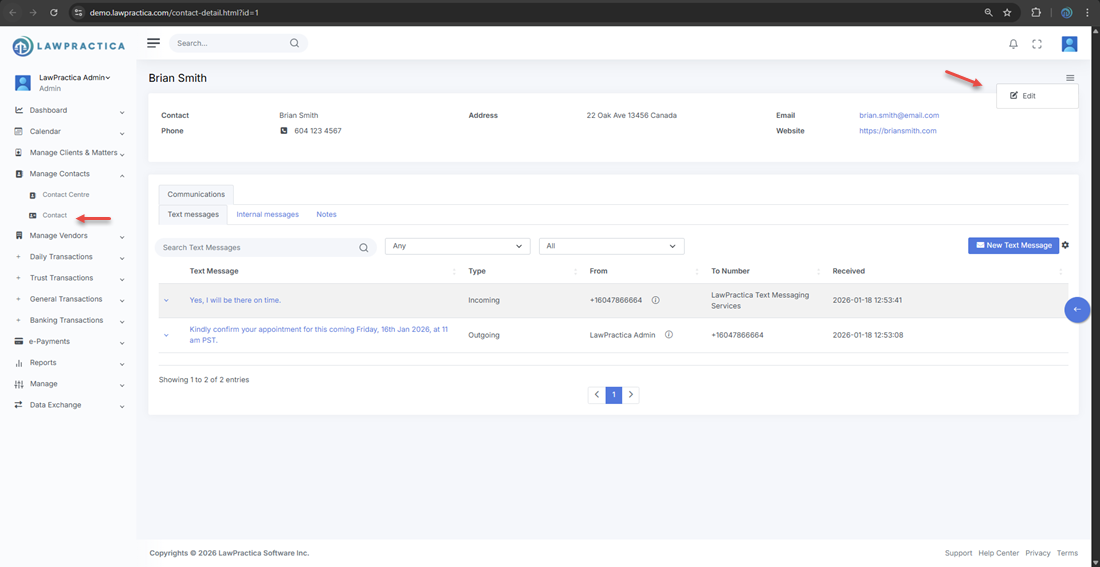
¶ 2. Creating a New Contact
Users can create a new contact directly from the Contact Centre or through any workflow that requires adding a new individual or organization.
¶ Steps
- Open the Add Contact interface.
- Enter personal and business information.
- Select the appropriate contact type (Client, Vendor, General).
- Add communication details such as phone numbers and email addresses.
- Assign roles or link the contact to matters if applicable.
- Save the contact.
The new contact becomes immediately available across all relevant modules.
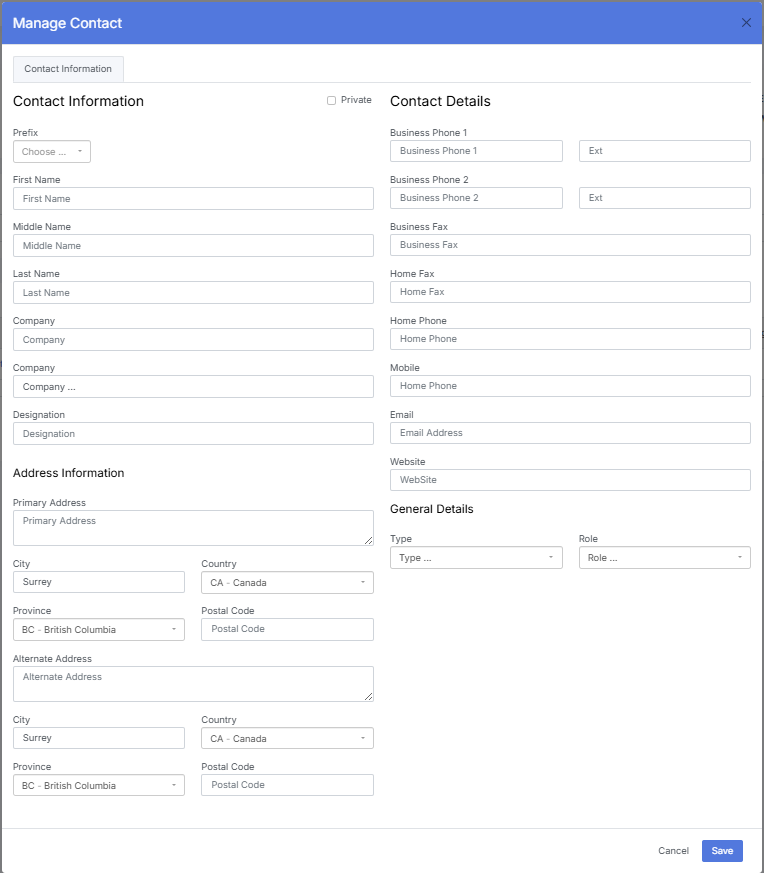
¶ 3. Editing an Existing Contact
When editing an existing contact, users can update any field to ensure information remains current and accurate.
¶ Editable Elements
- Personal details
- Company information
- Phone numbers and email addresses
- Contact type and role
- Matter associations
- Notes and internal comments
All updates apply instantly across the system.
¶ 4. Contact Information Fields
The interface supports a comprehensive set of fields to ensure complete and structured contact records.
¶ Personal Information
- First name
- Last name
- Preferred name (optional)
- Job title
¶ Company Information
- Company name
- Business phone
- Business email
- Address details
¶ Communication Details
- Mobile phone
- Email addresses
- SMS‑enabled numbers
¶ Classification
- Contact type (Client, Vendor, General)
- Role (e.g., Billing Contact, Primary Client Contact)
These fields ensure contacts are properly categorized and easy to locate.
¶ 5. Matter Associations
Contacts can be linked to one or more matters.
¶ Benefits
- Clear visibility of the contact’s involvement
- Streamlined communication and billing workflows
- Accurate role assignment within each matter
- Matter associations update automatically across the platform.
¶ 6. Text Messaging (SMS) Configuration
The Add/Edit Contact interface supports SMS communication setup.
¶ Messaging Capabilities
- Contacts can receive and send SMS messages through LawPractica.
- Users can specify which phone number is SMS‑enabled.
¶ Supported SMS Options
LawPractica Messaging Service Number
- Default option
- No setup required
Firm‑Dedicated SMS Number
- Optional branded number
- Enhances client recognition and professionalism
Once configured, SMS communication is available directly from the Contact Detail interface.
¶ 7. Notes & Internal Comments
Users can add internal notes to the contact record.
¶ Use Cases
- Communication history
- Special instructions
- Relationship context
- Internal reminders
Notes remain internal and are not visible to clients.
¶ 8. Summary
The Add/Edit Contact interface provides a complete, structured environment for creating and maintaining contact records. With detailed information fields, matter associations, and integrated SMS configuration, it ensures accurate, organized, and efficient contact management across the firm.