¶ 1. Overview
The Find feature provides a powerful search tool for locating financial activity across the system. Users can search by audit records or transactions, review detailed information, and perform corrective or administrative actions directly from the results.
This feature supports accuracy, compliance, and efficient financial management across the firm.
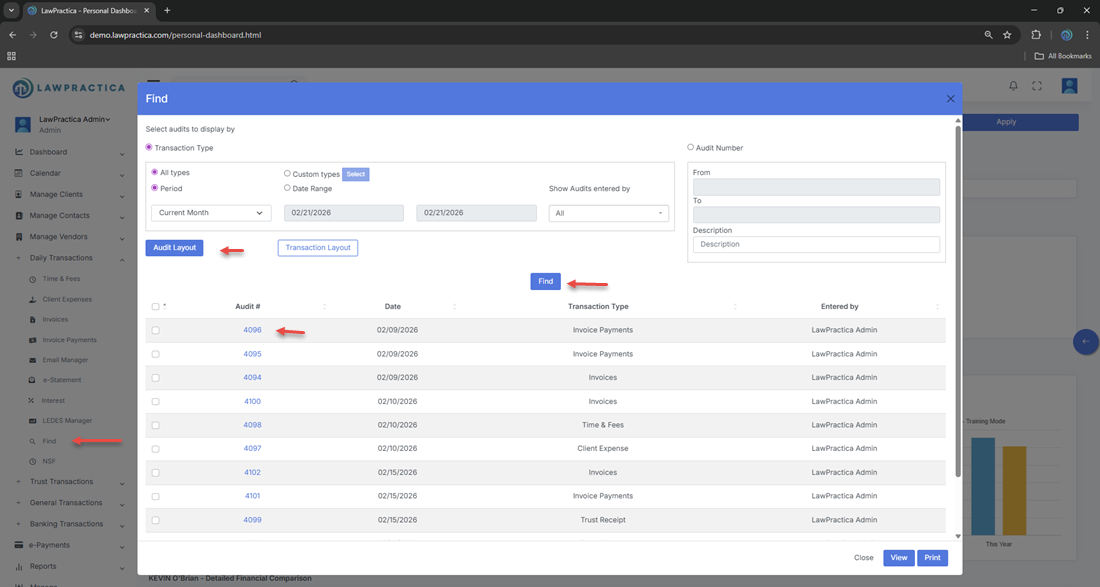
¶ 2. Search Modes
The Find feature includes two primary search types:
¶ 2.1 Find by Audits
This search mode allows users to locate audit records generated by system activity.
¶ What You Can Search
- User actions
- Edits or updates
- Posting activity
- Reversals
System‑generated audit trails
¶ Use Cases
- Investigating changes
- Reviewing who performed an action
- Confirming when a transaction was modified
- Supporting compliance and internal controls
Audit results provide a transparent history of activity for accountability and reporting.
¶ 2.2 Find by Transactions
This search mode allows users to locate financial transactions across all clients and matters.
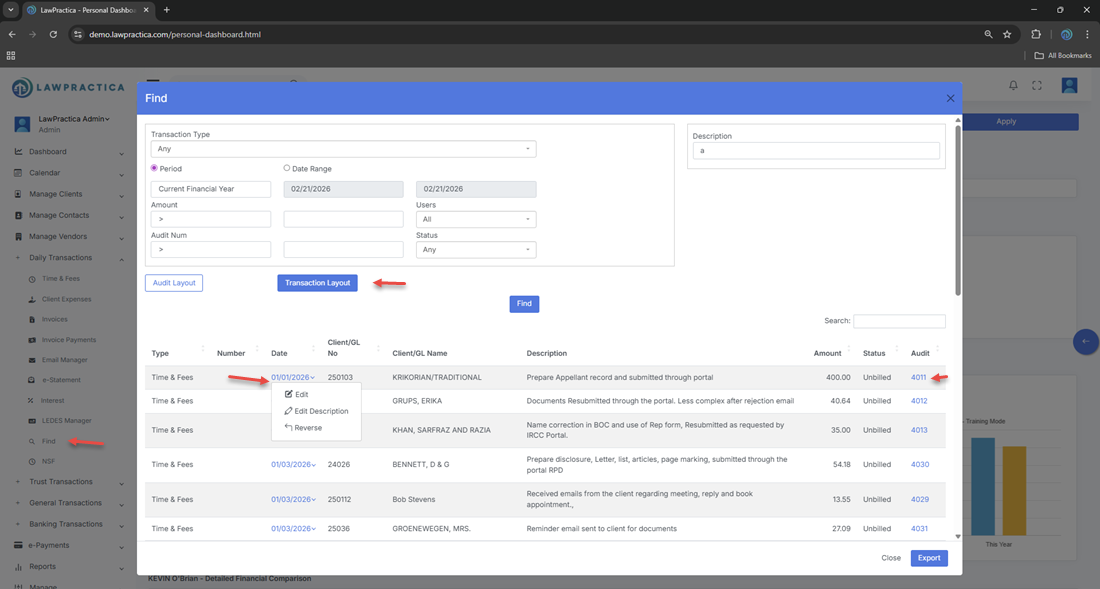
¶ Searchable Transaction Types
- Invoice payments
- Trust receipts
- Trust payments
- General payments
- Client expenses
- Time & fees
- Interest
- Write‑offs
- Reversals
- Adjustments
Users can filter by date, client, matter, amount, transaction type, or reference number.
¶ Use Cases
- Locating a specific payment
- Reviewing all transactions for a client
- Identifying errors or duplicates
- Preparing for reconciliation
- Supporting audits or financial reviews
¶ 3. Transaction Details
Selecting a transaction displays key information such as:
- Client and matter
- Date
- Amount
- Payment or receipt number
- Bank account (if applicable)
- Description
- Status (posted, reversed, written‑off)
- Linked invoice or trust entry
This helps users verify accuracy before taking action.
¶ 4. Actions Available on Transactions
The Find feature allows users to perform corrective or administrative actions directly from the search results.
¶ Common Actions
- Edit – Update details such as description or reference fields
- Reverse – Undo a posted transaction (e.g., payment, receipt)
- View Audit – Open the full transaction record
These actions help maintain accurate financial records and support efficient corrections.
¶ 5. Benefits of the Find Feature
- Efficiency
- Quickly locate any transaction or audit entry without navigating through multiple modules.
- Accuracy
- Supports error correction, reconciliation, and financial cleanup.
- Compliance
- Provides visibility into audit trails and user activity.
- Control
- Allows authorized users to reverse or adjust entries safely.
¶ 6. Integration with Other Features
The Find feature integrates with:
- Client Detail – Opens linked client or matter
- Invoices & Payments – Connects to invoice history
- Trust – Links to trust receipts and payments
- General Transactions – Supports bank and ledger activity
- Audit Logs – Displays system‑generated audit trails
- Reports – Ensures consistency across financial summaries
This creates a unified financial management workflow.
¶ 7. Summary
The Find feature provides a comprehensive search tool for locating audits and transactions across the firm. With powerful filtering, detailed results, and corrective actions such as edit, reverse, and write‑off, it ensures accurate financial management, compliance, and operational efficiency.