¶ 1. Overview
The Interest feature allows law firms to calculate and apply interest charges on overdue client invoices. Users can review outstanding balances, apply interest rules, generate interest amounts, and post the resulting charges to the client’s account.
This feature supports firm billing policies, improves receivables management, and ensures accurate financial reporting.
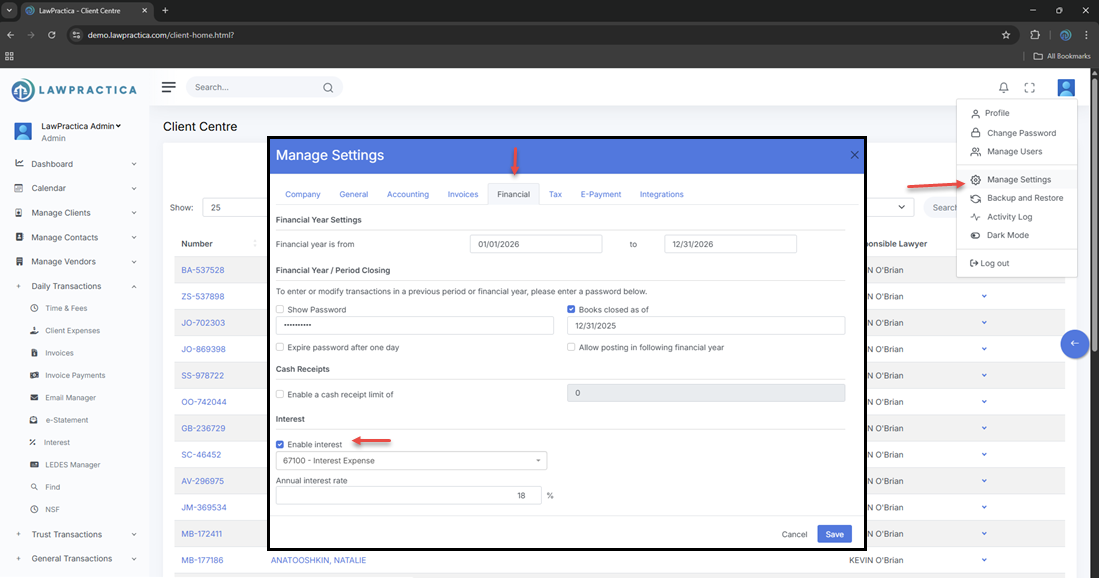
To enable interest feature, Firm administrator (owner-account) must enable through Manage settings.
¶ 2. Interest Calculation Workflow
The feature identifies invoices that are:
- Overdue
- Unpaid or partially paid
- Eligible for interest based on firm settings
Users can then calculate interest based on:
- Invoice date
- Due date
- Outstanding balance
- Interest rate defined in firm settings
- Number of days overdue
The calculated interest appears as a new charge that can be reviewed before posting.
¶ 3. Interest Details
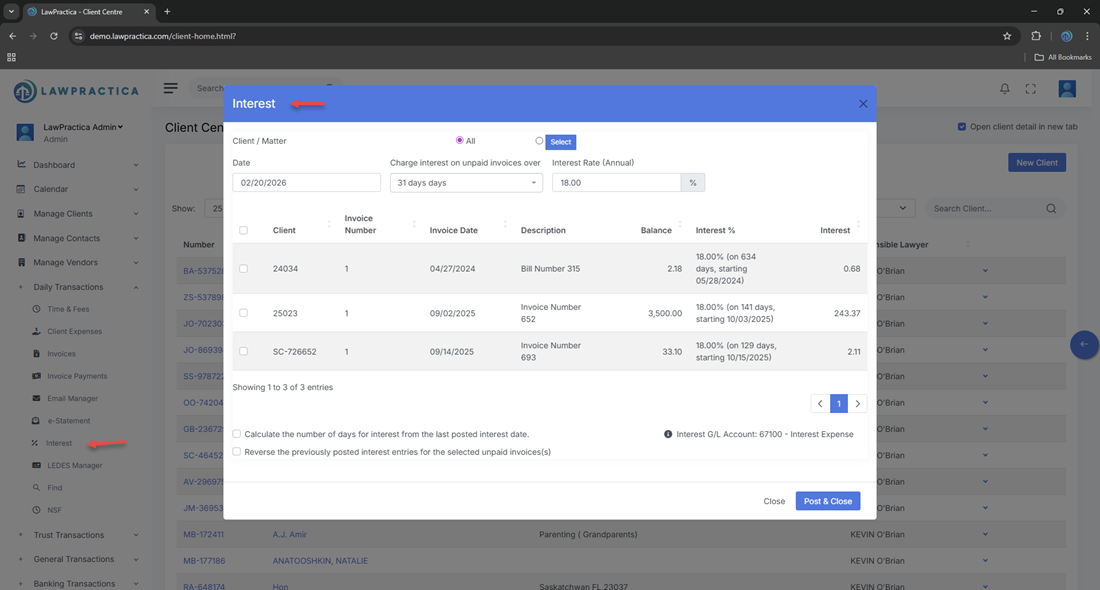
When calculating interest, the feature displays:
¶ Key Fields
- Invoice Number
- Invoice Date
- Due Date
- Outstanding Amount
- Days Overdue
- Interest Rate (%)
- Calculated Interest Amount
These values help users confirm the accuracy of the interest charge before posting.
¶ 4. Editing Interest Values
Depending on permissions, users may adjust:
- Interest rate
- Interest amount
- Description or notes
This allows flexibility for client‑specific arrangements or billing exceptions.
¶ 5. Posting Interest
Once reviewed, interest charges can be posted to the client’s account.
¶ Posting Effects
- Creates a new interest transaction
- Updates the client’s outstanding balance
- Adds the interest charge to the next invoice
- Appears in the client’s financial history
- Updates billing and receivables reports
Posting ensures interest is formally recorded and included in future billing.
¶ 6. Drafted vs. Posted Interest
The feature may display:
¶ Drafted Interest
- Calculated but not yet posted
- Editable
- Can be deleted or recalculated
¶ Posted Interest
- Finalized and added to the client ledger
- Locked from editing
- Included in billing and reporting
This separation ensures accuracy and control before interest affects financial records.
¶ 7. Integration with Other Features
Interest integrates seamlessly with:
- Client Invoices – Identifies overdue invoices
- Invoice Payments – Adjusts interest eligibility
- General Transactions – Posts interest charges
- Reports – Displays interest revenue and receivables
- Client Detail – Shows interest in the financial history
This ensures consistent and accurate billing workflows.
¶ 8. Summary
The Interest feature provides a structured, reliable method for calculating and posting interest on overdue invoices. With support for firm‑defined interest rules, drafted vs. posted tracking, and full integration across billing modules, it ensures accurate receivables management and consistent financial reporting.