¶ 1. Overview
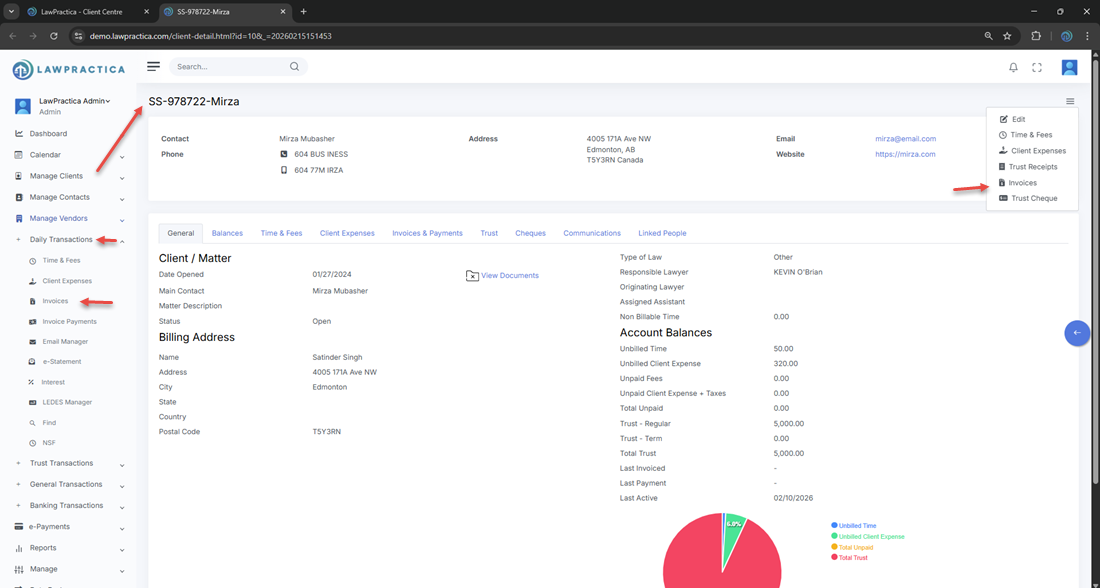
The Client Invoice feature allows users to prepare and finalize invoices for a client or matter. Users can include time entries, flat fees, discounts, and client expenses, apply taxes, and generate a final invoice total before posting.
This feature supports accurate billing, financial reporting, and seamless integration with Time & Fees, Client Expenses, and General Transactions.
¶ 2. Invoice Header
The top section of the invoice displays key billing information pulled from the client/matter.
¶ Fields Visible
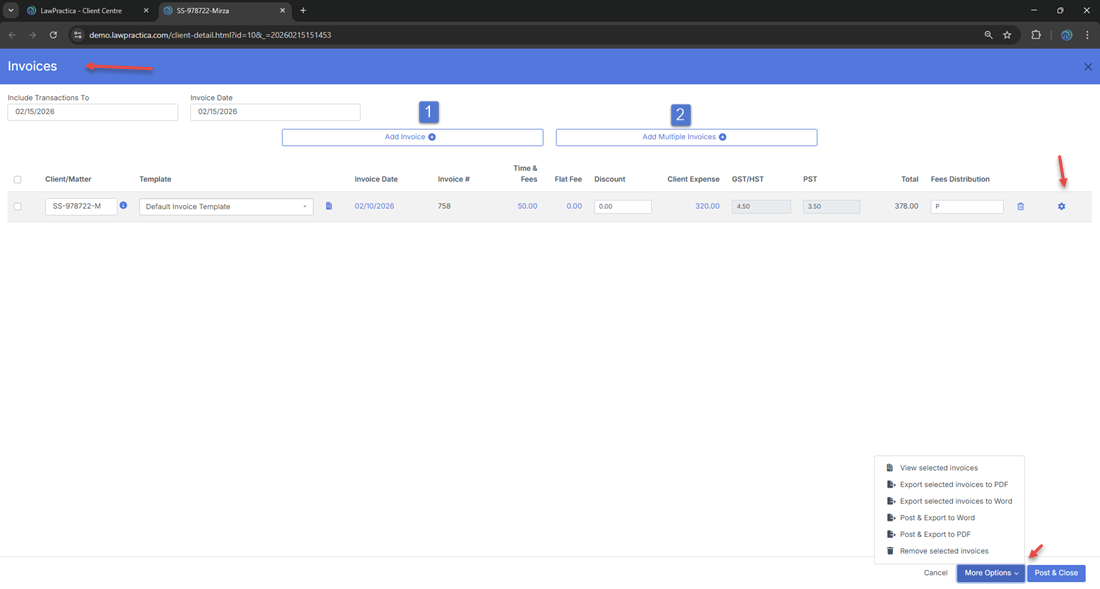
- Client/Matter – e.g., SS‑978722 – Mirza
- Template – Selected invoice template
- Invoice Date – e.g., 02/15/2026
- Invoice # – System‑generated or user‑entered
These fields define the invoice identity and determine how it appears on the final document.
¶ 3. Invoice Components
The invoice includes multiple billing components that contribute to the final total.
¶ Time & Fees
- Billable hours or fixed fee entries pulled from the Time & Fees feature.
¶ Flat Fee
- A fixed amount is billed regardless of time spent.
¶ Discount
- An optional reduction is applied to the invoice.
¶ Client Expense
- Disbursements/expenses recorded under Client Expenses.
¶ GST/HST & PST
- Taxes are calculated based on the client’s tax settings.
¶ Total
Final invoice amount after all components and taxes are applied.
Example from your screen:
- Time & Fees: 50.00
- Client Expense: 320.00
- GST/HST: 4.50
- PST: 3.50
- Total: 378.00
¶ 4. Adding Invoice Items
Users can add invoice items using:
- Add Invoice – Create a single invoice
- Add Multiple Invoices – Batch creation for multiple matters
These options allow flexible billing workflows depending on the volume of work.
¶ 5. Reviewing Invoice Details
Before posting, users can review:
- All included time entries
- All included expenses
- Tax calculations
- Discounts
- Final totals
This ensures accuracy before the invoice becomes part of the client’s financial history.
¶ 6. More Options
The More Options menu allows users to access additional invoice settings, such as:
- Template selection
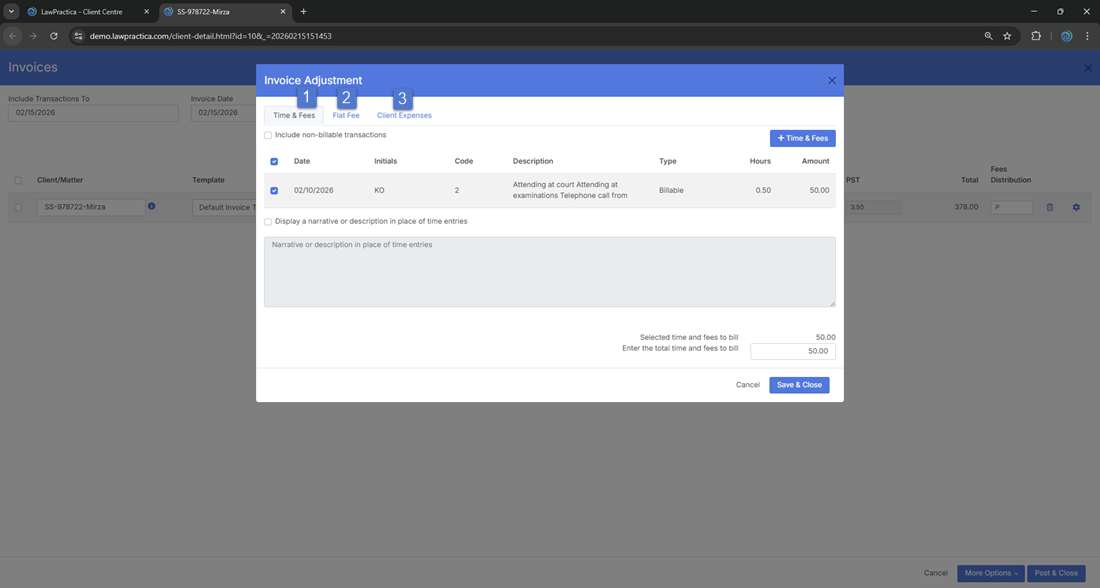
- Adjustments (Time & Fees entries, Flat Fees & Client Expenses)
- Formatting preferences
This helps tailor the invoice to the firm’s billing standards.
¶ 7. Apply Payment during invoicing
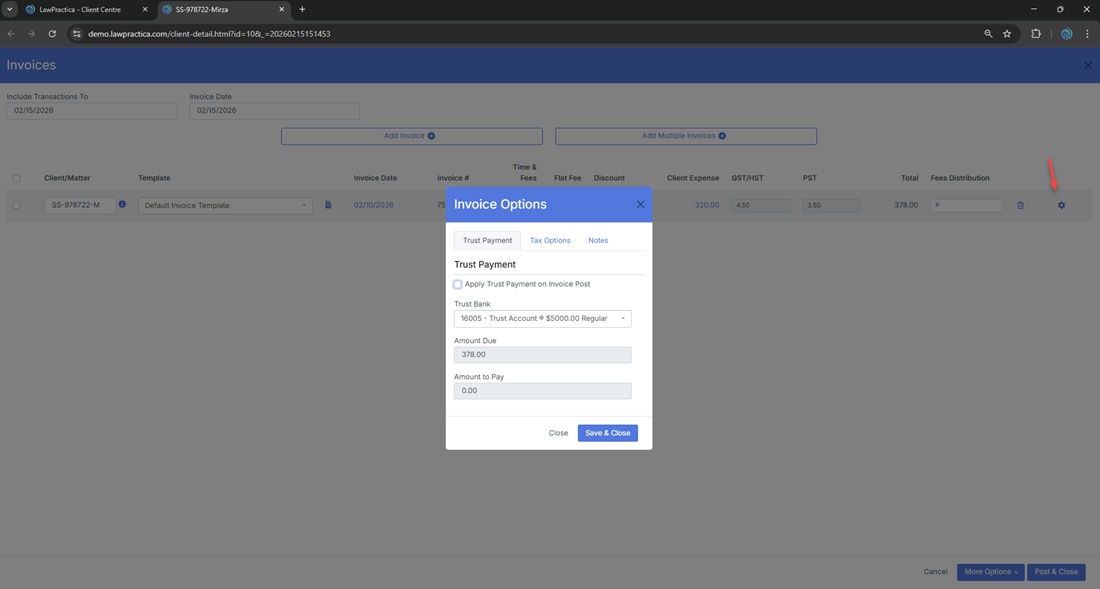
You may also apply Trust Payment when invoicing, review tax settings, and add notes to show on the invoice automatically.
¶ 7. Posting the Invoice
Once reviewed, users can finalize the invoice using:
¶ Post & Close
- Posts the invoice to the client’s account and closes the feature.
¶ Posting Effects
- The invoice becomes part of the client’s billing history
- Time & Fees and Expenses included in the invoice are marked as billed
- Financial reports update
- The invoice becomes available for payment processing
¶ Cancel
- Closes the feature without saving changes.
¶ 8. Integration with Other Features
The Client Invoice feature integrates with:
- Time & Fees – Pulls billable hours
- Client Expenses – Pulls disbursements
- Invoice Payments – Records payments against posted invoices
- General Transactions – Updates financial ledgers
- Reports – Reflects billed amounts and tax totals
This ensures a seamless billing workflow across the system.
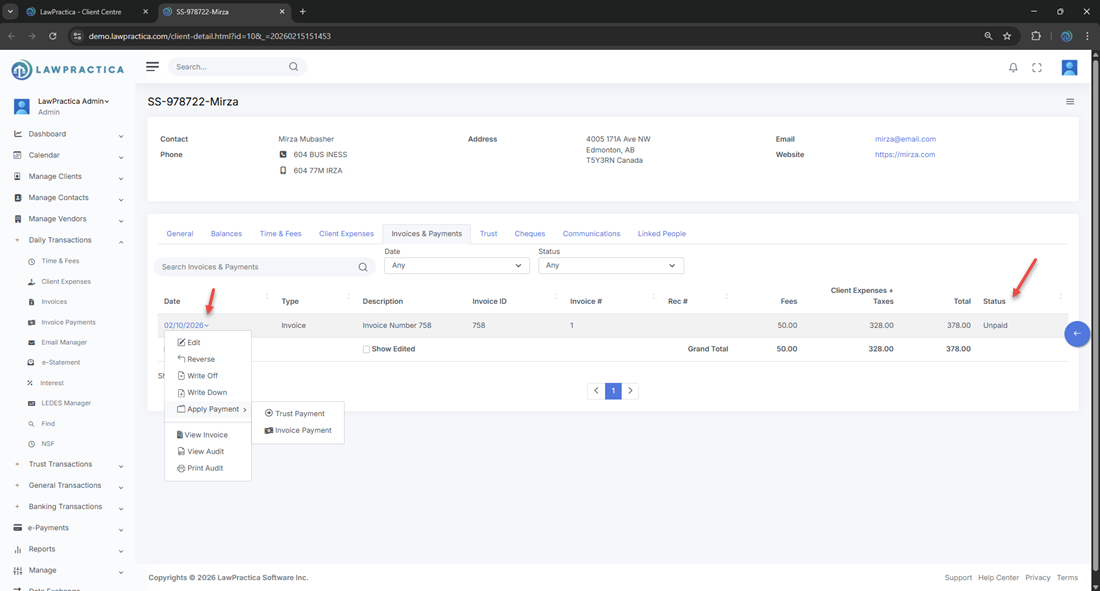
¶ 9. Invoice Edit & View, Reverse, Write-Off, Write-Down, Apply Payment.
Through Manage Clients > Client Centre > Client Details, you can reverse, write off, or write down the invoice. You can also apply a payment and view the invoice along with the audit.
¶ 10. Summary
The Client Invoice feature provides a complete, structured environment for preparing and posting client invoices. With support for time, fees, expenses, taxes, discounts, and template selection, it ensures accurate billing and consistent financial reporting across the firm.