¶ 1. Overview
The Invoice Payment feature allows users to record client payments toward outstanding invoices. Users can enter payment details, apply the payment to a specific invoice, review amounts owing, and post the payment to update the client’s financial history.
This feature integrates with Invoices, Time & Fees, Client Expenses, and General Transactions to ensure accurate billing and reconciliation.
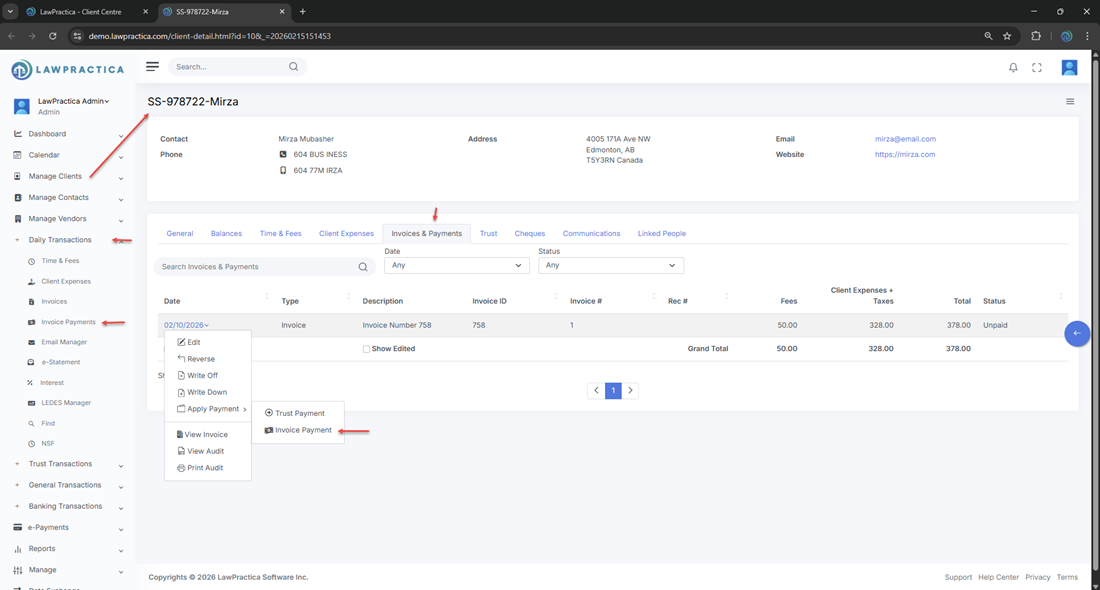
¶ 2. Payment Information
At the top of the feature, users enter the core payment details.
¶ Fields Visible
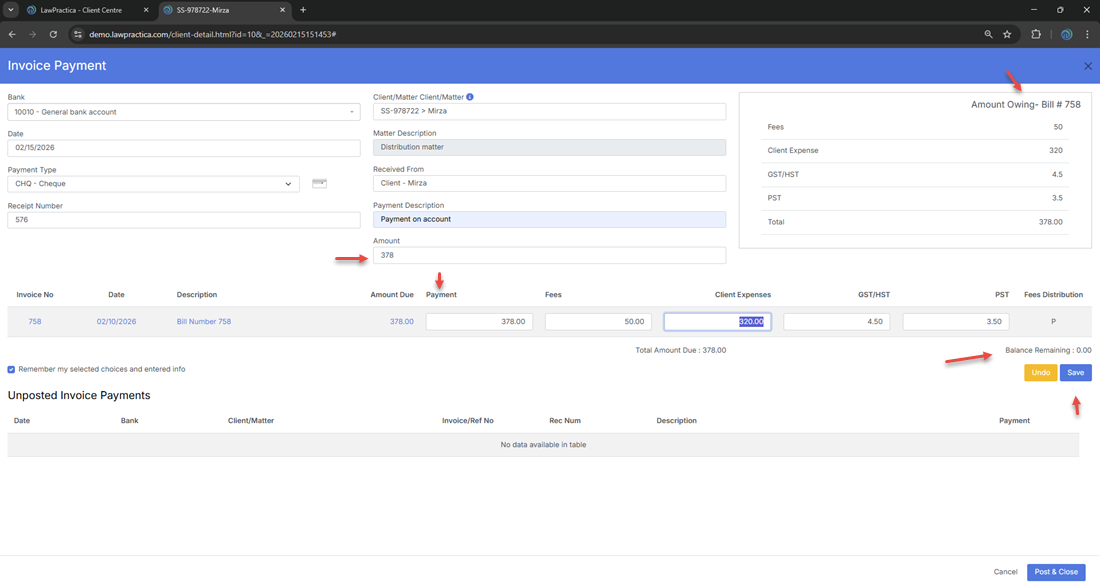
- Bank – Selected bank account (e.g., 10010 – General bank account)
- Date – Payment date (e.g., 02/15/2026)
- Payment Type – e.g., CHQ – Cheque
- Receipt Number – System‑generated or user‑entered
- Client/Matter – e.g., SS‑978722 > Mirza
- Matter Description – e.g., Distribution matter
- Received From – Client name
- Payment Description – Notes about the payment
- Amount – Total payment amount (e.g., 378.00)
These fields define the payment record and ensure it is linked to the correct client and matter.
¶ 3. Invoice Details & Amount Owing
The feature displays the invoice being paid, including:
- Invoice Number – e.g., 758
- Invoice Date – e.g., 02/10/2026
- Description – e.g., Bill Number 758
- Amount Due – e.g., 378.00
- Breakdown
- Fees: 50.00
- Client Expenses: 320.00
- GST/HST: 4.50
- PST: 3.50
This ensures users confirm the correct invoice before applying payment.
¶ 4. Applying the Payment
The payment amount is automatically applied to the selected invoice.
¶ Displayed Totals
- Total Amount Due – e.g., 378.00
- Balance Remaining – e.g., 0.00
When the payment equals the invoice total, the balance becomes zero.
¶ 5. Remember My Selected Choices
A checkbox allows users to save frequently used selections, such as:
- Bank account
- Payment type
- Description fields
This speeds up future payment entry.
¶ 6. Unposted Invoice Payments
Below the main form, the feature displays a table of unposted payments.
¶ Columns Include
- Date
- Bank
- Client/Matter
- Invoice/Ref No
- Receipt Number
- Description
- Payment
If no unposted payments exist, the table displays: “No data available in table.”
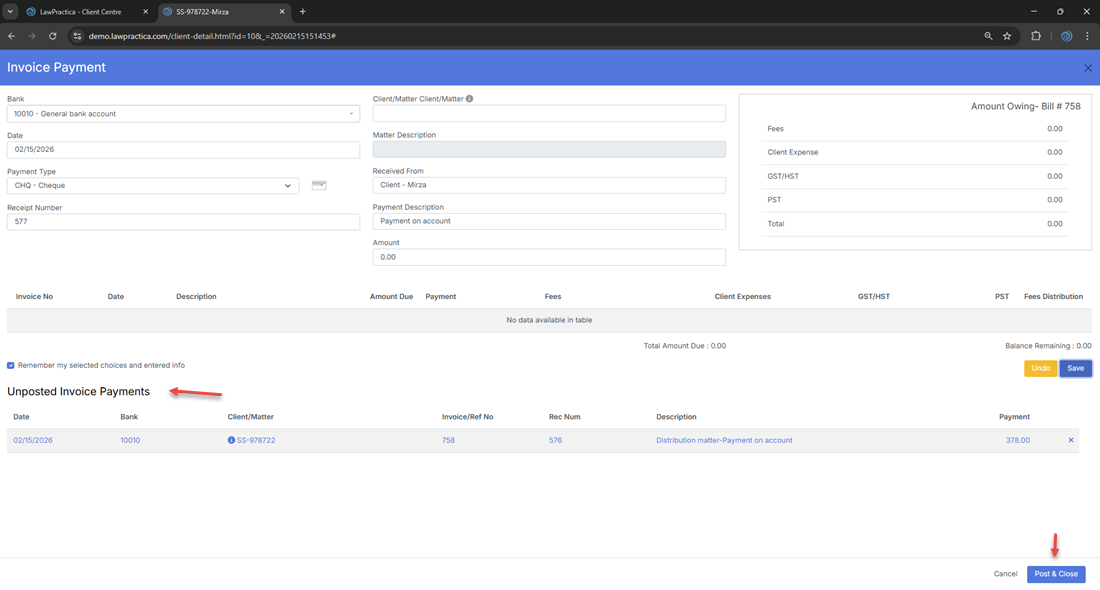
This section helps users review pending payments before posting.
¶ 7. Actions
¶ Undo
- Clears entered values and resets the form.
¶ Cancel
- Closes the feature without saving.
¶ Save
- Saves the payment as unposted, allowing review before final posting.
¶ Post & Close
- Finalizes the payment and updates all related financial records.
¶ Posting Effects
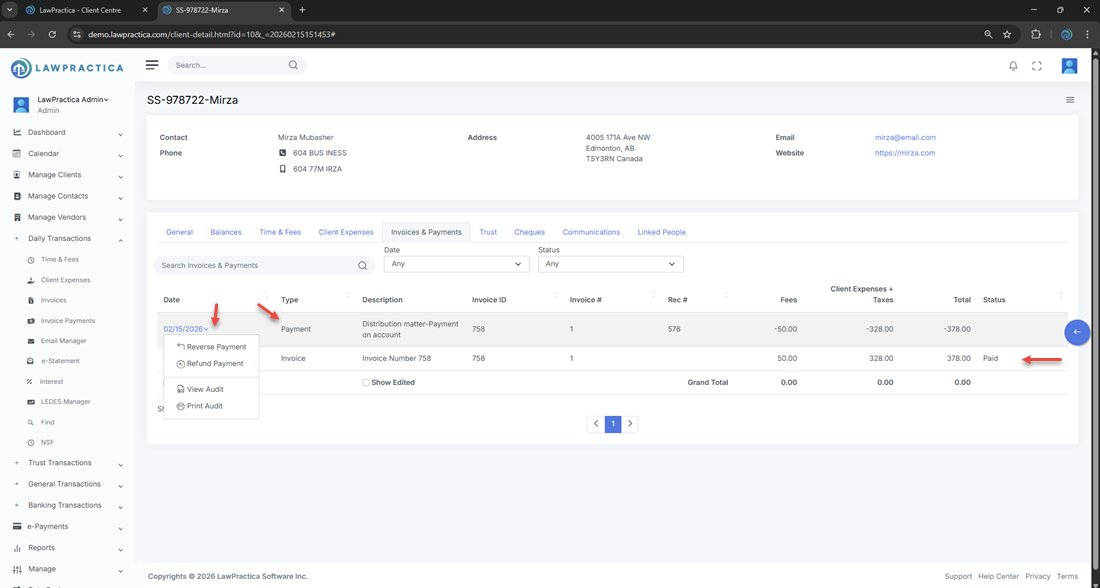
- Payment is added to the client’s financial ledger
- Invoice status updates (e.g., Paid)
- Client balances adjust
- Payment appears in the Invoices & Payments section
¶ 8. Integration with Other Features
Invoice Payment integrates with:
- Invoices – Applies payments to outstanding bills
- Time & Fees – Marks billed items as paid
- Client Expenses – Updates expense billing status
- General Transactions – Posts financial entries
- Reports – Reflects payments in financial summaries
This ensures consistent and accurate billing workflows.
¶ 9. Invoice Payment - Reverse & Refund
You may also reverse or refund the payment.
¶ 10. Summary
The Invoice Payment feature provides a structured, reliable method for recording and posting client payments. With detailed payment fields, invoice breakdowns, unposted payment tracking, and seamless integration across billing modules, it ensures accurate financial reconciliation and client account management.