¶ 1. Overview
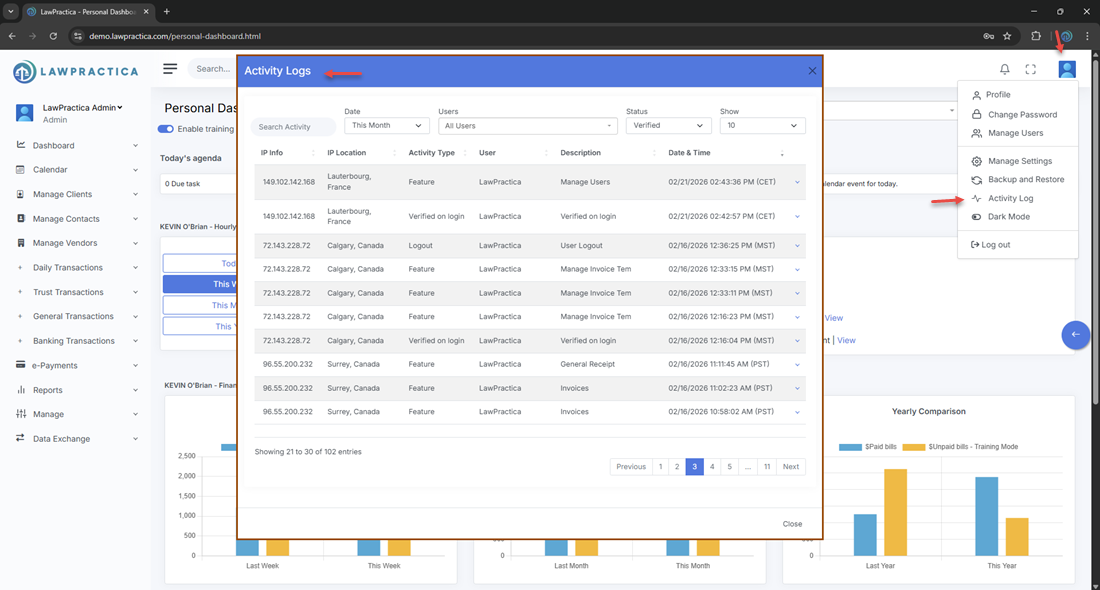
The Activity Logs feature provides administrators with a complete audit trail of user login activity across the firm. It helps monitor:
- Login attempts
- Device and browser information
- IP addresses
- Geographic location
- Suspicious or unusual access patterns
This module is essential for maintaining security, compliance, and visibility into user authentication behavior.
¶ 2. What You Can Do in Activity Logs
The Activity Logs screen allows administrators to:
- View all login events for all users
- Identify unusual or unauthorized access
- Review IP address details
- Review geographic location details
- Mark login events as suspicious
- Strengthen security by monitoring patterns
¶ 3. Activity Logs (List View)
The list view displays all recorded login events.
¶ Information Displayed
- User Name
- Login Date & Time
- IP Address
- Location (City, Country)
- Device / Browser
- Status (Successful / Failed)
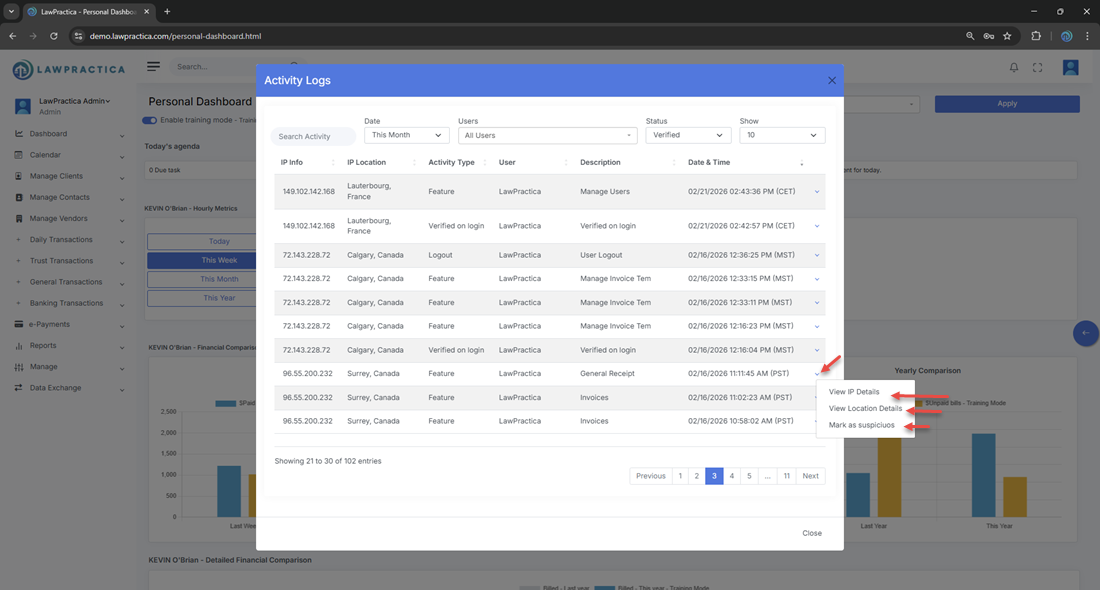
- Actions (View IP Details, View Location Details, Mark as Suspicious)
¶ Key Capabilities
- Search by user
- Filter by date range
- Filter by status (Success / Failed / Suspicious)
- Review detailed event information
¶ 4. Activity Log Detail Actions
Each login event includes three important security actions:
¶ 4.1 View IP Details
¶ Purpose
- Provides technical information about the IP address used during the login attempt.
¶ Information Displayed
- IP Address
- ISP / Network Provider
- IP Type (Residential, Corporate, VPN, Proxy)
- Risk Indicators (if applicable)
- Previous activity from this IP
¶ Why It Matters
- Helps identify unknown or risky IP addresses
- Detects VPN or proxy usage
- Supports security investigations
¶ 4.2 View Location Details
¶ Purpose
- Shows the geographic location associated with the login event.
¶ Information Displayed
- City
- Region / State
- Country
- Approximate coordinates (if available)
- Map preview (if supported)
- Previous logins from this location
¶ Why It Matters
- Detects unusual geographic access
- Helps identify compromised accounts
- Supports compliance and audit requirements
¶ 4.3 Mark as Suspicious
¶ Purpose
- Allows administrators to flag a login event as suspicious for internal review or security escalation.
¶ What Happens When Marked Suspicious
- The event is labeled Suspicious in the logs
- It may trigger internal alerts (depending on system configuration)
- Admins can review patterns of suspicious activity
- Helps track potential unauthorized access attempts
¶ When to Use
- Login from an unknown country
- Login from an unrecognized device
- Multiple failed attempts
- Login outside normal working hours
- IP flagged as high‑risk
¶ 5. Security & Compliance Benefits
The Activity Logs module supports:
¶ ✔ Security Monitoring
- Identify unauthorized access attempts quickly.
¶ ✔ Compliance
- Maintain audit trails for regulatory requirements.
¶ ✔ Risk Detection
- Spot unusual login patterns or suspicious IPs.
¶ ✔ User Accountability
- Track who accessed the system and when.
¶ ✔ Incident Response
- Provide evidence for internal investigations.
¶ 6. Best Practices
To maintain a secure environment:
- Review logs weekly for unusual activity
- Enable MFA for all high‑risk roles
- Mark suspicious events immediately
- Investigate unknown IPs or locations
- Deactivate compromised accounts promptly
- Document internal security procedures
¶ 7. Summary
The Activity Logs feature provides a complete, centralized audit trail of all user login activity. With tools to view IP details, location details, and mark suspicious events, it helps administrators maintain a secure, compliant, and well‑monitored environment.
This module is essential for protecting firm data and ensuring responsible system access.