¶ 1. Overview
The Backup & Restore feature allows Admin/Owner users to:
- Create system backups
- View and download existing backups
- Restore the system to a previous backup
- Protect restores with a special security code sent to the Owner account
This module is central to data protection, disaster recovery, and controlled restoration.
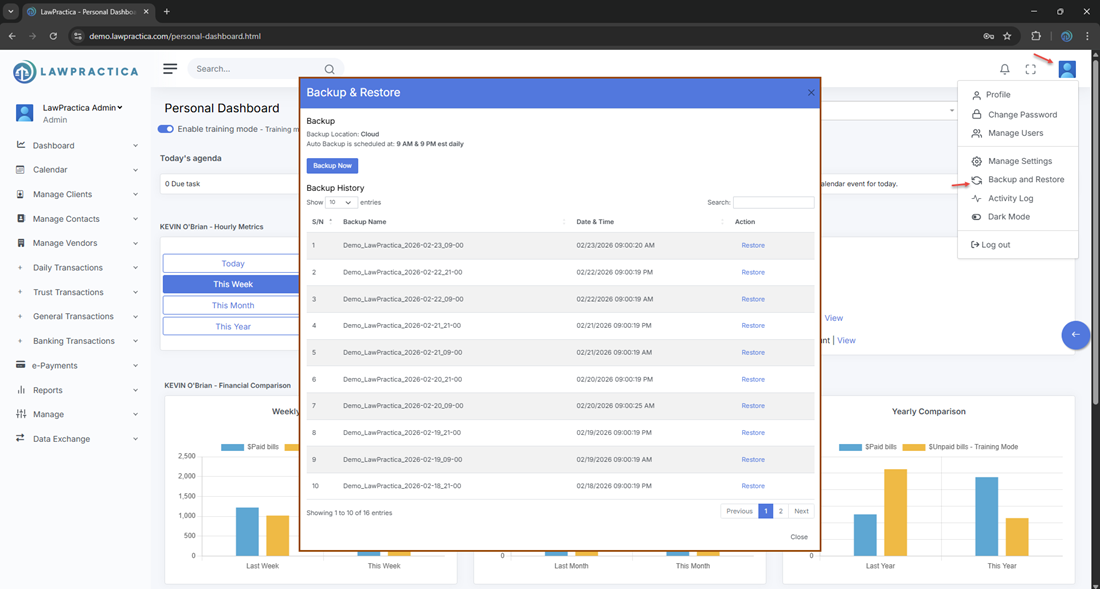
¶ 2. Backup list
The main view shows all available backups.
Information displayed:
- Backup name/label
- Created date & time
- Created by
- Backup type (e.g., automatic/manual, if shown)
- Size (if shown)
- Actions (e.g., Download, Restore, View Details if available)
Key capabilities:
- View backups: See all existing backup points.
- Sort/filter: By date, user, or type (if supported).
- Download backup: Save a copy externally for archival or compliance.
¶ 3. Creating backups (by default, auto-backup is enabled)
Depending on your implementation, Admin/Owner users may be able to:
- Trigger a manual backup (e.g., “Create Backup” button).
- Optionally name/label the backup for easier identification (e.g., “Pre‑Year‑End Close”).
- Backups typically include:
- Configuration and settings
- Financial and billing data
- User and matter data
- Templates and codes
- (Exact scope can be clarified in a separate technical note if needed.)
¶ 4. Restore flow and owner security code
- Restoring is intentionally tightly controlled.

Restore action:
- Admin/Owner selects a backup and clicks Restore.
- System displays a warning/confirmation explaining that restoring may overwrite current data/state.
- To proceed, a special restore code is sent to the Owner account (e.g., via email or in‑app message).
- The user must enter this code into the restore dialog.
- Only after the correct code is entered does the system allow the restore to continue.
Why the restore code matters:
- Prevents accidental restores.
- Prevents unauthorized restores even if someone has Admin access.
- Ensures the Owner is always aware of restore operations.
¶ 5. Permissions and access
- Who can view backups: Typically Admin/Owner roles.
- Who can restore: Only Admin/Owner, with Owner code verification required.
- Who receives the restore code: The Owner account only.
- You can note this explicitly in your KB to reinforce internal policy.
¶ 6. Best practices
- Schedule regular backups (daily/weekly, depending on firm size and activity).
- Download and store critical backups in secure external locations.
- Use clear backup names before major changes (e.g., “Before Trust Migration”).
- Restrict restore capability to a very small group (ideally Owner only).
- Never share the restore code; treat it like a master key.
¶ 7. Summary
The Backup & Restore feature provides a controlled, secure way to:
- Maintain historical snapshots of your system
- Recover from data loss or configuration errors
- Ensure that any restore is explicitly authorized via a special code sent to the Owner account
- It is a core part of your firm’s data protection and disaster recovery strategy.