¶ 1. Overview
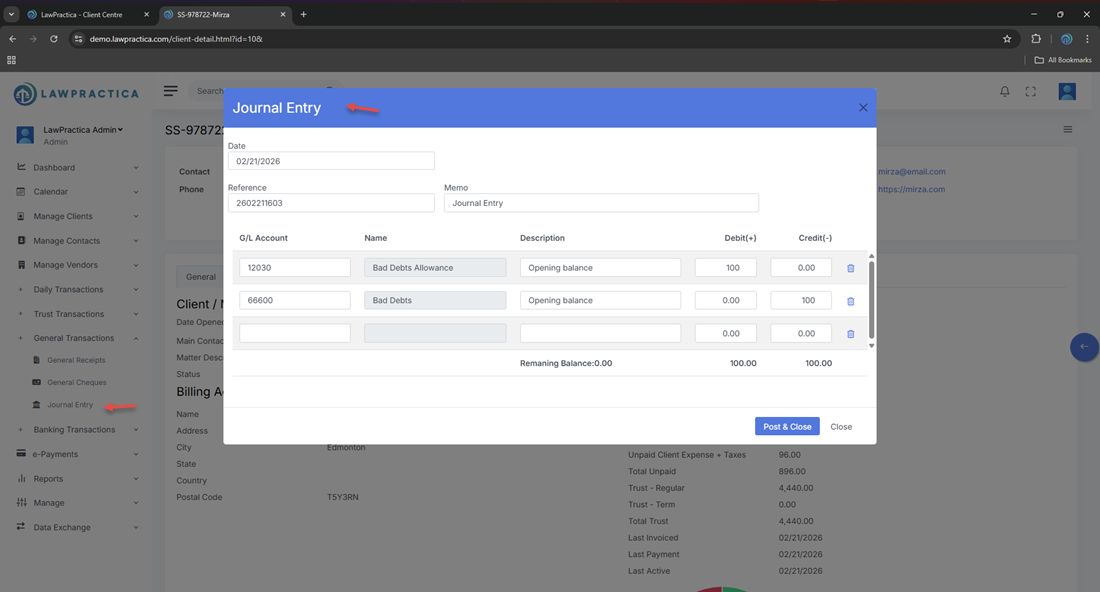
The Journal Entry feature allows law firms to create manual accounting entries that adjust balances in the general ledger. Journal entries are essential for:
- Correcting posting errors
- Adjusting balances
- Recording non‑cash transactions
- Year‑end accounting adjustments
- Reclassifying amounts between accounts
This feature ensures that all manual adjustments are properly documented, balanced, and included in financial reporting and audit trails.
¶ 2. When to Use a Journal Entry
Journal Entries are used when:
- A transaction was posted to the wrong general ledger account
- An accountant needs to adjust revenue, expense, asset, or liability balances
- A correction is required that cannot be made through standard workflows
- Non‑cash adjustments must be recorded (e.g., accruals, write‑downs)
- Reclassification between accounts is needed
- Year‑end adjustments are required
- Journal Entries must not be used for trust‑accounting corrections — those must be done through Trust Transfer or Trust Cheque.
¶ 3. Debit & Credit Lines
A Journal Entry consists of two or more lines:
¶ Debit Line(s)
- Increases assets or expenses
- Decreases liabilities, equity, or revenue
¶ Credit Line(s)
- Increases liabilities, equity, or revenue
- Decreases assets or expenses
¶ Balancing Requirement
- The total debits must equal total credits before posting.
- The system will not allow posting unless the entry is balanced.
¶ 4. Account Selection
- Users must select the general ledger accounts affected by the adjustment.
¶ Account Types Include
- Bank accounts
- Revenue accounts
- Expense accounts
- Asset accounts
- Liability accounts
- Equity accounts
Selecting the correct accounts ensures accurate financial reporting.
¶ 5. Date & Reference Number
¶ Date
- The effective date of the adjustment (e.g., month‑end, correction date).
¶ Reference Number
- System‑generated or user‑entered for tracking and audit purposes.
¶ 6. Description / Memo
A clear description must be entered to explain the purpose of the journal entry.
¶ Examples
- “Correction: Payment posted to wrong expense account”
- “Year‑end accrual for unpaid vendor invoice”
- “Reclassification of prepaid expense”
- “Adjustment for bank reconciliation variance”
This description appears in all audit logs and financial reports.
¶ 7. Posting the Journal Entry
When the user selects Post & Close, the system:
¶ General Ledger Effects
- Updates all affected accounts
- Records the debit and credit entries
- Adjusts balances immediately
¶ Audit Trail
- Logs user, timestamp, accounts, and amounts
- Ensures compliance with accounting standards
- Journal Entries cannot be edited after posting — they must be reversed if corrections are needed.
¶ 8. Compliance Notes
Journal Entries must follow standard accounting rules:
¶ 1. Balanced Entries
- Debits must equal credits.
¶ 2. Full Documentation
Every entry must include:
- Date
- Accounts
- Amounts
- Description
- User who posted it
¶ 3. No Trust Adjustments
- Journal Entries cannot be used to adjust trust balances.
¶ 4. Audit Trail
- All entries must be traceable and reviewable.
¶ 5. Reconciliation
- Journal Entries must appear in:
- General ledger
- Financial statements
- Audit logs
¶ 9. Integration with Other Features
Journal Entry integrates with:
- General Ledger – Updates account balances
- Reports – Financial statements, trial balance, audit logs
- Find – Search and reverse journal entries
- General Cheque / General Receipt – Correcting misposted transactions
- Daily Activities – Supports billing‑related adjustments
This ensures a complete and accurate general‑accounting workflow.
¶ 10. Summary
The Journal Entry feature provides a structured, compliant method for recording manual adjustments in the general ledger. With support for debit/credit lines, account selection, descriptions, and full audit trail tracking, it ensures accurate financial reporting and supports accountants in maintaining clean, compliant books.