¶ 1. Overview
The Cheque Templates feature allows firms to configure and maintain the templates used when printing trust and general cheques in LawPractica.
This includes:
- Cheque layout and formatting
- MICR line configuration
- Cheque alignment settings
- Firm name and address placement
- Signature line options
- Bank account mapping
- Template activation and customization
Cheque templates ensure that all printed cheques follow the firm’s required format and align correctly with pre‑printed cheque stock.
¶ 2. Features Under Cheque Templates
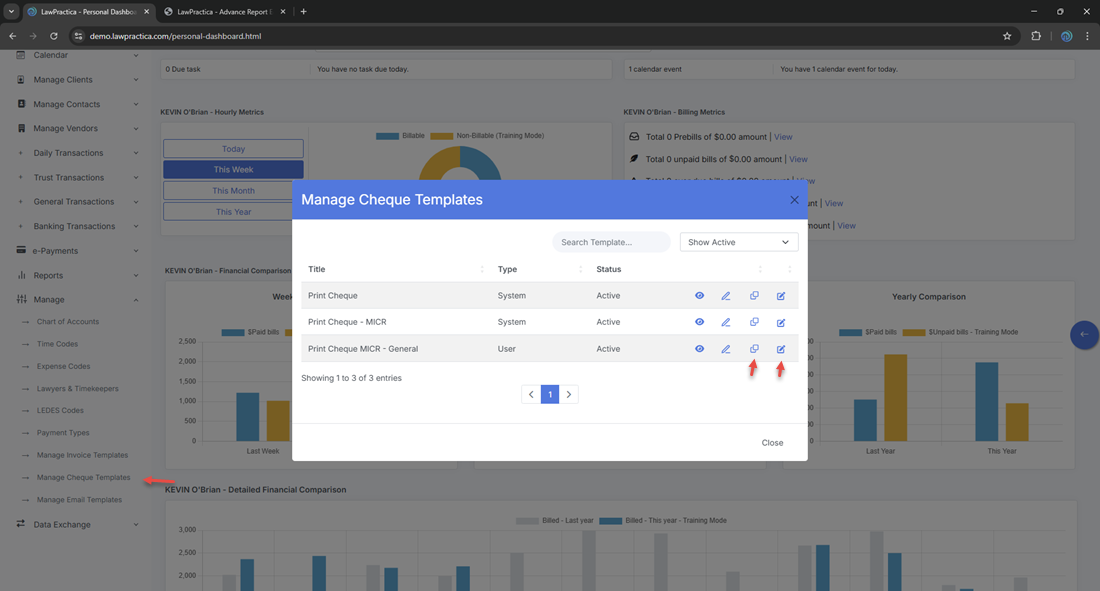
¶ 2.1 Cheque Templates (List View)
- Displays all cheque templates available in the system.
¶ Key capabilities
- View all cheque templates
- Create new templates
- Edit existing templates
- Duplicate templates
- Activate or deactivate templates
- Assign templates to trust or general bank accounts
¶ 2.2 Cheque Template Detail (Template Editor)
- A detailed editor for customizing the structure, layout, and formatting of a cheque template.
¶ Key capabilities
- Edit template name
- Configure cheque layout
- Adjust MICR line settings
- Set alignment and spacing
- Add firm name and address
- Configure signature lines
- Preview cheque layout
¶ 3. Cheque Templates (List View)
- The list view provides a complete overview of all cheque templates.
¶ Information Displayed
- Template Name
- Bank Account Type (Trust / General)
- Status (Active/Inactive)
- Actions (Edit, Duplicate, Deactivate)
¶ Key Capabilities
- Search templates by name
- Create new templates
- Edit or duplicate existing templates
- Deactivate templates no longer in use
- Assign templates to specific bank accounts
This view is the central management screen for all cheque printing formats.
¶ 4. Cheque Template Detail (Template Editor)
- The detail modal provides full customization options for a single cheque template.
¶ 4.1 Template Information
- Template Name
- Status (Active/Inactive)
- Bank Account Type (Trust or General)
¶ 4.2 Cheque Layout Settings
¶ Firm Information
- Firm name
- Address
- Optional custom text
¶ Cheque Body Layout
Configure placement of:
- Payee name
- Date
- Amount (numeric and written)
- Memo line
- Signature line(s)
- Firm address block
- Bank information
¶ MICR Line Settings
MICR line includes:
- Transit number
- Institution number
- Account number
You can adjust:
- MICR font alignment
- Spacing
- Positioning
This ensures compatibility with pre‑printed cheque stock and bank processing requirements.
¶ 4.3 Alignment & Spacing
Fine‑tune cheque printing alignment:
- Horizontal and vertical offsets
- Field spacing
- Line height adjustments
These settings help ensure the printed cheque aligns perfectly with the physical cheque paper.
¶ 4.4 Signature Line Options
Configure:
- Single or dual signature lines
- Signature line labels
- Placement on the cheque
- If the firm uses e‑Signatures, the template can include:
- Automatic signature placement
- Lawyer name and title
¶ 4.5 Preview
Users can preview the cheque layout to verify:
- Alignment
- Field placement
- MICR line accuracy
- Signature line positioning
This helps avoid printing errors before using physical cheque stock.
¶ 5. Integration with Other Features
Cheque Templates integrate with:
¶ Print Cheques
- Templates define the layout for printed trust and general cheques
- MICR line settings ensure bank compatibility
¶ Trust Transactions
- Trust cheques use trust‑assigned templates
¶ General Transactions
- General cheques use general‑assigned templates
¶ Bank Accounts
- Templates can be mapped to specific bank accounts
¶ e‑Signature
- Lawyer signatures can be applied automatically if enabled
¶ 6. Best Practices
To maintain a clean and effective cheque template library:
- Use clear template names (e.g., “Trust Cheque Template”, “General Cheque Template”)
- Verify MICR line accuracy with your bank
- Test alignment using blank paper before printing on cheque stock
- Avoid unnecessary templates
- Use duplication when creating variations
- Review templates annually for compliance and formatting updates
¶ 7. Summary
The Cheque Templates feature provides a centralized, flexible system for creating and maintaining cheque printing formats across the firm. With tools for layout customization, MICR configuration, alignment adjustments, and signature placement, it ensures accurate, compliant, and professional cheque printing.
This module is essential for firms that print trust and general cheques and require precise alignment with pre‑printed cheque stock.