¶ 1. Overview
Document Automation provides a document‑agnostic generation process: You upload a standard Word document (*.docx) containing placeholders such as {Matter.Client.Name} or {User.Rate}, and LawPractica automatically replaces those placeholders with live data from the system.
This feature is ideal for:
- Engagement letters
- Retainer agreements
- Trust letters
- Billing summaries
- Client correspondence
- Internal templates
- Court forms (where placeholders are permitted)
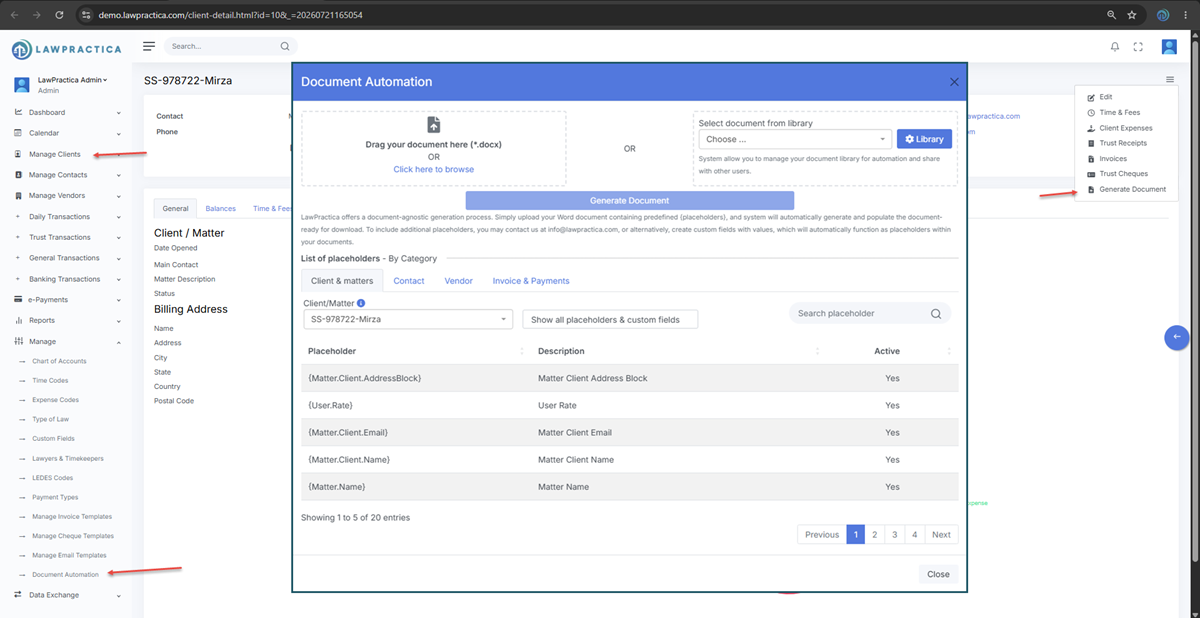
¶ 2. Uploading or Selecting a Document
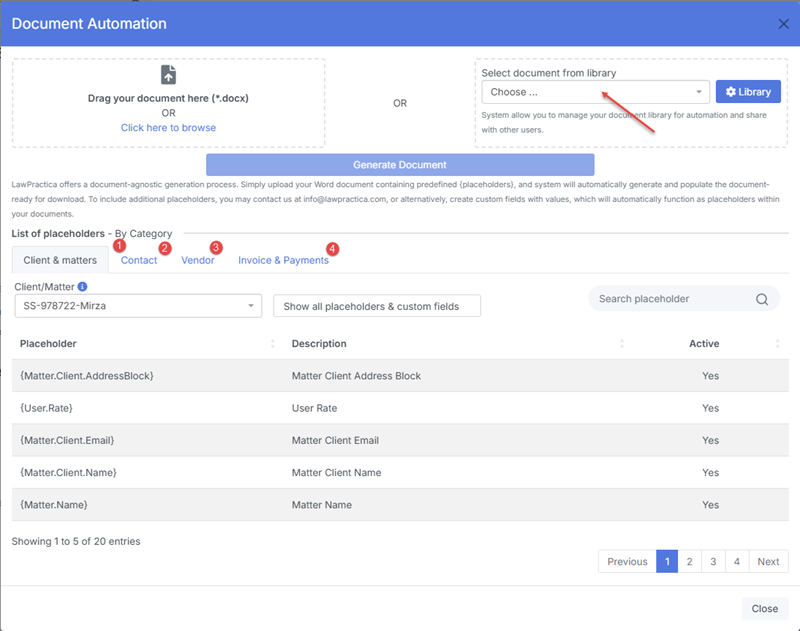
The feature provides three ways to begin:
¶ Drag your document here (.docx)*
- Drag and drop a DOCX file directly into the upload section.
¶ Click here to browse
- Select a DOCX file from your computer.
¶ Select document from library
- Choose a previously uploaded template from your Document Library.
¶ 3. Document Library
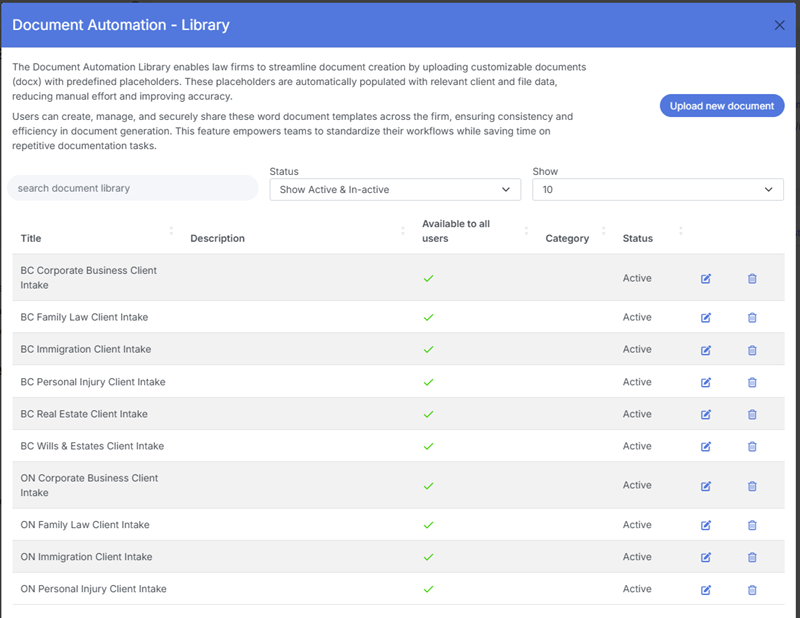
LawPractica includes a shared Document Library where firms can:
- Upload reusable templates
- Organize templates by category
- Share templates with other users
- Update or replace existing templates
This ensures consistent document generation across the firm and reduces duplication.
¶ 4. How Document Automation Works
- Upload or select a DOCX template.
- LawPractica scans the document for placeholders (e.g.,
{Matter.Client.Email}). - The system retrieves the corresponding values from the client, matter, invoice, trust, or user records.
- A fully populated DOCX file is generated and made available for download.
No special formatting or macros are required—just plain text placeholders inside curly braces.
¶ 5. Adding New Placeholders
LawPractica supports a wide range of predefined placeholders across multiple categories. If you need additional placeholders, you have two options:
¶ Option A: Contact LawPractica
- Email info@lawpractica.com to request new system‑level placeholders.
¶ Option B: Create Custom Fields
- Any custom field you create (with a value) automatically becomes a usable placeholder in your documents.
Example: If you create a custom field named “Client.PreferredPronoun”, you can use{Client.PreferredPronoun}in your DOCX template.
¶ 6. Placeholder Categories
Placeholders are organized into categories for easy browsing:
- Client & Matters
- Contact
- Vendor
- Invoice & Payments
- Client/Matter
- User
- Trust
- Financial
A search bar allows you to quickly locate any placeholder by name or description.
¶ 7. Placeholder List (Example Entries)
Below are examples of placeholders exactly as they appear in the list:
| Placeholder | Description | Active |
|---|---|---|
{Matter.Client.AddressBlock} |
Matter Client Address Block | Yes |
{User.Rate} |
User Rate | Yes |
{Matter.Client.Email} |
Matter Client Email | Yes |
{Matter.Client.Name} |
Matter Client Name | Yes |
{Matter.Name} |
Matter Name | Yes |
LawPractica will display the full list, searchable and filterable based on Clients, Contacts, Vendors and Invoice & Payments.
¶ 8. Best Practices
- Keep placeholders consistent across templates.
- Use the Document Library for shared firm‑wide templates.
- Test new templates with sample clients before firm‑wide rollout.
- Use custom fields for firm‑specific information (e.g., “RetainerAmount”).
- Store frequently used templates (retainers, engagement letters) in the library.
- Avoid complex formatting—placeholders work best in plain text areas.
¶ 9. Supported File Format
- Microsoft Word (.docx) is supported
- Other formats (PDF, DOC, RTF) are not supported for automation. However you may use online document conversion tool to generate the Word document. for example, Generate PDF to docx
¶ 10. Summary
The Document Automation feature allows firms to generate fully populated Word documents using real client, matter, invoice, trust, and user data. With reusable templates, searchable placeholders, and support for custom fields, LawPractica provides a powerful and flexible document‑generation system that saves time, reduces errors, and ensures consistency across the firm.