¶ 1. Overview
The Manage Payment Types feature allows firms to maintain a standardized list of payment methods used when recording client payments in LawPractica.
These payment types appear when users post:
- Invoice payments
- Trust receipts
- General receipts
- e‑Payments (if applicable)
- POS payments
A consistent set of payment types ensures accurate financial posting, clean reporting, and standardized terminology across the firm.
¶ 2. What You Can Do in Manage Payment Types
The Payment Types screen allows users to:
¶ ✔ View all predefined payment types
- Displayed in a structured list for easy management.
¶ ✔ Create new payment types
- Add firm‑specific payment methods if needed.
¶ ✔ Edit existing payment types
- Update names or descriptions.
¶ ✔ Activate or deactivate payment types
- Control which payment methods appear during payment posting.
¶ ✔ Maintain standardized terminology
- Ensure all staff select from approved payment methods.
¶ 3. Typical Use Cases
Payment Types are used when:
- Recording invoice payments
- Posting trust deposits
- Posting general receipts
- Reconciling payments
- Categorizing payment methods for reporting
Common examples include:
- Cash
- Cheque
- Credit Card
- Debit Card
- EFT / Wire Transfer
- e‑Payment (LawPay)
- POS Terminal
- Bank Draft
- Money Order
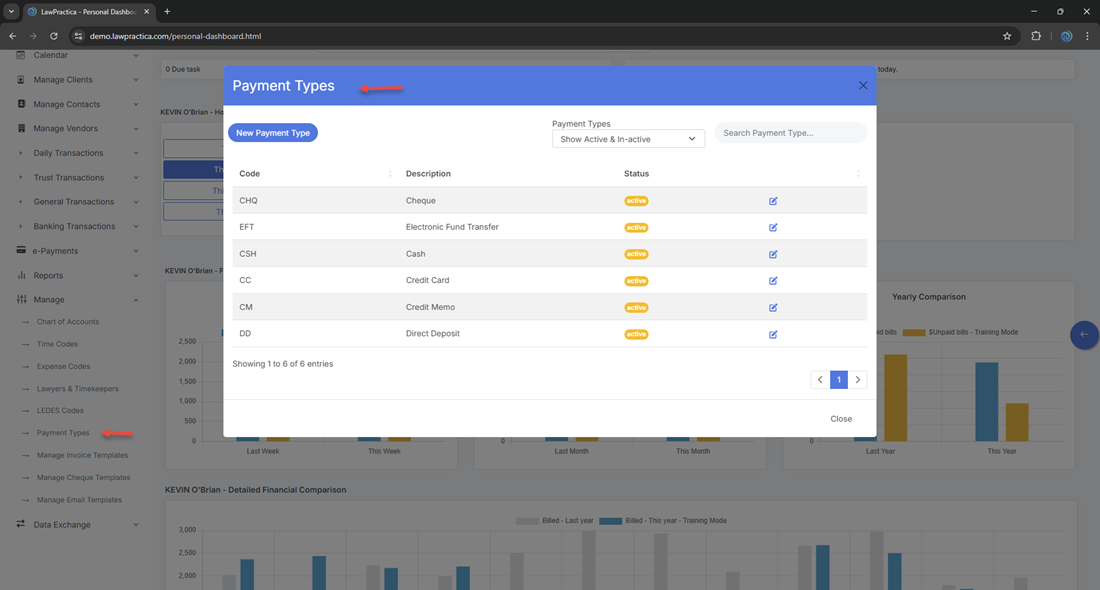
¶ 4. Payment Types (List View)
- The list view provides a complete overview of all payment types.
¶ Information Displayed
- Payment Type Name
- Description
- Status (Active/Inactive)
- Actions (Edit, View Detail)
¶ Key Capabilities
- Search by name
- Filter by status
- Add new payment types
- Edit or deactivate existing types
This view is the central management screen for all payment method options.
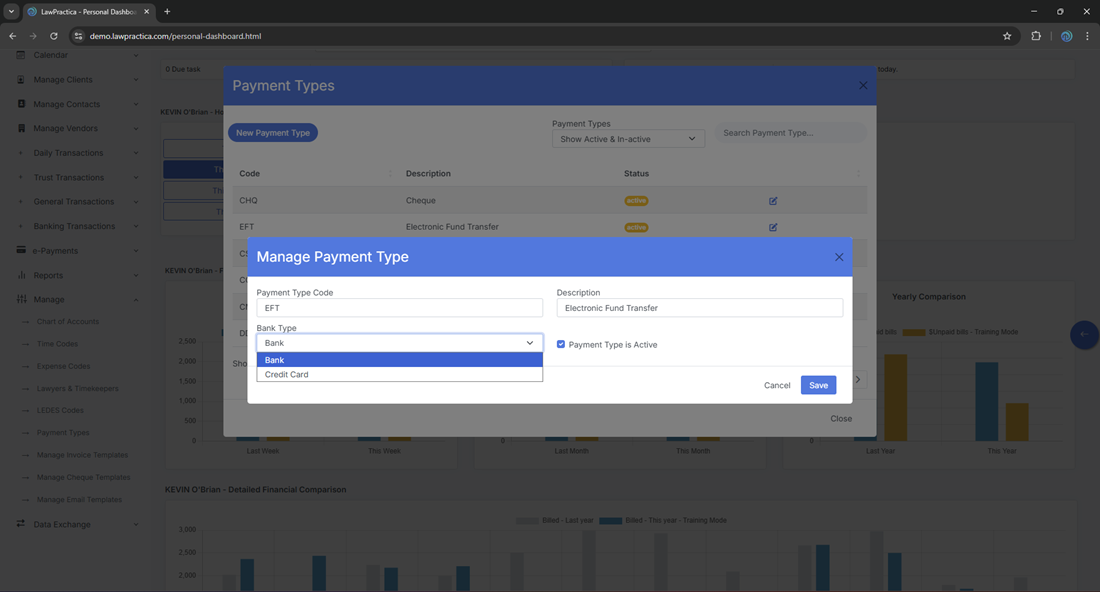
¶ 5. Payment Type Detail (Detail)
- The detail modal provides full visibility into a single payment type.
¶ Fields Displayed
- Payment Type Name
- Description
- Status (Active/Inactive)
¶ Actions Available
Edit name or description
- Activate or deactivate the payment type
- Save changes
¶ Why This Matters
Accurate payment type details ensure:
- Correct categorization of payments
- Clean financial reporting
- Consistent terminology across the firm
- Reduced posting errors
This view is essential for maintaining a clean and standardized payment method structure.
¶ 6. Integration with Other Features
Payment Types integrate with:
¶ Invoice Payments
- Users select a payment type when recording invoice payments.
¶ Trust Receipts
- Payment types determine how trust deposits are categorized.
¶ General Receipts
- Used when recording general account deposits.
¶ e‑Payment Manager
- Online payments may map to specific payment types (e.g., “Credit Card – LawPay”).
¶ e‑POS
- POS terminal payments may map to “POS – Credit Card” or similar.
¶ Reports
- Payment type usage appears in:
- Revenue reports
- Trust audit logs
- Payment summaries
- Reconciliation reports
¶ Bank Reconciliation
- Payment types help categorize deposits and match them to bank statements.
¶ 7. Best Practices
To maintain a clean and effective Payment Type list:
- Use clear, recognizable names
- Avoid duplicates
- Deactivate unused types instead of deleting
- Keep descriptions concise
- Review periodically to ensure relevance
- Align payment types with accounting and reconciliation workflows
¶ 8. Summary
The Manage Payment Types feature provides a structured, centralized way to manage all payment methods used across LawPractica. With tools for viewing, creating, editing, and maintaining payment type details, it ensures consistent payment posting, accurate financial reporting, and standardized terminology across the firm.
This feature is essential for maintaining a clean, efficient, and audit‑ready financial system.