¶ 1. Overview
The Bill of Costs Report provides a detailed listing of all billable transactions within a selected date range, grouped by Client → Matter. It is commonly used for:
- Cost assessments
- Legal billing reviews
- Court submissions
- Matter‑level financial audits
- Detailed breakdowns of time, fees, and balances
Users can refine the report using filters in the report window before generating the output.
¶ 2. Report Window (Filters)
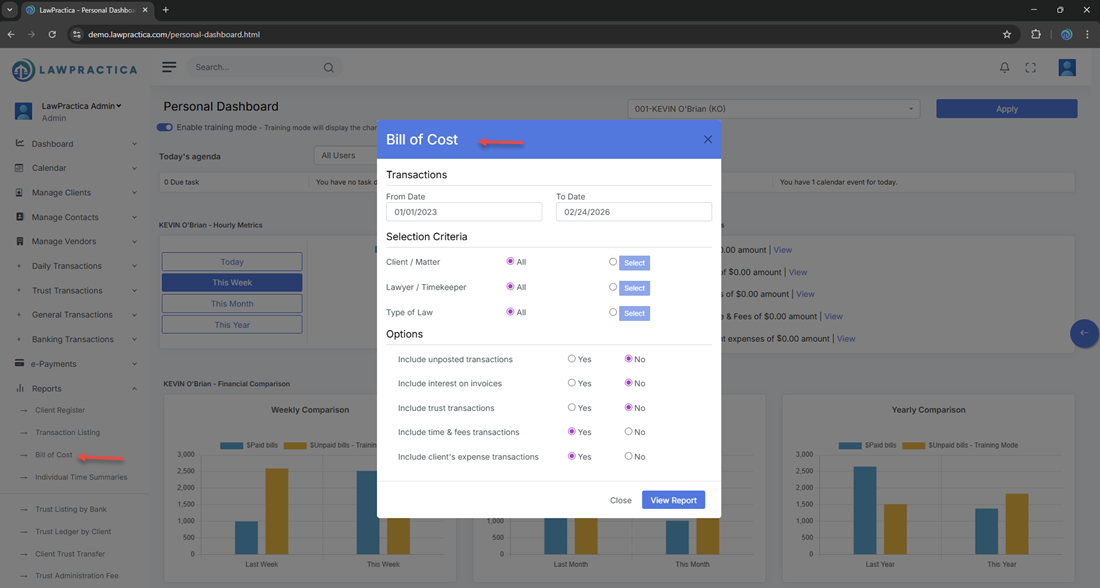
When the Bill of Costs Report is opened, a filter modal appears.
¶ Purpose
- Narrow the dataset
- Improve performance
- Produce targeted cost summaries
- Export only relevant activity
¶ Common Filters
Depending on configuration, the modal may include:
¶ 2.1 Date Range
Filters transactions by transaction date.
- From Date
- To Date
¶ 2.2 Lawyer
- Filter by originating or responsible lawyer.
¶ 2.3 Client / Matter
- Search or select a specific client or matter.
¶ 2.4 Status
Filter by matter status (e.g., active, closed).
¶ 2.5 Additional Filters (if applicable)
- Billable only
- Transaction type
- Practice area
¶ Actions in the Modal
- Generate Report — Runs the report with selected filters
- Reset Filters — Clears all selections
- Close — Closes the modal without generating a report
¶ 3. Report Output
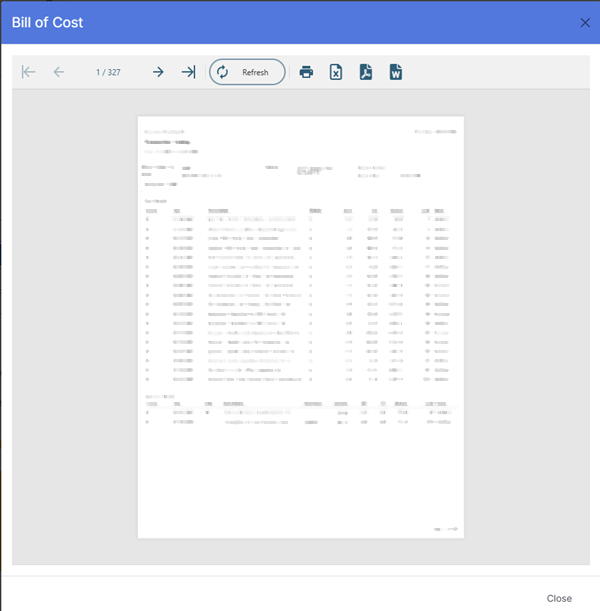
- Once generated, the report displays a structured, client‑grouped table containing the following information.
¶ 3.1 Header Information
Displayed at the top of the report:
- Firm Name: Demo‑LawPractica‑BC
- Print Date: 02/24/2026
- Report Title: Bill of Costs
- Date Range: From 1/1/2023 to 2/24/2026
¶ 3.2 Client & Matter Header Block
Each client/matter group begins with:
- Client Matter No.
- Name (e.g., BASIC)
- Address (e.g., 10138 Whalley Blvd, Surrey, BC CA)
- Matter Name (e.g., Immigration Joint 3rd Contract)
- Closed Number
- Closed Date (e.g., 01/01/1980)
- Lawyer
This block identifies the client and matter for all transactions listed below it.
¶ 3.3 Transaction Columns
The Bill of Costs Report uses the following columns:
| Column | Description |
|---|---|
| Date | Date the transaction was recorded |
| Description | Summary of the transaction (e.g., time entry, fee, disbursement) |
| Billable | Indicates whether the entry is billable |
| Hours | Total hours recorded for the transaction |
| Fees | Monetary value of the transaction |
| Balance | Running balance for the matter or transaction group |
| Audit | Internal audit reference or audit trail indicator |
| Status | Current status of the transaction (e.g., active, closed) |
These columns provide a complete financial and operational view of all billable activity tied to the client or matter.
¶ 4. Export Options
Users may export the report in:
- Excel
- CSV
Exports preserve grouping and respect all applied filters.
¶ 5. Best Practices
- Use date filters to isolate activity for court submissions
- Use lawyer filters for cost allocation or workload analysis
- Use client/matter filters for detailed cost assessments
- Export to Excel for deeper financial analysis
- Use the report before invoicing to verify accuracy
¶ 6. Summary
The Bill of Costs Report provides a detailed, client‑grouped view of all billable transactions, including hours, fees, balances, and audit information. It supports legal cost assessments, billing reviews, and compliance reporting.
This report is essential for accurate cost documentation and transparent financial analysis.