¶ 1. Overview
The Client Register Report provides a consolidated list of all clients in the system. It is used for:
- Auditing client records
- Reviewing active vs. inactive clients
- Tracking client creation trends
- Producing compliance or administrative summaries
- Exporting client lists for internal reporting
The report can be customized using filters in the report modal before generating the output.
¶ 2. Report (Filters Window)
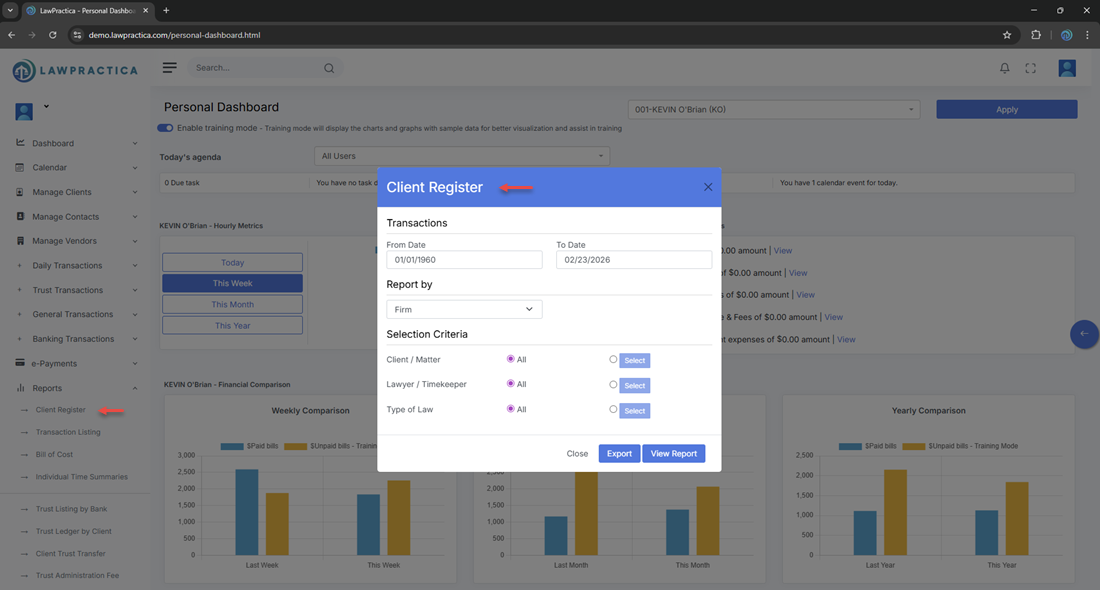
- When the user opens the Client Register Report, a modal appears allowing them to apply filters before generating the report.
¶ Purpose
- Narrow down the client list
- Produce targeted reports
- Improve performance by filtering large datasets
- Allow users to export only the data they need
¶ 3. Available Filters
The exact filters may vary slightly depending on your configuration, but the Client Register Report typically includes the following:
¶ 3.1 Client Status
- Filter clients by their current status.
Options may include:
- Active
- Inactive
- Archived (if applicable)
- All clients
Useful for administrative audits and cleanup tasks.
¶ 3.2 Date Range (Client Created Date)
Allows filtering clients based on when they were added to the system.
Options:
- From Date
- To Date
- Ideal for:
- Monthly/quarterly reporting
- Year‑end summaries
- Tracking new client acquisition
¶ 3.3 Assigned Lawyer / Responsible Lawyer
Filter clients by the lawyer assigned to them.
Useful for:
- Lawyer‑specific client lists
- Workload distribution analysis
- Departmental reporting
¶ 3.4 Client Type (if applicable)
- Some firms categorize clients (e.g., Individual, Corporate).
- This filter allows narrowing the report by type.
¶ 3.5 Additional Filters (if present)
Depending on your configuration, the modal may include:
- Practice Area
- Client Category
- Billing Type
- Custom Tags
- These allow more granular reporting.
¶ 4. Actions in the Report Modal
The modal typically includes the following actions:
¶ Generate / View Report
- Runs the report using the selected filters and displays the results on screen.
¶ Reset Filters
- Clears all selections and returns the modal to default values.
¶ Cancel / Close
- Closes the modal without generating a report.
¶ 5. Report Output
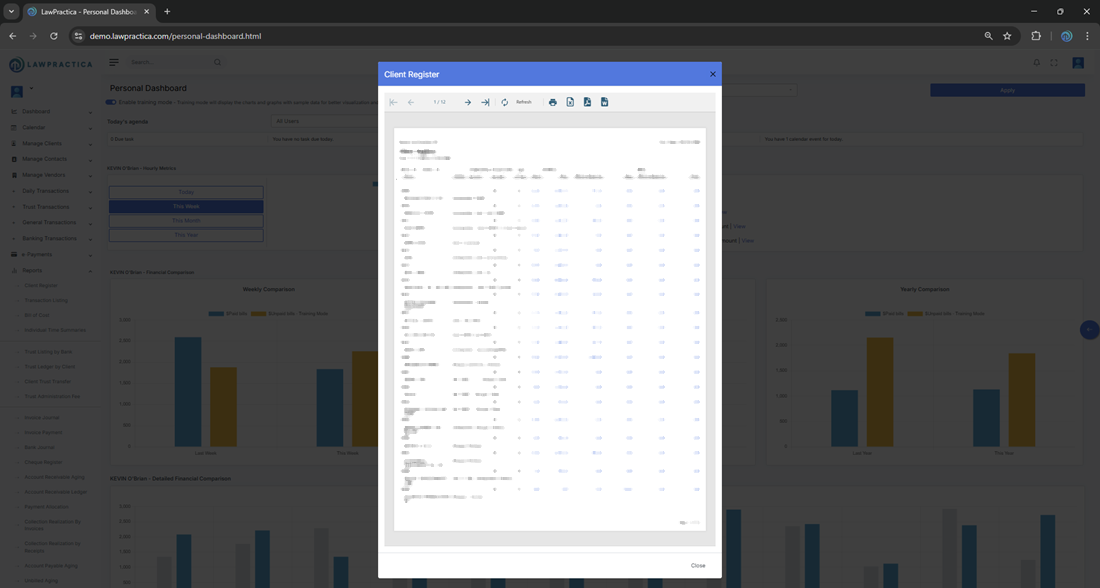
Once generated, the report displays a structured table containing the following columns:
¶ Header Information
Report Title: Client Register
Print Date: e.g., 02/24/2026
Date Range: e.g., From 1/1/1960 to 2/24/2026
Firm Name: e.g., Demo‑LawPractica‑BC
¶ Data Columns
| Column | Description |
|---|---|
| Matter No | Unique identifier for each matter |
| Client No | Unique identifier for each client |
| Client Name | Name of the client |
| Matter Name | Name/title of the matter |
| Lawyer | Assigned lawyer for the matter |
| Lawyer # | Internal lawyer/timekeeper code |
| Originating | Lawyer who originated the client/matter |
| Responsible | Lawyer responsible for ongoing work |
| Type | Client or matter type/category |
| Hours | Total billable hours recorded |
| Fees | Total fees recorded (billed & unbilled) |
| Unbilled | Outstanding fees not yet invoiced |
| Billed | Total fees already invoiced |
| Client Expense | Total client‑related expenses |
| Trust | Trust balance or trust activity (depending on configuration) |
Note: Some columns may appear with group depending the filter selection on time of generating report.
¶ 6. Export Options
Depending on system configuration, users may export the report as:
- Excel
- CSV
Exports respect all filters applied in the modal.
¶ 7. Best Practices
To get the most out of the Client Register Report:
- Use date filters for monthly or quarterly reporting
- Use status filters to identify inactive or archived clients
- Use assigned lawyer filters for workload or performance reviews
- Export to Excel for deeper analysis or pivot tables
Save commonly used filter combinations for consistency (if supported)
¶ 8. Summary
The Client Register Report provides a flexible, filter‑driven way to review and export client information. With customizable filters for status, date range, assigned lawyer, and more, it supports administrative audits, compliance reporting, and operational analysis.
This report is essential for maintaining accurate client records and supporting firm‑wide reporting needs.