¶ 1. Overview
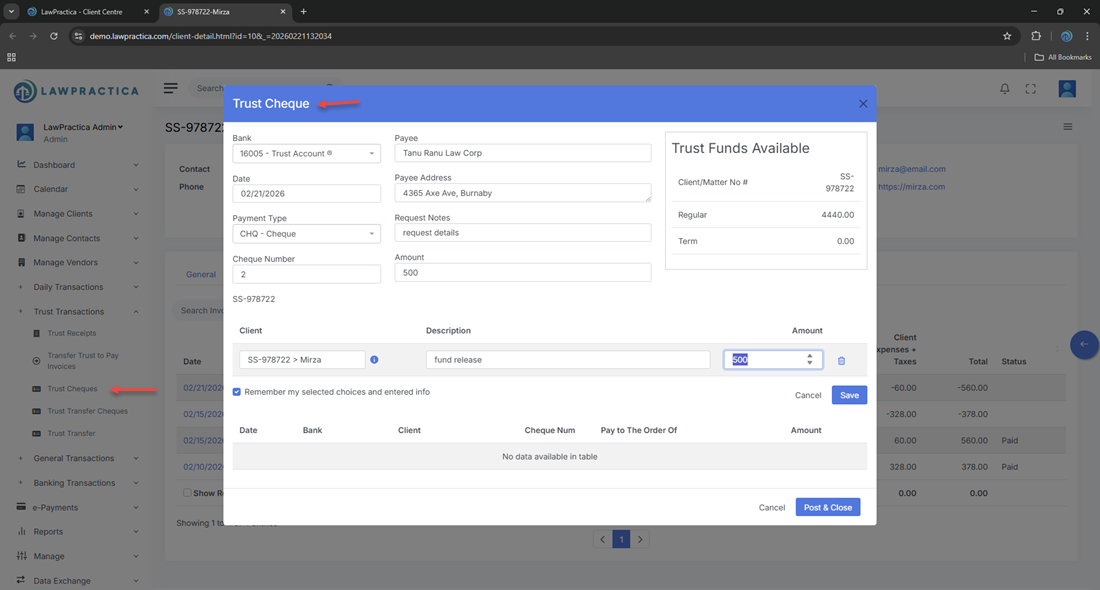
The Trust Cheque feature allows law firms to withdraw funds from a trust account by issuing a cheque. Trust cheques are used when trust funds must be paid out to:
- Clients
- Third parties
- Courts
- Opposing counsel
- Vendors
- The firm (when transferring trust funds to general to pay invoices)
Every trust cheque is fully audited, logged, and tracked to ensure compliance with trust accounting regulations.
This feature is essential for maintaining proper trust ledger balances, supporting reconciliation, and meeting legal and regulatory requirements.
¶ 2. When to Use a Trust Cheque
- A trust cheque is required when:
- Paying a client from trust
- Paying a settlement amount
- Paying a vendor or third party using trust funds
- Paying court‑ordered disbursements
- Returning unused retainer funds
- Moving trust funds between trust accounts
- Issuing trust‑to‑general transfers (if firm policy requires cheque‑based movement)
Trust cheques ensure a clear, traceable movement of funds with a complete audit trail.
¶ 3. Bank Selection
At the top of the Trust Cheque form, users must select the trust bank account from which the cheque will be issued.
¶ Bank Selection Details
- Only trust‑designated bank accounts appear
- Ensures the cheque is posted to the correct trust ledger
- Required before entering cheque details
- Prevents accidental use of general operating accounts
Selecting the correct trust bank is essential for reconciliation and compliance.
¶ 4. Trust Type
The Trust Type field identifies the purpose of the trust withdrawal.
¶ Common Trust Types
- General Trust Withdrawal
- Retainer Refund
- Settlement Payment
- Disbursement Payment
- Court‑Ordered Payment
- Transfer Between Trust Accounts
¶ Purpose
Trust Type ensures the withdrawal is categorized correctly for:
- Trust reporting
- Compliance audits
- Client ledger accuracy
- Reconciliation
¶ 5. Payment Type
The Payment Type is automatically set to Cheque, indicating that:
- Funds are being withdrawn via a physical or electronic cheque
- The transaction will appear as a trust withdrawal
- The cheque number must be recorded
¶ Cheque Number
Users must enter the cheque number to maintain:
- Audit trail integrity
- Bank reconciliation accuracy
- Compliance with trust accounting rules
¶ 6. Payee Details
Users must specify who the trust cheque is being issued to.
¶ Payee Types
- Client
- Vendor
- Court
- Opposing counsel
- Third‑party beneficiary
- Firm (if permitted for trust‑to‑general transfers)
¶ Fields
- Payee Name
- Address (optional but recommended)
- Description / Reason for Payment
These details appear in the trust ledger and audit reports.
¶ 8. Amount & Description
¶ Amount
- Enter the exact amount being withdrawn from trust.
- The system validates that:
- The client has sufficient trust balance
- The withdrawal does not exceed available funds
- The transaction complies with trust accounting rules
¶ Description
Examples:
- “Settlement payment to client”
- “Refund of unused retainer”
- “Payment to court for filing fee”
- “Trust transfer to general account”
Descriptions appear in all audit logs and financial reports.
¶ 9. Posting the Trust Cheque
When the user selects Post & Close, the system:
¶ Trust Ledger Effects
- Deducts the cheque amount from the trust balance
- Records a trust withdrawal entry
- Logs the cheque number
- Updates trust reconciliation records
¶ Compliance Effects
- Creates a complete audit trail
- Ensures trust funds are not overdrawn
- Maintains separation between trust and general accounts
- Supports law society trust audit requirements
Trust cheques cannot be edited after posting — they must be reversed if corrections are needed.
¶ 10. Compliance Notes (General Legal Requirements)
Trust cheques must follow strict legal and regulatory rules, including:
¶ 1. No Commingling
Trust funds must remain separate from general operating funds.
¶ 2. No Overdrafts
A trust cheque cannot exceed the client’s available trust balance.
¶ 3. Full Audit Trail
Every trust cheque must record:
- Cheque number
- Payee
- Amount
- Date
- Purpose
- Trust bank account
¶ 4. Client‑Specific Allocation
Funds must be withdrawn only for the client to whom the trust funds belong.
¶ 5. Reconciliation
Trust cheques must appear in:
- Monthly trust reconciliation
- Trust ledger
- Bank statements
These rules protect client funds and ensure compliance with law society trust accounting standards.
¶ 11. Integration with Other Features
Trust Cheque integrates with:
- Trust Ledger – Updates trust balances
- Client Detail – Displays trust withdrawals
- Invoices & Payments – Supports trust‑to‑general transfers
- General Transactions – Reflects bank activity
- Find – Allows searching and reversing trust cheques
- Reports – Trust reconciliation, audit logs, trust summary
This ensures a complete and compliant trust accounting workflow.
¶ 12. Summary
The Trust Cheque feature provides a secure, compliant method for withdrawing trust funds. With support for bank selection, trust type, payment type, TAF, and full audit trail tracking, it ensures accurate trust accounting and adherence to legal and regulatory requirements.