¶ 1. Overview
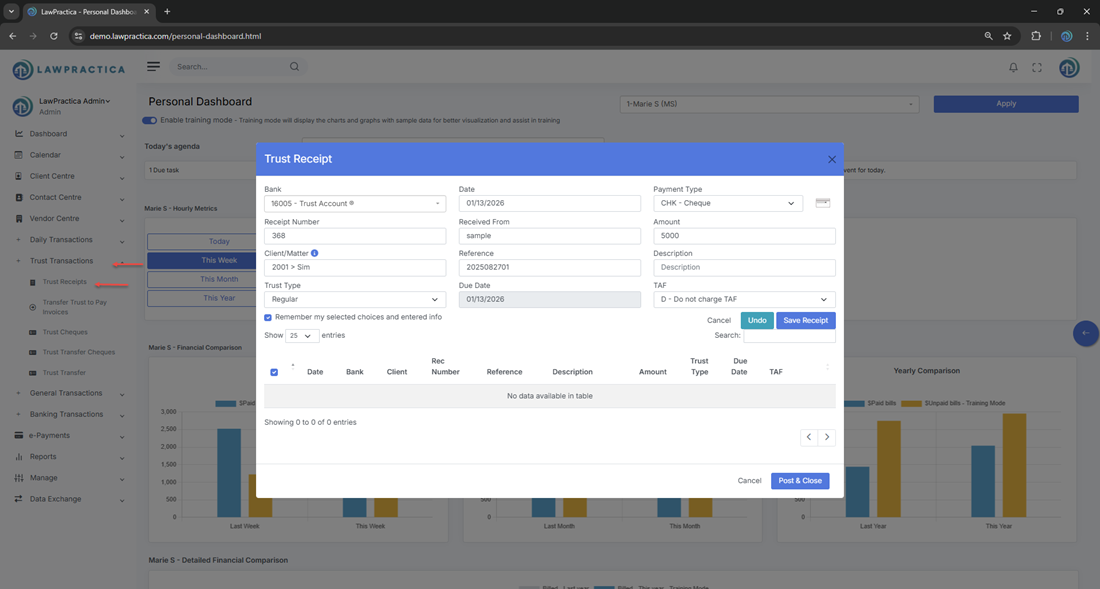
The Trust Receipt feature allows law firms to record money received into a trust account on behalf of a client or matter. Trust receipts must be handled with strict compliance, and this feature ensures all trust deposits are properly recorded, allocated, and tracked.
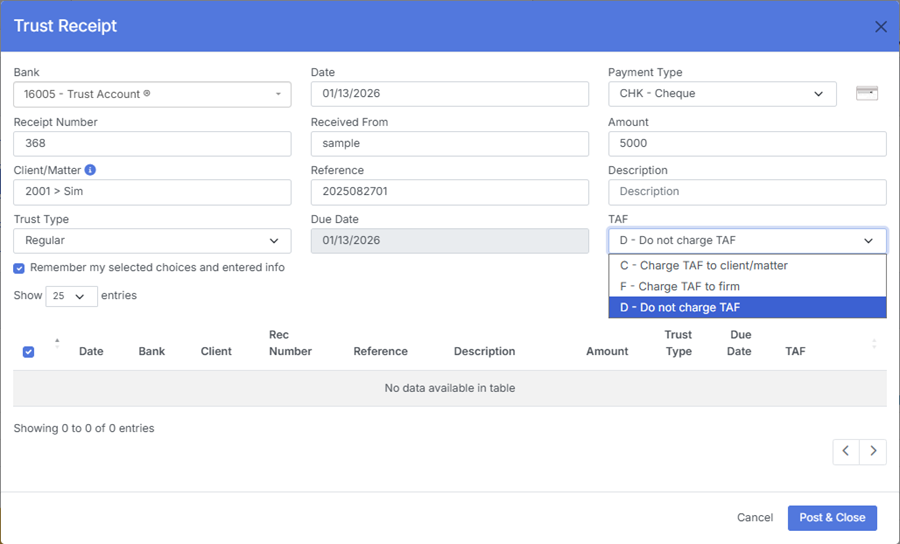
Users can select the trust bank account, trust type, payment method, and apply TAF (Trust Administration Fee) if applicable.
This feature integrates with Trust Ledger, Client Detail, and financial reporting to maintain accurate trust accounting.
¶ 2. Bank Selection
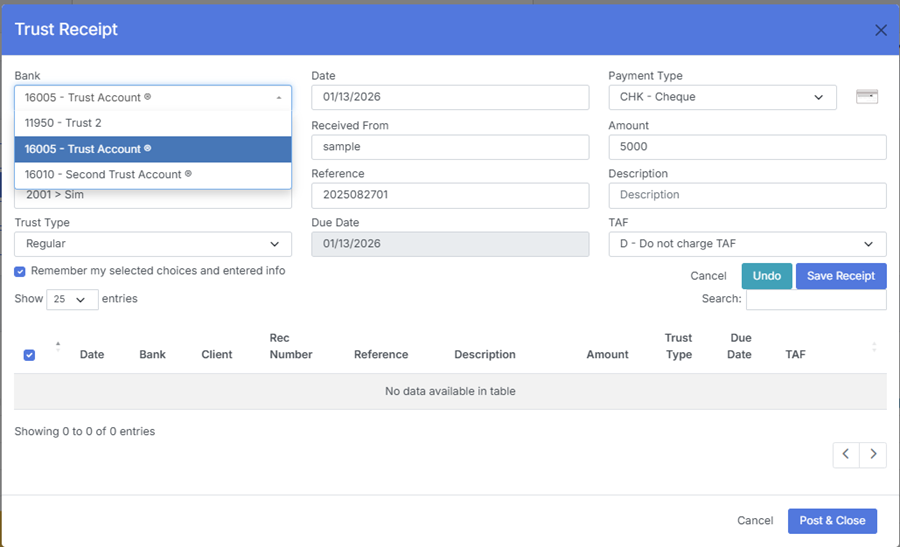
At the top of the Trust Receipt form, users must select the trust bank account where the funds are being deposited.
¶ Bank Selection Details
- Displays all trust‑designated bank accounts configured by the firm
- Ensures the receipt is posted to the correct trust ledger
- Prevents posting trust funds into general operating accounts
- Required before posting the receipt
- Selecting the correct bank is essential for compliance and reconciliation.
¶ 3. Trust Type
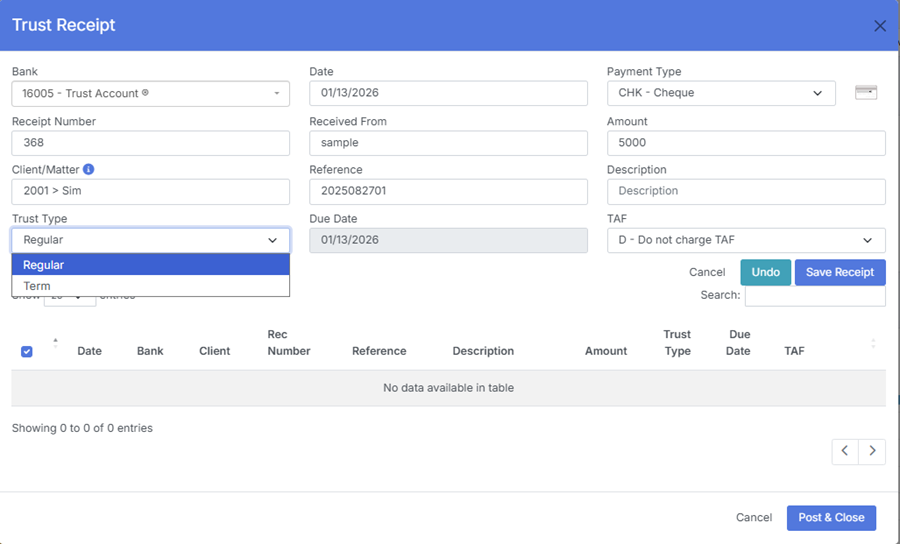
The Trust Type field defines the purpose of the trust deposit.
¶ Common Trust Types
- General Trust – Standard trust deposit for client matters
- Retainer – Funds held for future fees
- Settlement Funds – Funds received from third parties
- Disbursement Trust – Funds held to pay expenses
- Court‑Ordered Trust – Funds held under court direction
¶ Purpose
Trust Type ensures the deposit is categorized correctly for:
- Reporting
- Reconciliation
- Compliance audits
- Client ledger accuracy
¶ 4. Payment Type
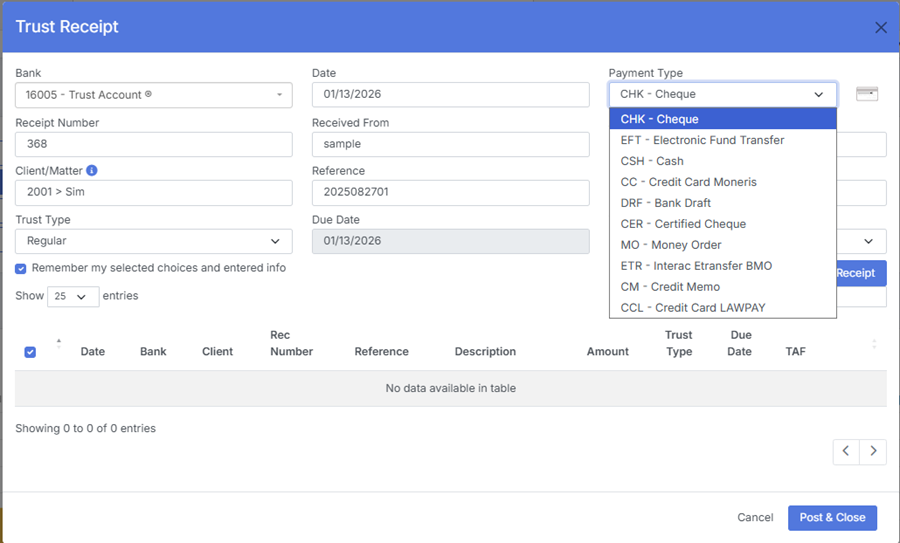
The Payment Type field identifies how the trust funds were received.
¶ Typical Payment Types
- Cheque
- E‑Transfer
- Wire Transfer
- Bank Draft
- Cash (if permitted by firm policy)
¶ Why It Matters
- Supports accurate audit trails
- Helps reconcile bank statements
- Ensures proper documentation for trust compliance
¶ 5. TAF (Trust Administration Fee)
Some jurisdictions require a Trust Administration Fee (TAF) like Bristish Columbia, to be collected when trust funds are received.
¶ TAF Options
- Apply TAF – Adds the required fee to the transaction
- Do Not Apply TAF – For exempt transactions
¶ TAF Behavior
- Automatically calculates the fee based on firm or jurisdiction rules
- Posts the fee to the appropriate ledger
- Ensures compliance with regulatory requirements to post only once.
If TAF is enabled, the system will prompt the user to confirm or adjust the fee before posting.
¶ 6. Additional Fields in Trust Receipt
¶ Client / Matter
Select the client and matter the trust funds belong to.
¶ Amount
Total amount received into trust.
¶ Description
Notes describing the purpose of the deposit (e.g., “Retainer for litigation”, “Settlement funds received”).
¶ Receipt Number
System‑generated or user‑entered reference number.
¶ Date
Date the funds were received.
¶ 7. Posting the Trust Receipt
When the user selects Post & Close, the system:
- Records the trust deposit
- Updates the client’s trust ledger
- Updates the trust bank ledger
- Applies TAF (if enabled)
- Makes the receipt available for trust reconciliation
- Logs the transaction for audit purposes
Trust receipts cannot be edited after posting — they must be reversed if corrections are needed.
¶ 8. Integration with Other Features
Trust Receipt integrates with:
- Trust Ledger – Updates trust balances
- Client Detail – Displays trust activity
- Invoices & Payments – Supports trust‑to‑general transfers
- General Transactions – Reflects bank activity
- Find – Allows searching and reversing trust receipts
- NSF – Handles returned trust cheques
- Reports – Trust summary, trust reconciliation, audit reports
This ensures a complete and compliant trust accounting workflow.
¶ 9. Summary
The Trust Receipt feature provides a structured, compliant method for recording trust deposits. With support for bank selection, trust type, payment type, and TAF, it ensures accurate trust accounting and full regulatory compliance across the firm.