¶ 1. Overview
The Trust Transfer feature allows law firms to move trust funds from one client or matter to another within the trust account. This workflow is essential when:
- A trust receipt was posted to the wrong client
- Funds need to be reallocated between matters for the same client
- A correction is required without reversing the original bank deposit
- Trust funds must be moved internally while maintaining compliance
Trust Transfer ensures that all adjustments are properly documented, audited, and compliant with trust‑accounting regulations.
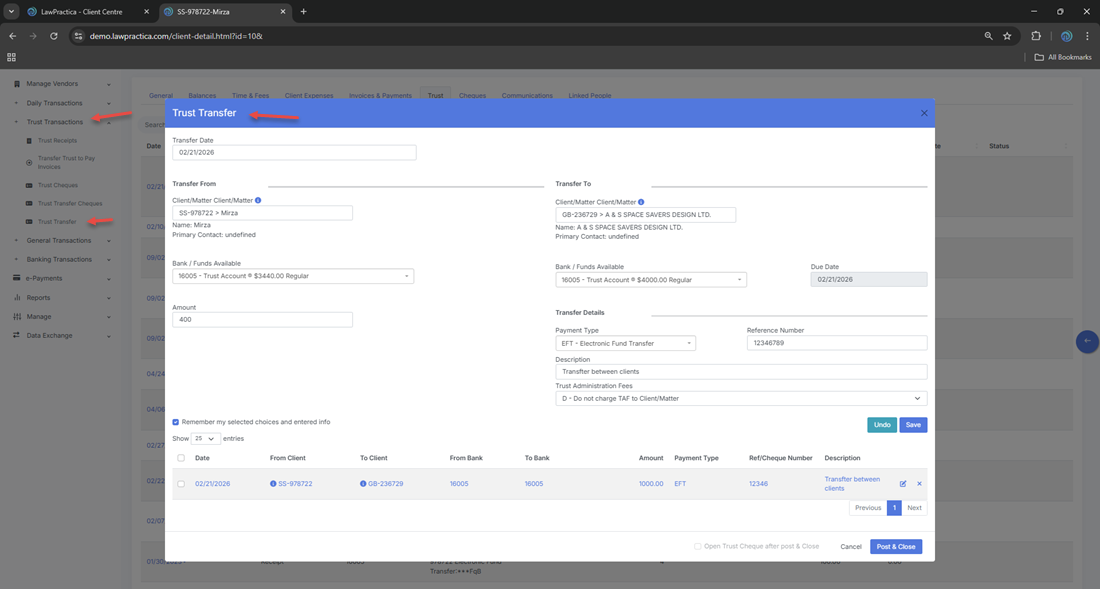
¶ 2. Why Trust Transfer Is Needed
Trust accounting rules require that:
- Trust funds must always belong to the correct client
- Trust receipts cannot be edited after posting
- Corrections must be made through auditable transactions, not manual changes
- Every movement of trust funds must be traceable
When a user mistakenly selects the wrong client during a trust receipt, the firm cannot simply “edit” the receipt. Instead, the correct process is:
- Transfer trust funds from the incorrect client to the correct client
- Maintain a full audit trail of the correction
- Ensure trust balances remain accurate and compliant
The Trust Transfer feature provides this compliant correction workflow.
¶ 3. How Trust Transfer Works
A Trust Transfer consists of two linked trust transactions:
¶ 1. Trust Withdrawal (from the source client)
- Funds are removed from the client who was incorrectly credited.
¶ 2. Trust Deposit (to the destination client)
- Funds are added to the correct client or matter.
- Both entries are automatically created and linked, ensuring:
- Full transparency
- Accurate trust ledger updates
- Proper reconciliation
- A complete audit trail
¶ 4. Bank Selection
Users must select the trust bank account from which the transfer will occur.
¶ Bank Selection Details
- Only trust‑designated bank accounts appear
- Ensures the transfer is recorded in the correct trust ledger
- Required before selecting clients or amounts
The trust bank account remains the same for both sides of the transfer.
¶ 5. Source Client (From Client)
This is the client whose trust balance will be reduced.
¶ Fields
- Client / Matter
- Current trust balance
- Amount to transfer
The system prevents:
- Overdrawing trust funds
- Transferring more than the available balance
¶ 6. Destination Client (To Client)
This is the client whose trust balance will be increased.
¶ Fields
- Client / Matter
- Description / reason for transfer
This ensures the funds are properly allocated to the correct matter.
¶ 7. Amount & Description
¶ Amount
Enter the exact amount being transferred.
¶ Description
Examples:
- “Correction: Trust receipt posted to wrong client”
- “Reallocation between matters”
- “Internal trust transfer for settlement distribution”
Descriptions appear in:
- Trust ledger
- Audit logs
- Reconciliation reports
- Client financial history
¶ 8. Posting the Trust Transfer
When the user selects Post & Close, the system automatically creates:
¶ 1. Trust Withdrawal (Source Client)
- Deducts the transfer amount
- Records a trust withdrawal entry
- Logs the user and timestamp
¶ 2. Trust Deposit (Destination Client)
- Adds the transfer amount
- Records a trust receipt entry
- Links back to the withdrawal
¶ Compliance Effects
- Full audit trail
- No editing of original trust receipt
- Transparent correction workflow
- Trust balances remain accurate
Trust transfers cannot be edited after posting — they must be reversed if corrections are needed.
¶ 9. Compliance Notes (Legal Requirements)
Trust accounting rules require that:
¶ 1. Trust funds must always belong to the correct client
- Transfers ensure misallocated funds are corrected properly.
¶ 2. Corrections must be auditable
- Trust Transfer creates a clear, traceable record.
¶ 3. No trust transaction may be edited after posting
- Transfers provide the compliant correction method.
¶ 4. Trust balances must remain accurate
- Both sides of the transfer update the trust ledger.
¶ 5. Reconciliation must match bank statements
- Transfers appear in reconciliation reports and audit logs.
This feature ensures the firm meets all trust‑accounting obligations.
¶ 10. Integration with Other Features
Trust Transfer integrates with:
- Trust Ledger – Updates both clients’ trust balances
- Client Detail – Displays trust activity for each client
- Trust Receipt – Corrects misallocated receipts
- Trust Cheque – If required, generates linked trust withdrawal entries
- Find – Search and reverse trust transfers
- Reports – Trust reconciliation, audit logs, trust summary
This ensures a complete and compliant trust accounting workflow.
¶ 11. Summary
The Trust Transfer feature provides a secure, compliant method for moving trust funds between clients or matters. It is essential for correcting trust receipt errors, reallocating funds, and maintaining accurate trust balances. With automatic audit trail creation, trust ledger updates, and reconciliation support, it ensures full trust‑accounting compliance across the firm.