¶ 1. Overview
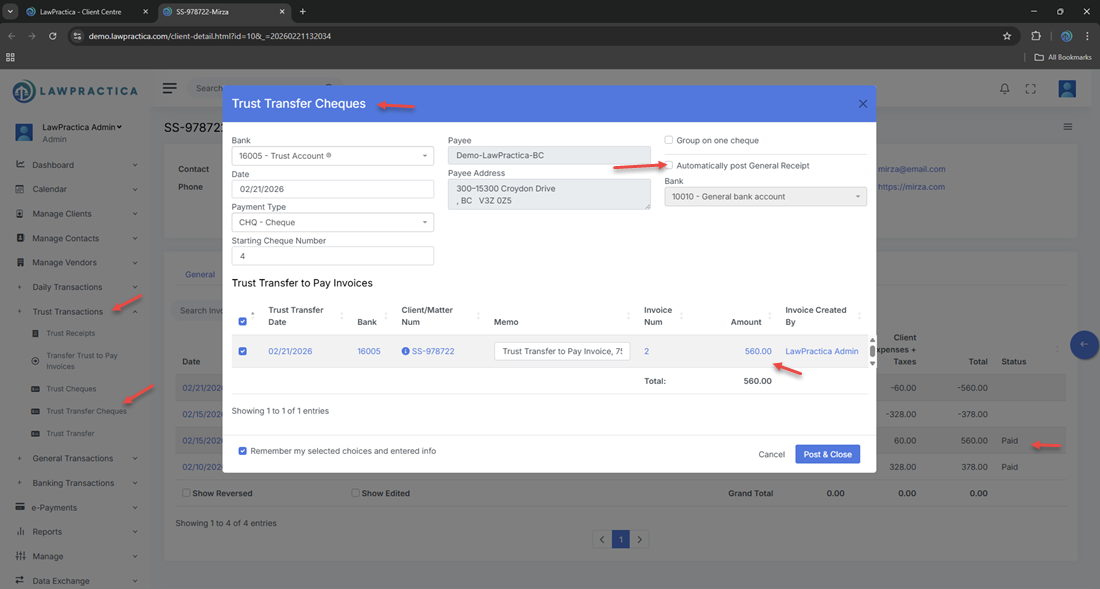
The Trust Transfer Cheque feature records the cheque created when trust funds are transferred from a client’s trust account to the firm’s general account to pay an invoice. Whenever a user posts a Trust Transfer – Pay Invoice transaction, the system automatically generates a corresponding Trust Transfer Cheque to document the withdrawal from trust.
This ensures:
- Full compliance with trust accounting rules
- A complete audit trail
- Accurate trust ledger and bank reconciliation
- Transparent movement of funds between trust and general accounts
The Trust Transfer Cheque is not created manually — it is automatically generated as part of the trust‑to‑general transfer workflow.
¶ 2. When Trust Transfer Cheque Is Created
A Trust Transfer Cheque is automatically created when:
- A user pays an invoice using trust funds
- The transaction is posted through Trust Transfer – Pay Invoice
- The trust withdrawal must be documented as a cheque for compliance
This ensures that every trust‑to‑general movement is supported by a cheque entry, even if no physical cheque is printed.
¶ 3. Purpose of the Trust Transfer Cheque
The Trust Transfer Cheque serves several compliance and operational purposes:
¶ Compliance
- Documents the withdrawal of trust funds
- Ensures trust funds are not moved without a recorded cheque
- Supports law society trust audit requirements
¶ Accounting
- Updates the trust ledger
- Creates a matching withdrawal entry
- Ensures trust reconciliation accuracy
¶ Transparency
- Shows the exact amount transferred
- Links directly to the invoice payment
- Provides a clear audit trail for internal and external review
¶ 4. What the Trust Transfer Cheque Contains
The automatically generated cheque includes:
¶ Cheque Details
- Cheque number (system‑generated or sequential)
- Trust bank account
- Date of withdrawal
- Amount transferred
¶ Payee Information
- Payee is the firm’s general account
- Description such as:
- “Trust transfer to pay Invoice #12345”
- “Retainer applied to outstanding invoice”
¶ Client & Matter Details
- Client name
- Matter description
- Invoice number(s) paid
¶ Audit Information
- User who posted the transfer
- Timestamp
- Linked trust transfer transaction
¶ 5. How Trust Transfer Cheque Works in the Workflow
¶ Step 1 — User initiates Trust Transfer – Pay Invoice
- Selects trust bank
- Selects invoice(s)
- Confirms trust balance
- Posts the transfer
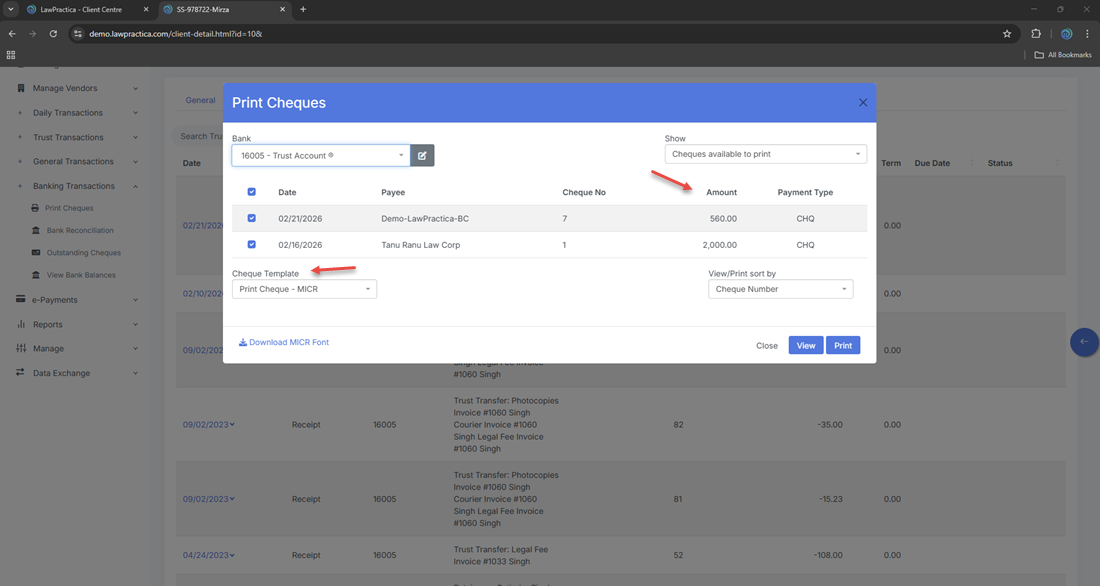
¶ Step 2 — System automatically creates Trust Transfer Cheque
- No manual entry required
- Cheque is linked to the trust transfer
- Cheque appears in Trust Ledger and Trust Cheque list
¶ Step 3 — Cheque appears in reconciliation
- Included in trust bank reconciliation
- Included in trust audit reports
- This ensures a complete and compliant trust‑to‑general transfer workflow.
¶ 6. Why Trust Transfer Cheque Is Required (Compliance Notes)
Trust regulations in most jurisdictions require:
¶ 1. Every trust withdrawal must be supported by a cheque or equivalent record
Even if the transfer is internal (trust → general), a cheque entry must exist.
¶ 2. Trust funds cannot be moved without documentation
The cheque acts as the official withdrawal record.
¶ 3. Trust ledger must show:
- Date
- Amount
- Payee
- Purpose
- Cheque number
¶ 4. Trust reconciliation must match bank statements
- The cheque ensures the withdrawal appears in reconciliation.
¶ 5. Full audit trail must be maintained
- Auditors must be able to trace every trust withdrawal to a specific transaction.
- The Trust Transfer Cheque feature ensures all these requirements are met automatically.
¶ 7. Viewing Trust Transfer Cheques
Users can view the generated cheque from:
- Trust Transactions → Trust Cheques
- Client Detail → Trust Ledger
- Find → Transactions
- Invoice Payment History (linked entry)
Each cheque includes full details and links back to the originating trust transfer.
¶ 8. Reversing a Trust Transfer Cheque
If a trust transfer was posted incorrectly:
- The Trust Transfer – Pay Invoice transaction must be reversed
- The system will automatically reverse the associated Trust Transfer Cheque
- Trust and general ledgers will be restored to their previous state
- Manual editing of trust cheques is not permitted for compliance reasons.
¶ 9. Integration with Other Features
Trust Transfer Cheque integrates with:
- Trust Transfer – Pay Invoice – Automatically generated
- Trust Ledger – Records trust withdrawal
- General Ledger – Records invoice payment
- Client Detail – Shows trust and payment activity
- Find – Search and reverse transactions
- Reports – Trust reconciliation, audit logs, trust summary
This ensures a complete and compliant trust accounting workflow.
¶ 10. Summary
The Trust Transfer Cheque feature automatically creates a compliant trust cheque whenever trust funds are used to pay client invoices. With full audit trail tracking, trust ledger updates, and reconciliation support, it ensures accurate and legally compliant trust‑to‑general transfers across the firm.