¶ 1. Overview
The Trust Transfer – Pay Invoice feature allows law firms to apply funds held in a client’s trust account toward outstanding invoices. This workflow ensures trust funds are transferred correctly, recorded accurately, and fully compliant with trust accounting regulations.
Users can select the trust bank, choose the invoice to pay, confirm available trust balance, and post the transfer in a single streamlined process.
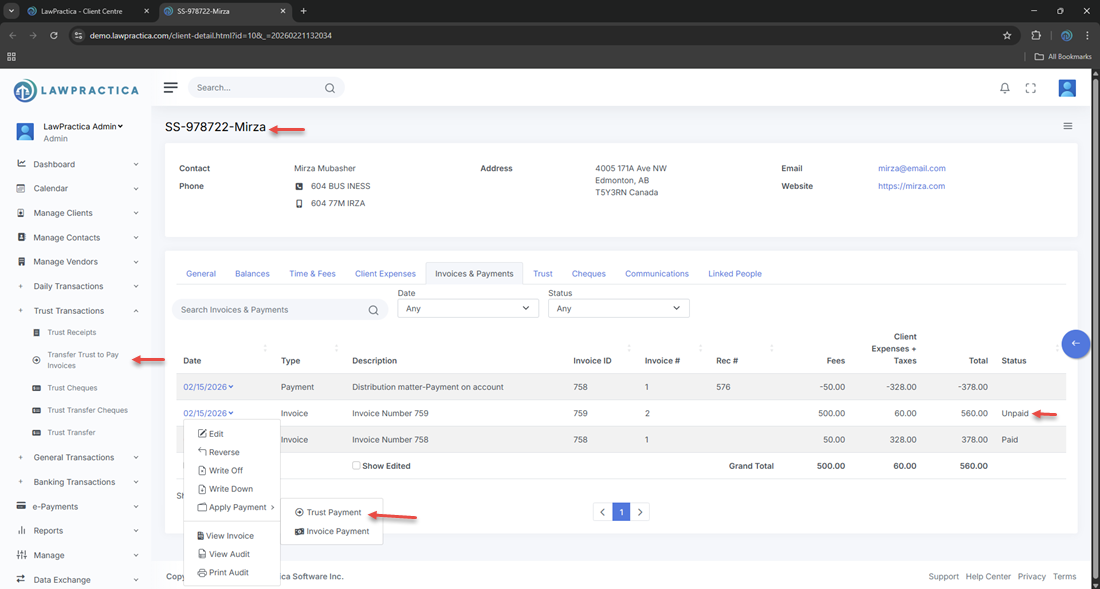
This feature is accessible from both the Trust Transactions menu and the client’s Invoices & Payments screen.
¶ 2. When to Use Trust Transfer – Pay Invoice
This feature is used when:
- A client has funds in trust
- An invoice has been posted and is outstanding
- The firm is authorized to use trust funds to pay that invoice
- A compliant trust‑to‑general transfer must be recorded
This ensures proper movement of funds from trust to general accounts.
¶ 3. Bank Selection
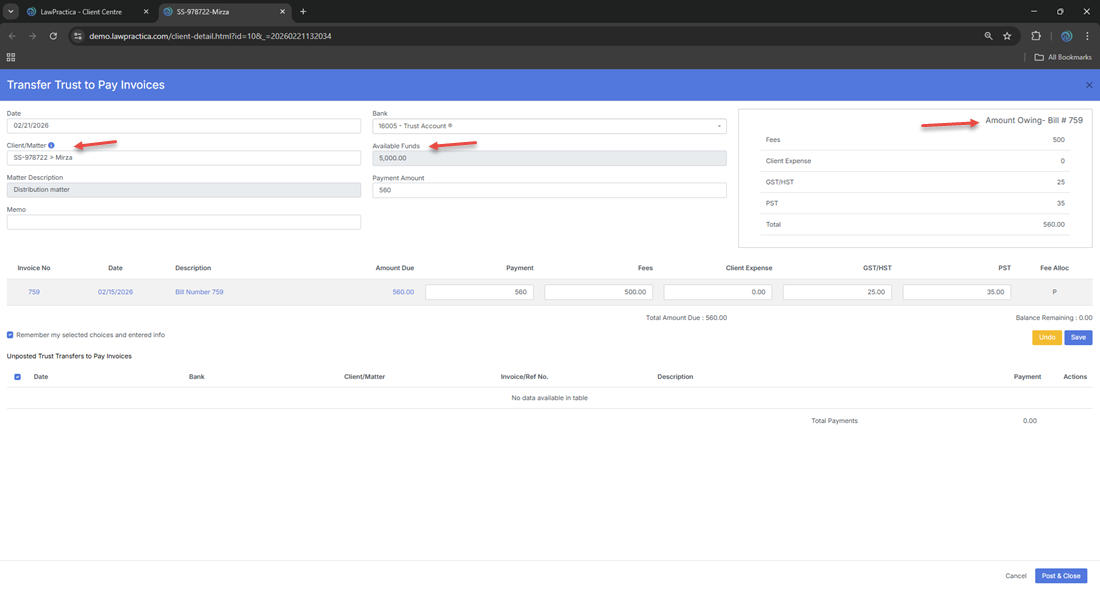
At the top of the form, users must select the trust bank account from which the funds will be transferred.
¶ Bank Selection Details
- Displays only trust‑designated bank accounts
- Ensures the transfer is posted to the correct trust ledger
- Required before selecting invoices
- Prevents accidental use of general operating accounts
Selecting the correct trust bank is essential for reconciliation and compliance.
¶ 4. Trust Balance Validation
Once the bank and client are selected, the system displays:
- Current Trust Balance
- Available Trust Funds
- Amount Required to Pay the Invoice
The system prevents transfers that exceed the available trust balance, ensuring compliance with trust accounting rules.
¶ 5. Invoice Selection
Users can select one or more outstanding invoices to pay using trust funds.
¶ Invoice Details Displayed
- Invoice Number
- Invoice Date
- Outstanding Amount
- Matter Description
- Total to Apply
Users may apply:
- Full payment
- Partial payment (if permitted by firm policy)
The system calculates the total trust transfer amount automatically.
¶ 6. Payment Type (Trust Transfer)
The Payment Type is automatically set to Trust Transfer, indicating that:
- Funds are moving from trust to general
- The transfer will appear in both ledgers
- No external payment method is involved
This ensures the transaction is categorized correctly for reporting and reconciliation.
¶ 7. Description / Notes
Users may enter a description such as:
- “Trust transfer to pay Invoice #12345”
- “Retainer applied to outstanding balance”
- “Client authorized trust payment on [date]”
These notes appear in the trust ledger, general ledger, and client financial history.
¶ 8. Posting the Trust Transfer
When the user selects Post & Close, the system:
¶ Trust Ledger Effects
- Deducts the transfer amount from the trust balance
- Records a trust withdrawal entry
- Updates trust reconciliation records
¶ General Ledger Effects
- Records a general receipt for the invoice
- Updates the client’s outstanding balance
- Marks the invoice as paid (full or partial)
¶ Compliance Effects
- Ensures a complete audit trail
- Prevents overdrawing trust funds
- Maintains separation of trust and general accounts
Trust transfers cannot be edited after posting — they must be reversed if corrections are needed.
¶ 9. Accessing the Feature
¶ Option 1: Trust Transactions Menu
Left Navigation → Trust Transactions → Trust Transfer – Pay Invoice
¶ Option 2: Client Centre
Client Centre → Client Details → Invoices & Payments → Pay Invoice from Trust
Both paths open the same workflow.
¶ 10. Integration with Other Features
Trust Transfer – Pay Invoice integrates with:
- Invoices & Payments – Applies trust funds to outstanding invoices
- Trust Ledger – Updates trust balances and withdrawal history
- General Ledger – Records invoice payments
- Client Detail – Displays trust and payment activity
- Reports – Trust reconciliation, invoice payment reports, audit logs
- Find – Allows searching and reversing trust transfers
This ensures a complete and compliant financial workflow.
¶ 11. Summary
The Trust Transfer – Pay Invoice feature provides a secure, compliant method for applying trust funds to outstanding invoices. With bank selection, trust balance validation, invoice selection, and automatic ledger updates, it ensures accurate trust accounting and seamless billing operations across the firm.