¶ 1. Overview
The Pay Invoice interface is used to record payments made to a vendor and apply those payments to outstanding invoices. This ensures accurate vendor balances, proper allocation of payments, and up‑to‑date financial reporting.
The interface is accessed from the Vendor Detail workspace and integrates with Vendor Centre, Vendor Invoices, Vendor Credits, and General Transactions.
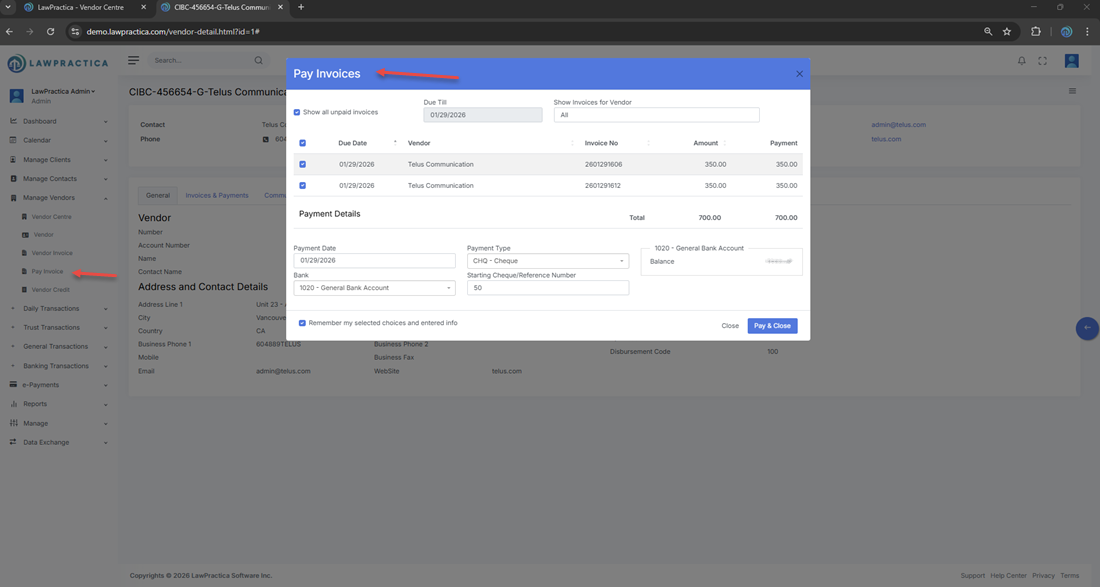
¶ 2. Accessing Pay Invoice
Users can open the Pay Invoice feature from the Invoices & Payments section within Vendor Detail.
What you see in the feature:
- Vendor name
- Vendor address
- Invoice number
- Invoice date
- Due date
- Description
- Amount
- GST/HST
- PST
- Total
These fields help confirm the correct invoice before applying payment.
¶ 3. Payment Information Fields
The Pay Invoice feature includes the following fields:
¶ Payment Date
The date the payment was made or will be recorded.
¶ Vendor Invoice No.
Automatically populated based on the selected invoice.
¶ Due Date
Displays the invoice’s due date for reference.
¶ Description
Optional notes describing the payment (e.g., EFT Payment, Cheque #1023).
¶ Amount
The amount being paid toward the invoice.
¶ GST/HST & PST
Displayed for reference; taxes are already included in the invoice totals.
¶ Total
The total amount applied to the invoice.
¶ 4. Applying a Payment
When entering a payment:
- Confirm the invoice details at the top of the feature.
- Enter the payment date.
- Add a description (optional but recommended).
- Enter the payment amount.
- Review the total.
- Select Post & Close to finalize the payment.
Payments immediately update:
- Vendor balances
- Invoice status (Paid, Partially Paid)
- Financial reports
- Vendor transaction history
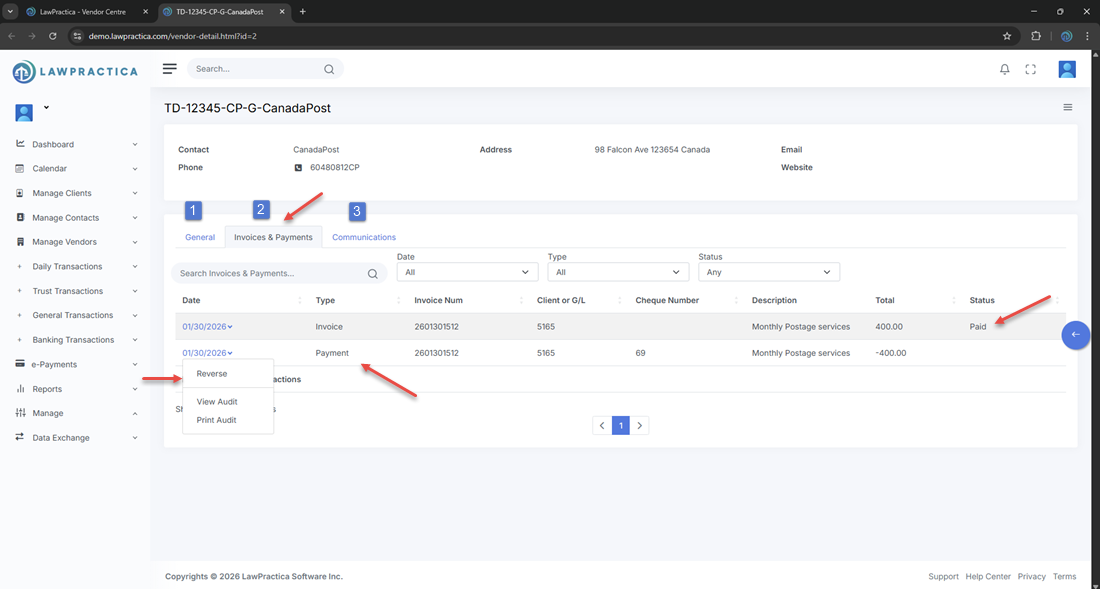
¶ 5. Invoice Status Updates
After posting a payment:
¶ Paid
If the full invoice amount is applied.
¶ Partially Paid
If only part of the invoice is covered.
¶ Unpaid
If no payment has been applied.
These statuses appear in the Invoices & Payments table in Vendor Detail.
¶ 6. Invoices & Payments Table
The Vendor Detail interface displays all financial activity for the vendor, including:
- Invoice date
- Type (Invoice or Payment)
- Invoice number
- Client or G/L number
- Description
- Total
- Status
Example from your screen:
- 01/27/2026 – Payment – TELUS Services – -180.00
- 01/29/2026 – Invoice – Telus Security Services – 350.00 – Unpaid
This table helps users track outstanding balances and payment history.
¶ 7. Posting Behavior
When a payment is posted:
- A vendor payment transaction is created
- Vendor balances update immediately
- The invoice status changes
- The payment appears in the vendor’s transaction history
- Accounting reports reflect the payment
This ensures accurate financial reconciliation.
¶ 8. Cancel vs. Post & Close
¶ Cancel
Closes the Pay Invoice feature without saving any changes.
¶ Post & Close
Finalizes the payment and updates all related financial records.
¶ 9. Summary
The Pay Invoice interface provides a structured, accurate method for recording vendor payments and applying them to outstanding invoices. With clear invoice details, payment fields, and automatic balance updates, it ensures consistent vendor accounting and reliable financial reporting.