¶ 1. Overview
The Vendor Credit is used to record credits issued by a vendor, such as refunds, adjustments, or corrections. Credits reduce the vendor’s outstanding balance and can be applied to future or existing invoices.
This feature is accessed from the Vendor Detail workspace and integrates with Vendor Centre, Vendor Invoices, Pay Invoice, and General Transactions.
¶ 2. Vendor Information Header
At the top of the Vendor Credit, users can verify vendor details:
- Vendor name
- Vendor address
- Credit number
- Credit date
- Description
- Amount
- GST/HST
- PST
- Total
This ensures the credit is being entered for the correct vendor.
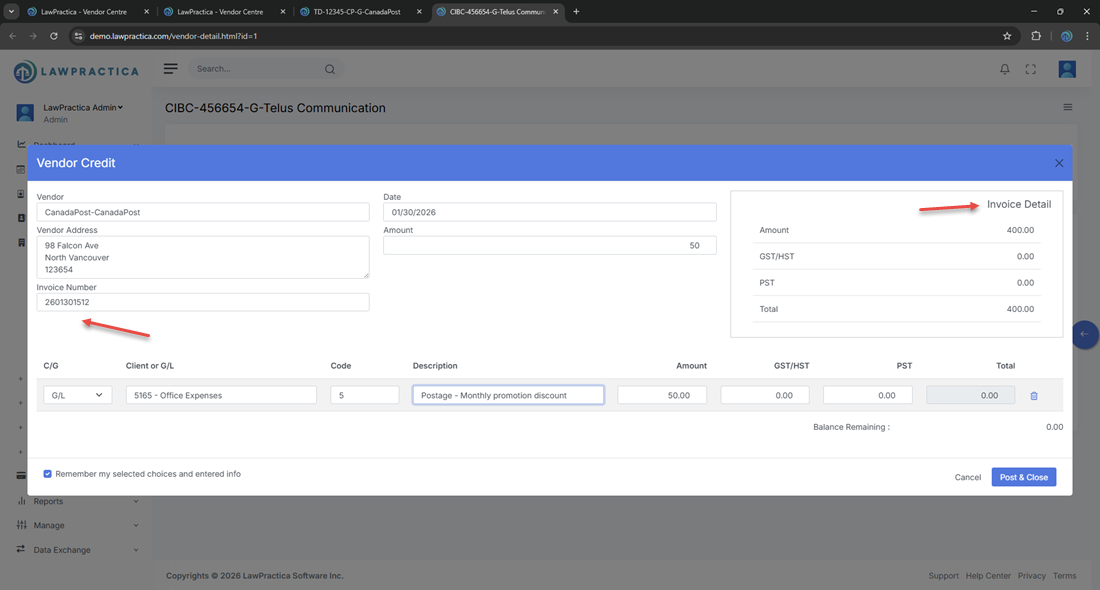
¶ 3. Credit Summary Fields
These fields define the core credit information:
- Credit Number – Vendor‑issued credit reference
- Credit Date – Date the credit was issued
- Description – Reason for the credit (e.g., Refund, Service Adjustment)
- Amount – Credit amount before taxes
These values appear at the top and determine how the credit is applied.
¶ 4. Line Item Entry
The line‑item table allows users to allocate the credit to the correct G/L or expense accounts.
¶ Columns Include
- C/G – Client or G/L
- Client or G/L Code – Matter or ledger account
- Description – Explanation of the credit
- Amount – Pre‑tax credit amount
- GST/HST – Automatically calculated
- PST – Automatically calculated
- Total – Amount + taxes
- Credits appear as negative values when posted to accounting.
¶ 5. Tax Calculation
Tax values are automatically applied based on the vendor’s tax configuration.
¶ Supported Taxes
- GST/HST
- PST
The system calculates tax amounts per line item and updates totals instantly.
¶ 6. Balance Remaining
Displayed at the bottom:
Balance Remaining shows how much of the credit still needs to be allocated.
- Credit Amount−Sum of Line Item Totals
Users must allocate the full credit amount before posting.
¶ 7. Remember My Selected Choices
Users can save frequently used selections, such as:
- G/L account
- Disbursement code
- Tax settings
This speeds up data entry for recurring vendor credits.
¶ 8. Actions & Buttons
¶ Cancel
Closes the feature without saving.
¶ Save Credit
Saves the credit but does not post it.
¶ Post & Close
Posts the vendor credit and updates all accounting records.
Posting creates:
- A vendor credit transaction
- Updated vendor balances
- Adjusted invoice totals (if applied)
- Updated financial reports
¶ 9. Vendor Credit in Invoices & Payments Table
Once posted, the credit appears in the vendor’s Invoices & Payments table.
- Columns include:
- Date
- Type (Credit)
- Credit number
- Description
- Total
- Status
Credits reduce the vendor’s outstanding balance and can be applied to invoices.
¶ 10. Summary
The Vendor Credit provides a structured method for entering, posting, and applying vendor credits. With detailed line‑item entry, automatic tax calculation, and real‑time balance updates, it ensures accurate vendor accounting and financial reporting.