¶ 1. Overview
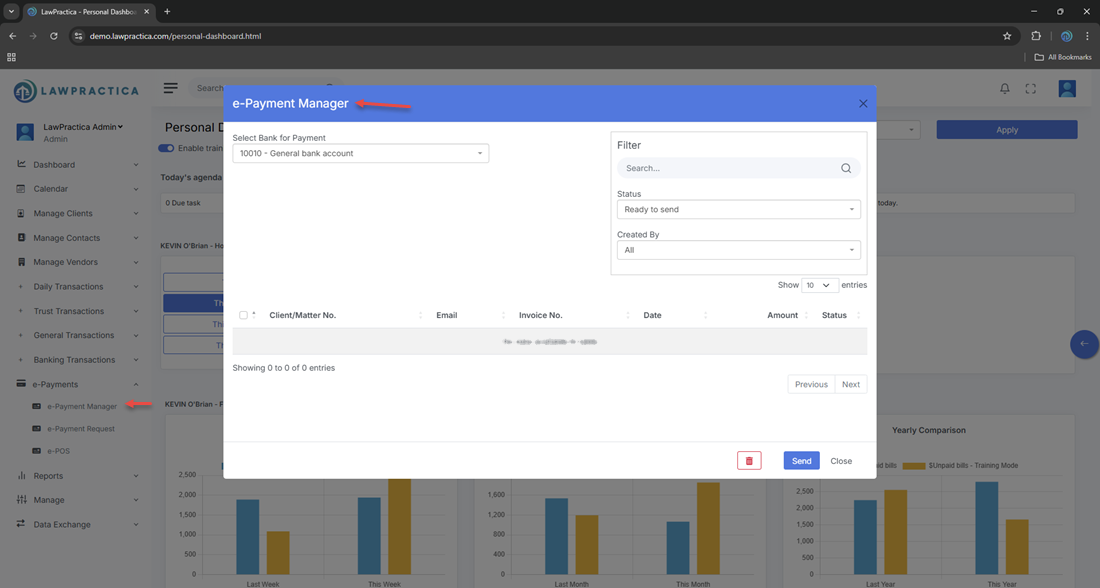
The e‑Payment Manager is LawPractica’s centralized hub for managing online payments processed through LawPay, the legal‑industry‑approved payment processor.
This feature becomes available only when LawPay is enabled under:
- Manage Settings → Integrations → LawPay
- Once enabled, firms can:
- Accept online credit‑card and e‑check payments
- Generate secure payment links
- Track payment status in real time
- Apply payments to invoices
- Reconcile LawPay deposits with LawPractica transactions
The e‑Payment Manager ensures seamless, compliant, and automated handling of electronic payments.
¶ 2. When e‑Payment Manager Is Used
Use this feature when:
- A client pays an invoice online
- A payment is made through a LawPay link
- A payment is made through the client portal
- A payment is processed via LawPay terminal
- You need to track or reconcile online payments
- You need to resend or regenerate a payment link
This feature centralizes all LawPay‑related activity.
¶ 3. LawPay Integration Requirements
- The e‑Payment Manager is only visible when LawPay is enabled.
¶ To enable LawPay:
Go to Manage Settings
- Open Integrations
- Enable LawPay
- Connect the firm’s LawPay account
- Select the trust and general accounts to map incoming payments
Once connected, LawPay transactions flow directly into LawPractica.

¶ 4. Key Functions of e‑Payment Manager
¶ 4.1 View Incoming Payments
Displays all payments processed through LawPay, including:
- Payment date
- Amount
- Client
- Invoice number
- Payment method (credit card, e‑check)
- Status (Completed, Pending, Failed)
This provides a real‑time view of online payment activity.
¶ 4.2 Apply Payments to Invoices
If a payment is not automatically matched, users can manually:
- Select the client
- Select the invoice
- Apply the payment
- Update the client’s outstanding balance
- This ensures accurate billing and financial records.
¶ 4.3 Generate & Send Payment Links
Users can create secure LawPay payment links:
- For a specific invoice
- For a general payment
- For trust deposits (if enabled)
- Links can be:
- Copied
- Emailed
- Sent through the client portal
This reduces friction and speeds up collections.
¶ 4.4 Track Payment Status
The system displays:
- Completed – Payment processed successfully
- Pending – Payment initiated but not yet settled
- Failed – Payment declined or interrupted
- Refunded – Payment reversed through LawPay
Statuses sync automatically from LawPay.
¶ 4.5 Reconciliation Support
The e‑Payment Manager helps reconcile:
- LawPay deposits
- LawPay fees
- Net deposits into trust or general accounts
- This ensures accurate financial reporting and trust compliance.
¶ 5. Payment Types Supported
LawPay supports:
- Credit Cards (Visa, MasterCard, AmEx)
- Debit Cards
- e‑Check / ACH
- Trust‑compliant online payments
LawPractica automatically routes payments to the correct bank account based on LawPay configuration.
¶ 6. Compliance Notes
LawPay is designed for legal‑industry compliance, and e‑Payment Manager supports this by ensuring:
¶ 1. Trust Accounting Compliance
- Trust payments go directly into the trust account
- No commingling of funds
- Full audit trail of online trust deposits
¶ 2. PCI Compliance
- LawPay handles all sensitive card data — LawPractica never stores card numbers.
¶ 3. Audit Trail
- Every online payment logs:
- User
- Timestamp
- Payment method
- Invoice
- Client
- Status
¶ 4. Reconciliation Accuracy
- Online payments must be matched to:
- Bank deposits
- LawPay fee deductions
- Client invoices
- The e‑Payment Manager centralizes this process.
¶ 7. Integration with Other Features
e‑Payment Manager integrates with:
- Invoices & Payments – Applies online payments to invoices
- Client Detail – Shows online payment history
- Trust Receipt – Records trust‑compliant online deposits
- General Receipt – Records general online payments
- Reports – Payment summaries, revenue reports, trust audit logs
- Bank Reconciliation – Matches LawPay deposits to bank statements
This creates a seamless online payment ecosystem.
¶ 8. Summary
The e‑Payment Manager provides a secure, compliant, and automated way to manage online payments through LawPay. With features for payment tracking, link generation, invoice application, and reconciliation, it ensures efficient billing operations and trust‑accounting compliance across the firm.